S2
S2
W
S1
or
01
Make sure the big button in Front
Support [02] hangs on the hook of the
arm assembly/wall plate.
02
Wrench
Screwdriver
(Not lncluded)
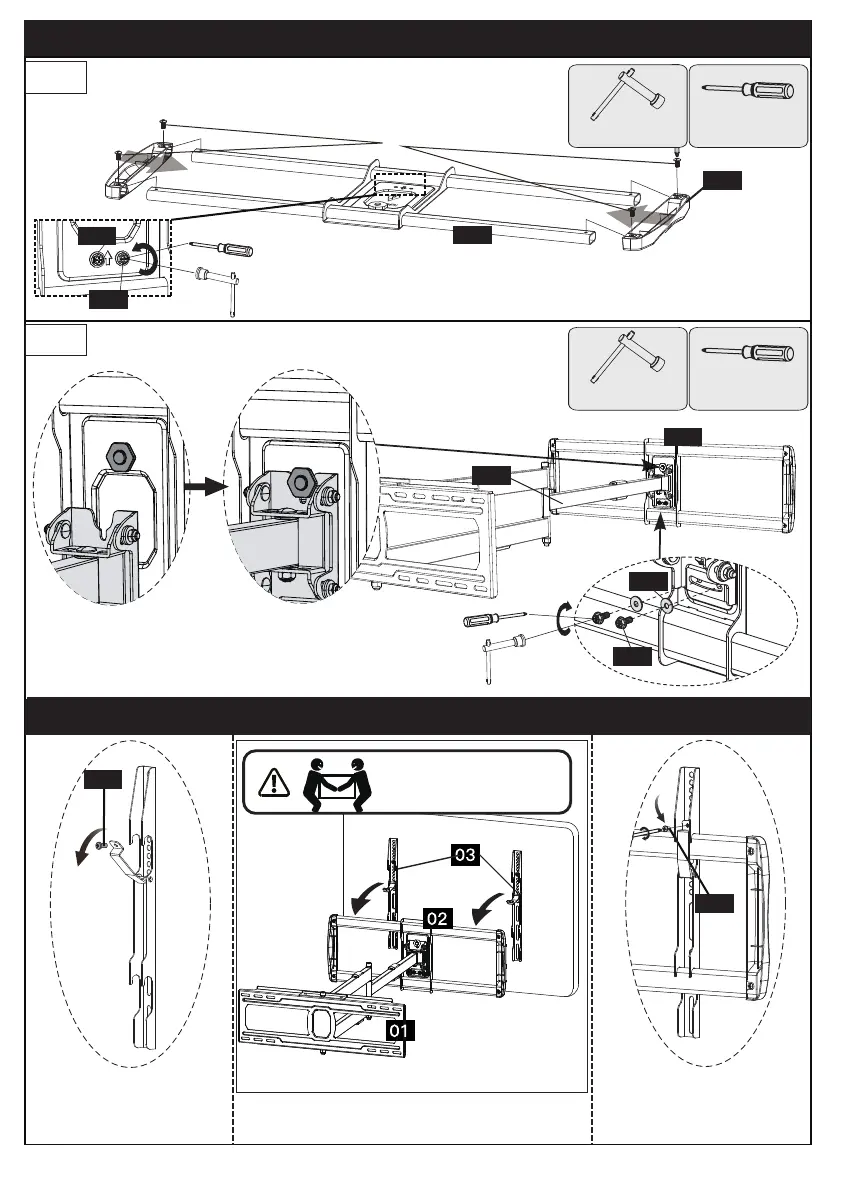
Step 3 Secure Front Support to Arm Assembly Wall Plate
Remove the preassembled
bolts [S2] and save to
use, then raise the safety
locks.
Press the safety locks
down.
Then fasten the bolts [S2].
Hang the TV with brackets [03] onto the
front support [02]
3-1
Install the plastic cover [04] to front support [02] with
the preassembled bolts [S].
S
Step 4 Hang TV with Brackets [03] onto the Front Support [02]
3-2
Secure the front support [02] to arm assembly/wall plate [01]
using preassembled bolts [S1] and washers [W]
Wrench
02
04
Loosen the preassembled bolts [S1] and washers
[W] from the back of front support assembly,
and keep them for use in step 3-2.
Screwdriver
(Not lncluded)
or
HEAVY! You may need
assistance with this step.
W
S1
10






 To Next Page