Permobil K/C300 Owner’s Manual
54
Design and function, R-net
Control panel R-Net LCD color display
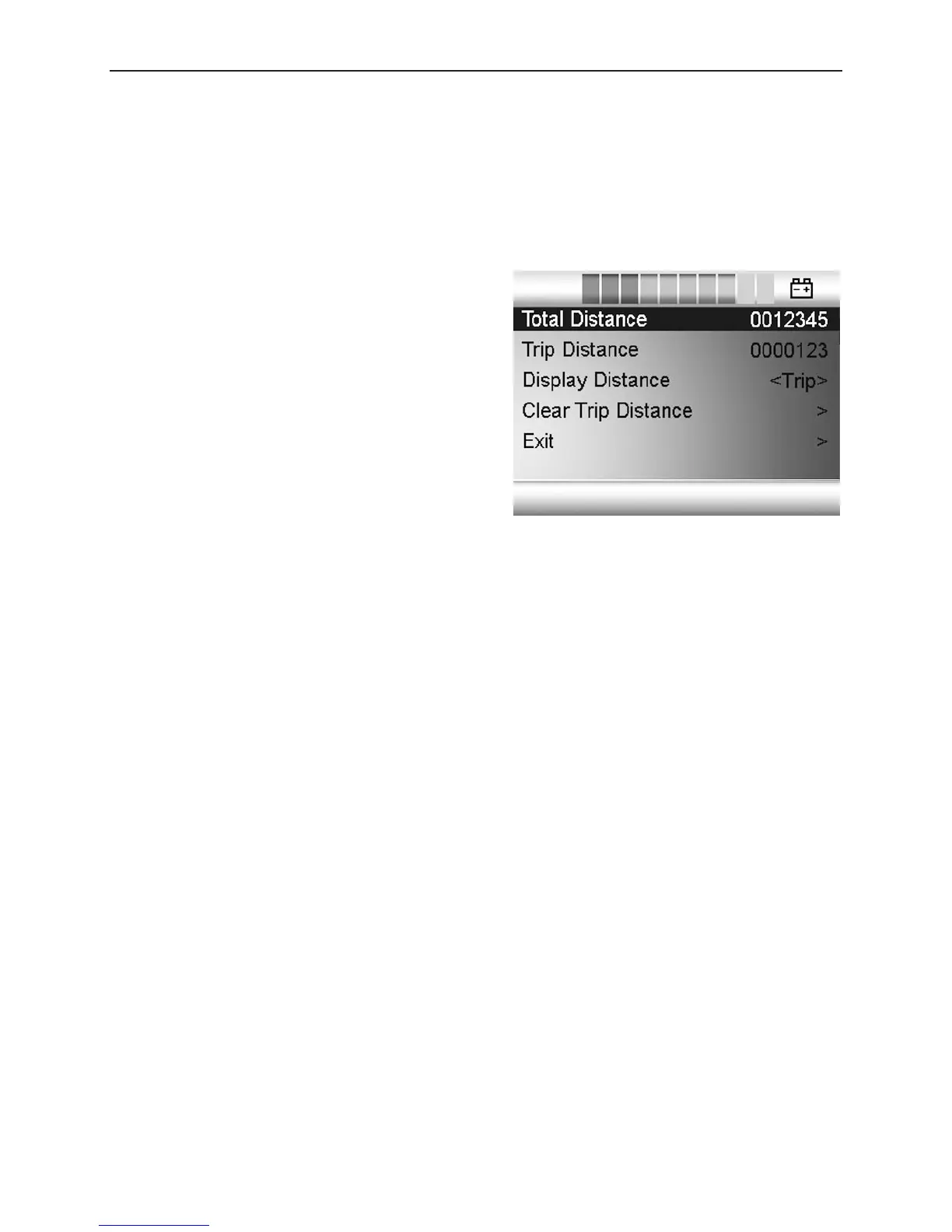
Distance measurement (Distance)
Select “Distance” in the menu. Move the joystick to the right to go to the menu
for setting distance measurement. Then select “Total distance”, “Trip”, “Distance
display” or “Reset” by moving the joystick up or down.
Brightness (Backlight)
Select “Backlight” in the menu. Move the joystick to right or left to set the desired
brightness for the display backlight. Ten fixed levels are available from 10-100%.
Background (Background)
Select “Background” in the menu. Move the joystick right or left to select “Blue”,
“White” or “Auto”.
- Blue (Blue): The display background is blue in all profiles.
- White (White): The display background is white in all profiles.
- Automatic (Auto): The display background is programmed in the various
travel profiles. E.g. blue background for slow profile for indoors travel and
white background for rapid profile for outdoors travel.
Diagnostics (Diagnostics)
For qualified technicians only.
- Total distance (Total Distance):
Shows the total distance traveled by
the control system.
- Trip (Trip Distance): Shows the total
distance traveled since the last reset.
- Distance display (Display Distance):
Selects Trip or Total Distance in the
display.
- Reset (Clear trip distance): Move the
joystick to the right to reset the Trip
measurer.
- Exit (Exit): Move the joystick to the
right to exit the installation menu.









 To Next Page