
 To Next Page
D
Deborah SantiagoSep 9, 2025
What to do if there is a TPR cable open circuit on my Pfeiffer Vacuum TPG 300?
- DDonna MunozSep 9, 2025
If there is a TPR cable open circuit in your Pfeiffer Vacuum Controller, replace the cable.

What to do if there is a TPR cable open circuit on my Pfeiffer Vacuum TPG 300?
If there is a TPR cable open circuit in your Pfeiffer Vacuum Controller, replace the cable.
Why is the Pirani pressure reading too high on my Pfeiffer Vacuum TPG 300?
A Pirani pressure reading that is too high on your Pfeiffer Vacuum Controller can be caused by a contaminated Pirani gauge. Try calibrating the measuring circuit or replacing the gauge. You may also want to clean the gauge.
What to do if the pressure display is unstable on my Pfeiffer Vacuum TPG 300 Controller?
If the pressure display on your Pfeiffer Vacuum Controller is unstable, the filter time constant might be too low. Increase the filtering to stabilize the display.
Why are the switching functions (relays) fluttering on my Pfeiffer Vacuum Controller?
If the switching functions (relays) on your Pfeiffer Vacuum Controller are fluttering, it could be due to hysteresis being too small. Try modifying the threshold values. Alternatively, increasing the filtering may resolve the issue.
What to do if the Pirani measurement circuit cannot be calibrated on my Pfeiffer Vacuum Controller?
If the Pirani measurement circuit on your Pfeiffer Vacuum Controller cannot be calibrated, the combination of the measurement plug-in board, gauge cable, and gauge might not be compatible. Select the correct combination. Another reason may be that the Pirani gauge is severely contaminated, in which case you should clean or replace the gauge.
Why does no display appear when my Pfeiffer Vacuum TPG 300 Controller is switched on?
If no display appears when your Pfeiffer Vacuum Controller is switched on, it might be because the unit was switched off for too short a period. After switching the unit off, wait approximately 10 seconds before restarting it.
What causes the Watch Dog timer overflow in Pfeiffer Vacuum TPG 300 Controller?
If the Watch Dog timer overflows on your Pfeiffer Vacuum Controller due to strong external electromagnetic influence, and this error occurs frequently, replace the basic unit.
What to do if there is an error during parameter reading on my Pfeiffer Vacuum Controller?
To address an error during parameter reading on your Pfeiffer Vacuum Controller, store default or user parameters.
What to do if the TPR gauge is defective on my Pfeiffer Vacuum TPG 300?
If the TPR gauge on your Pfeiffer Vacuum Controller is defective, replace the gauge.
What to do if I get an incomprehensible reading on my Pfeiffer Vacuum TPG 300?
If you are getting an incomprehensible reading on your Pfeiffer Vacuum Controller, check if the plug-in board is securely screwed down and tighten the screws if necessary. Also, inspect the contacts for contamination or bending; clean or carefully straighten them.
Provides essential safety precautions and guidelines for handling the equipment.
General overview of installation options for the TPG 300 unit.
Details how to install the TPG 300 into a control panel.
Explains the correct procedures and precautions for connecting the unit to mains power.
Instructions for installing the TPG 300 in a 19" rack frame.
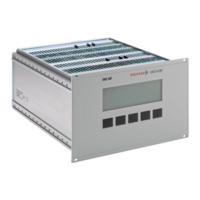
Identifies and describes the components and displays on the TPG 300's front panel.
Step-by-step guide for safely powering the TPG 300 unit on and off.
Explains how to use the TPG 300 for pressure measurements, including data validity and accuracy.
Outlines the three main operating modes of the TPG 300: sensor, set point, and set up.
Describes the standard operating mode, used for displaying measurement values and status information.
Explains how to manually switch individual measuring circuits on or off.
Describes the mode for reading, entering, and modifying threshold values for switching functions.
Details the functions of switching circuits 1-4 and A-B, and their assignment to relays or cold cathode gauges.
Guides on saving user or default parameters and activating immediate start-up.
Describes the mode for reading, entering, and modifying parameters and running test programs.
Describes how to define upper and lower thresholds for each switching function, including hysteresis.
Lists potential error messages, their causes, and recommended corrections for the TPG 300.
Details common operational and calibration issues and their solutions for the TPG 300.
Describes how to send commands to switch circuits and retrieve measurement values and status.
Details commands for setting thresholds and assigning switching functions to measuring circuits.
 General
| Display | LCD |
|---|---|
| Communication Interfaces | RS232, RS485, Ethernet |
| Temperature Range | 0 to 50 °C |
| Accuracy | Dependent on connected gauges |
| Outputs | Analog, Relay |
| Operating Temperature | 0°C to +50°C |
| Dimensions | 96 mm x 96 mm |
| Type | Pirani Gauge Controller |