Circuit Diagram
PHILIPS Confidential – Do Not Copy 105S5
C. Operating instructions
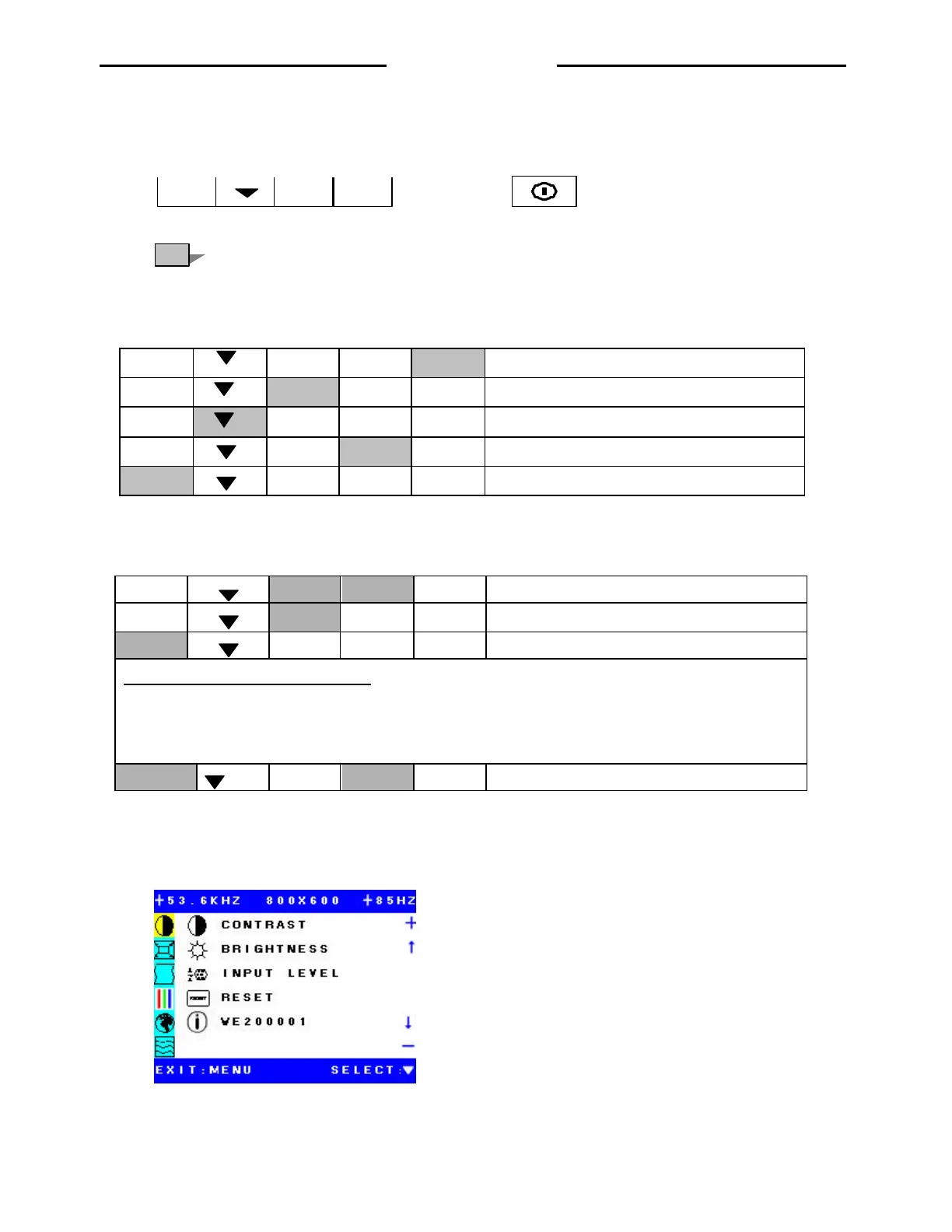
1. Key function define
MENU
Power switch
( Pressing key)
2. Normal key function
MENU
-
+
P
Power Switch
MENU
-
+
P
Adjust to increase value and move up the cursor
MENU
- +
P To select the main menu and move sub-menu curser.
MENU
- +
P Adjust to decrease value and move down the menu
MENU
- +
P
To display OSD menu
3. Start up key function
MENU
- +
P
Write Burn-in flag to EEPROM Enter Burn-in
MENU
- +
P Clear Burn-in flag (Exit Burn-in mode)
MENU
- +
P All mode recall function
Maintain key function by the Burn-in flag.
When Burn-in on: Enable the maintain key function
When Burn-in off: Disable the maintain key function
Maintain key function
MENU
- +
P
Enter Factory mode
D.OSD operation
1. Submenu 1
Contrast: Adjust the ratio of luminance
Brightness: Adjust the ratio of black level
Input Level: To show the signal input level
Reset: To reset to factory preset
WE200001: The monitor serial number
http://jdwxzlw.com/?fromuser=华盛维修



 To Next Page