Circuit Diagram
PHILIPS Confidential – Do Not Copy 105S5
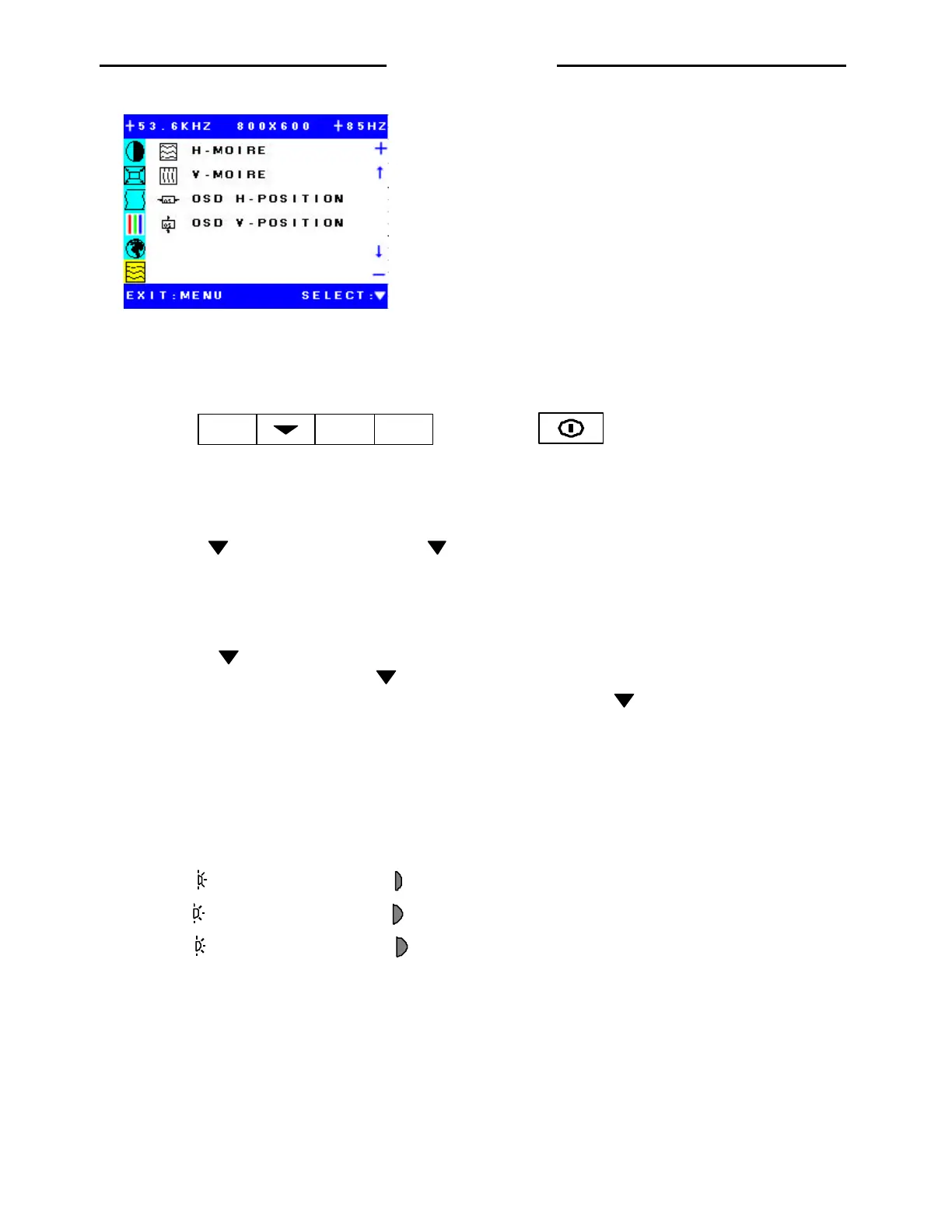
H-MORIRE: Adjust picture morie.
V-MORIE: Adjust picture morie.
OSD H-POSITION: Move horizontal OSD position.
OSD V-POSITION: Move vertical OSD position.
E. Manual Adjusting
1. Manual white balance adjusting
MENU
Power switch
*** Before adjust manual white balance must adjust picture to good size and center. ***
2. Enter to Burn-in mode
2.1 Press and - and Power On. Still press and - around 5 seconds after power On.
2.2 Apply Chroma to white pattern and degaussing the monitor.
2.3 Apply signal of Chroma to spec (See note. 2) and white pattern then Power Off monitor.
3. Enter to Factory mode
3.1 Press MENU and + and Power On.Still press MENU and + around 5 seconds after power On.
3.2 Press “ “ for display OSD (after entry to th Factory mode ).If can not see “Factory mode” in OSD. So try Item
4.4 again. (See note.1). This key for selection or enter to each function menu. - and + for move the cursor
to each menu and for adjusting decrease and increase , respectively. After press to enter to each function in
OSD menu.
4. Start adjust 9300K
4.1 After entering into “Factory mode “ . First move cursor to contrast and adjust Contrast to 0% then adjust
Brightness to 100%. Then go to OSD position function and move OSD to corner of display.
4.2 Low light adjusting : Go to R-CUT OFF, and adjust R-CUT OFF to 0% on OSD.
Repeat this method for G-CUT OFF and B-CUT OFF too.
R
R-CUT OFF
R
R-DRIVE
G
G-CUT OFF
G
G-DRIVE
B
B-CUT OFF
B
B-DRIVE
4.3 Observe which color is the most brightness. So that color is a strong gun. The strong gun shall be fixed the cut
off at 0% .
4.4 Move OSD to corner of display and use the probe of color analyzer machine to measure color. Then adjust the
other guns to meet x, y spec (See Note. 3)
4.5 Adjust G2 to meet Y (Low Light ) spec. (See Note. 3 )
http://jdwxzlw.com/?fromuser=华盛维修


 To Next Page