22
107T6 CRT
Go to cover page
Programms
Fig. 8
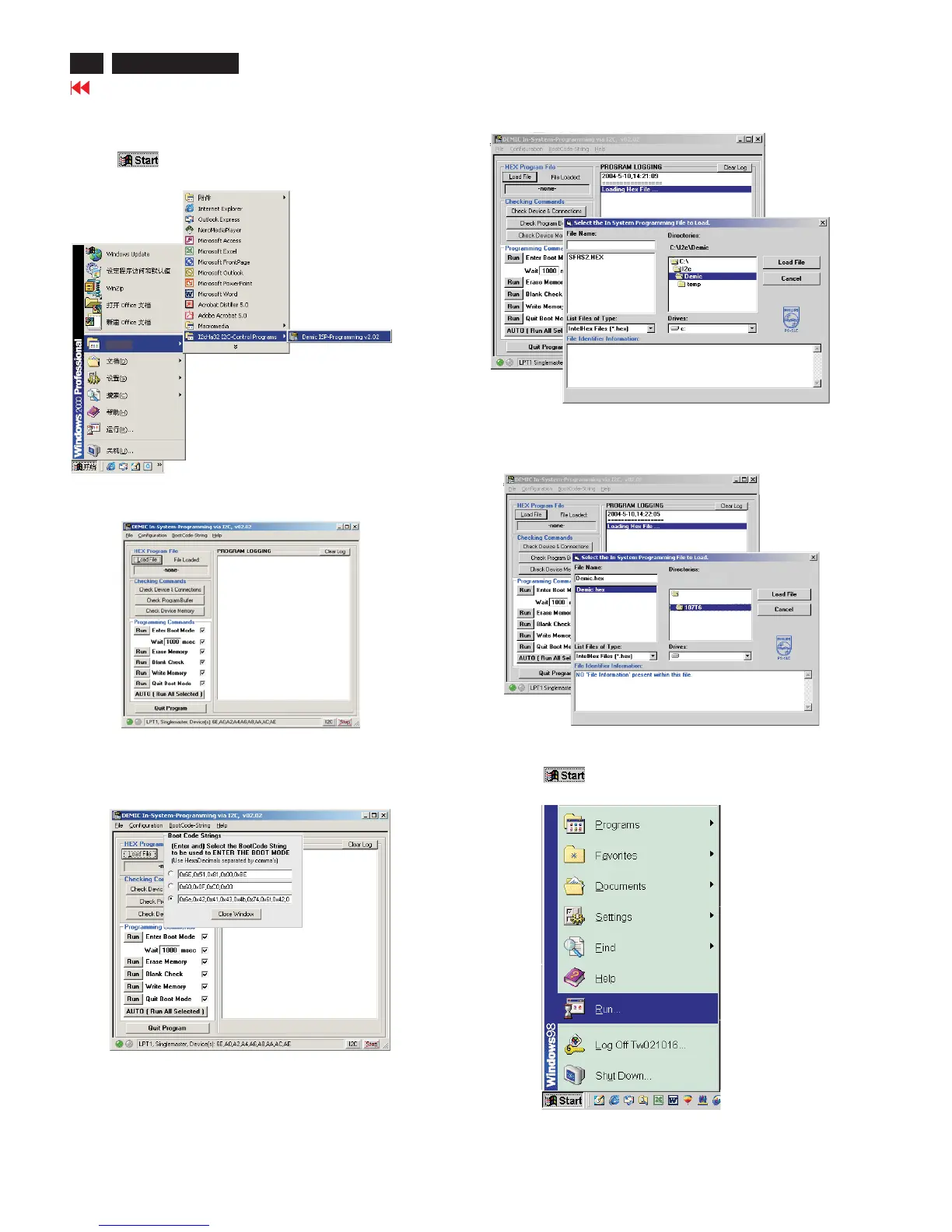
1. Click , choose Run at start menu of Windows95/98 as
shown in Fig. 13.
Fig. 13
1. Click , choose programs at start menu of Windows95/98 ,
find I2cHaI2c-Control Programs as shown in Fig. 8.
ISP (In System Program)
Step 2. Load Hex file and input the bootcode.
Fig. 9
3. Click Bootcode-string, choose the third row and input the
following codes ''0x6e, 0x42, 0x41, 0x43, 0x4b, 4x74, 0x6f,
0x42, 0x4f, 0x4f, 0x54'', then click ''close window''.
4. Click''loadfile'',bringupthefollowingwindowasshowninFig11.
(Fig. 10)
Fig. 10
5. Choose the Demic. Hex from C:\107T6, the left side of the window
will show the file name"Demic.hex", click "Demic.hex" of the left
sideofthewindow,thenclick"Loadfile",shownasFig.12.
C:\107T6
C:\
C:
Fig. 11
Fig. 12
Step 3. Run EDID46 program.
2. Click the ''I2cHaI2c-Control Programs'',bring up the below
window as shown in Fig. 9.



 To Next Page