T
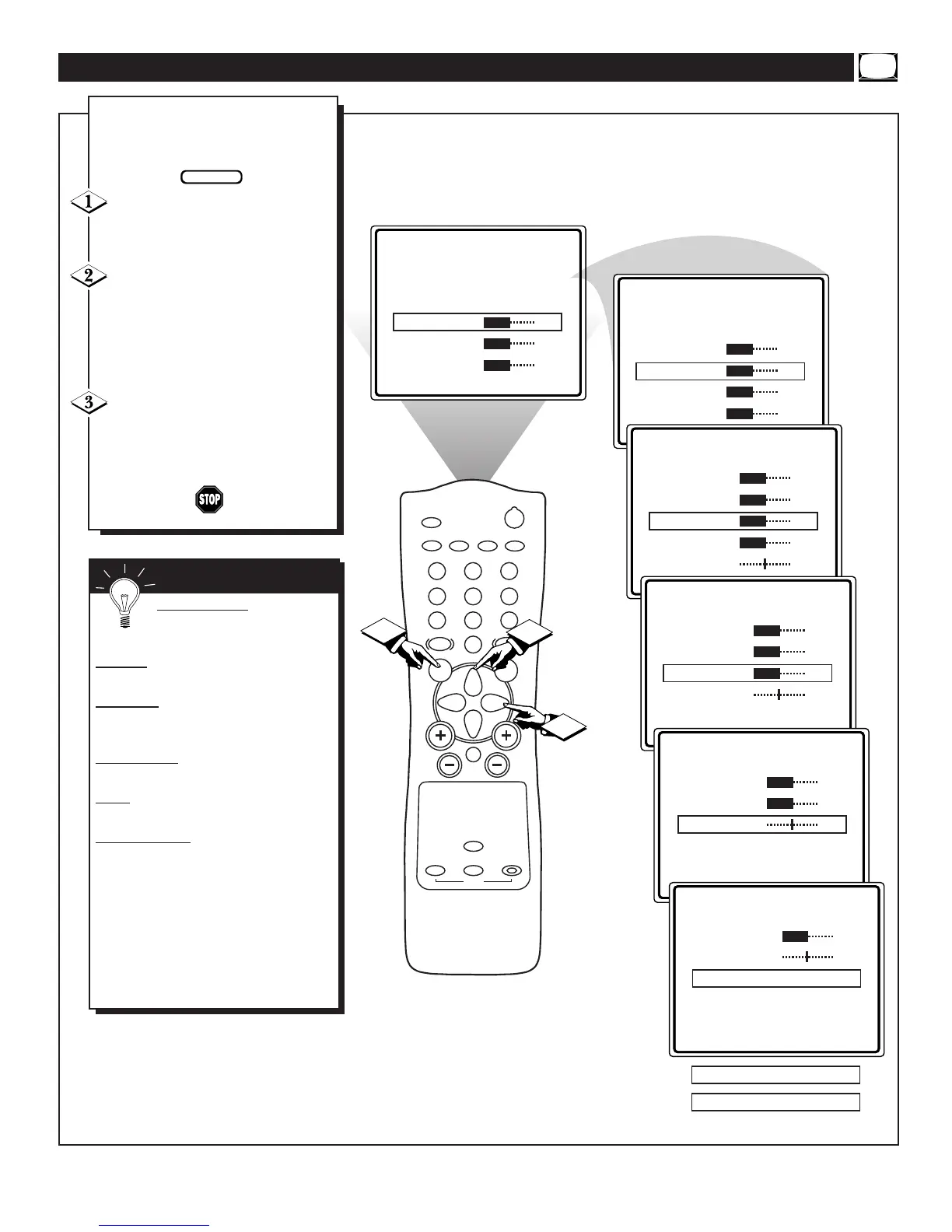
o adjust your TV picture con-
trols, select a channel and follow
the steps shown below:
Press the MENU button on the
remote to display the onscreen menu.
Press the CURSOR UP ▲ or
DOWN ▼ buttons until the
word BRIGHTNESS is highlighted.
(Or, COLOR, PICTURE, SHARP-
NESS, TINT, COL. TEMP depend-
ing on the adjustment you want to
make.)
Press the CURSOR RIGHT ©
or the CURSOR LEFT § buttons
to increase or decrease the brightness
of the picture.
HOW TO ADJUST THE TV PICTURE
BRIGHTNESS Press the ©
or § buttons until darkest parts of
the picture are as bright as you prefer.
COLOR
Press the © or § buttons to
add or eliminate color.
PICTURE
Press the © or § buttons
until lightest parts of the picture show
good detail.
SHARPNESS
Press the © or § buttons
to improve detail in the picture.
TINT
Press the © or § buttons to
obtain natural skin tones.
COLOR
TEMP Press the © or § but-
tons to select NORMAL, COOL, or
WARM picture preferences. (NORMAL
will keep the whites, white; COOL will
make the whites, bluish; and WARM will
make the whites, reddish.)
The onscreen menu will time out and dis-
appear from the screen when you finish, or
you can press the STATUS/EXIT button to
clear the menu from the screen.
SMART HELP


 To Next Page