U
sed along with the WAKEUP
features, you can set a specific
Volume level that the television will
set itself to when the Alarm control
is turned ON.
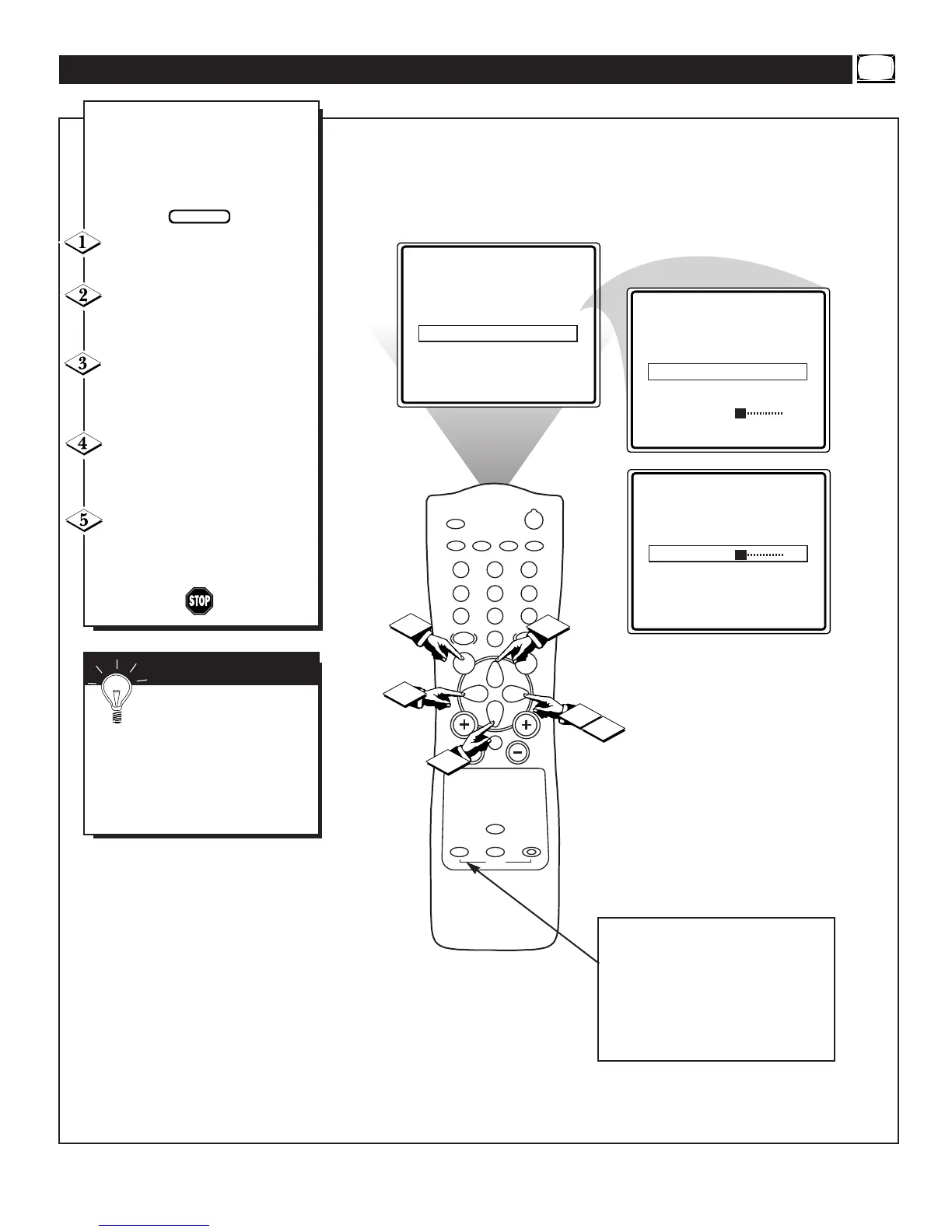
Press the MENU button to dis-
play the onscreen menu.
Press the CURSOR UP ▲ or
CURSOR DOWN ▼ button until
the word WAKEUP is highlighted.
Press the CURSOR RIGHT ©
button to display the WAKEUP fea-
tures. START TIME will be high-
lighted.
Press the CURSOR DOWN ▼
button to highlight the word VOL-
UME.
Press the CURSOR RIGHT
© or CURSOR LEFT § button to
adjust the volume level desired for the
TV’s Alarm.
SETTING THE WAKEUP VOLUME
SMART HELP
Remember: Be sure to set
the Wakeup Alarm to ON.
The onscreen menu will time out
and disappear from the screen when
you finish, or you can press the
STATUS/EXIT button to clear the
menu from the screen.
To turn the ALARM ON or OFF
simply press the ALARM ON/OFF
button located on the remote con-
trol. Please be sure that the TV’s
clock has been set using the
AutoChron feature and the WAKE-
UP features have been properly set.


 To Next Page