10
190CW7 LCD
Mechanical Instruction
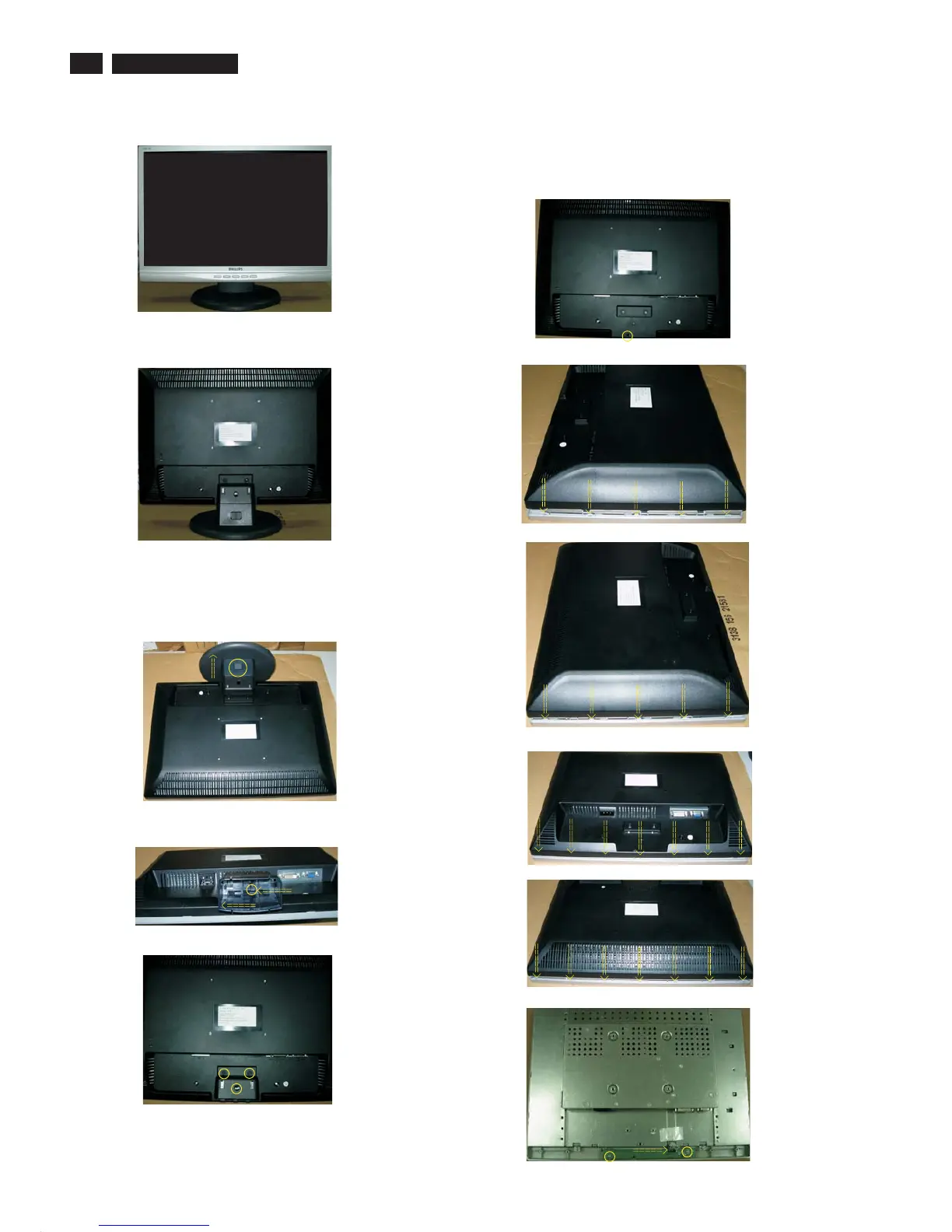
Front view
Back view
1. Remove .the base
Fig.8
Fig.2
Fig.1
Fig.11
Fig.9
Fig.10
2: Remove the Back Cover Assy
a. Unscrew 1 screws as shown in Fig.6.
b. Open 10 clicks on right and left side as shown in Fig.7 and Fig.8.
c. Open 7 clicks on bottom side as shown in Fig.9.
d. Open 7 clicks on top side as shown in Fig.10.
e. Remove the BACK COVER ASSY in Fig.11.
Fig.3
Fig.4
Fig.5
Fig.6
a: Place the monitor face down on a smooth surface as Fig.3.
Be carefully to prevent the scratch and injury during the
uninstallation. Press the botton and push the base as Fig.3.
b: Drag the click to left and slip the stand bottom to left at the same time
as Fig.4.
Fig.7
Botton
Base
c: Remove the three screws and remove the hinge and stand top as
Fig.5.



 To Next Page