8
190CW7 LCD
Lock/Unlock,Aging,Factory Mode
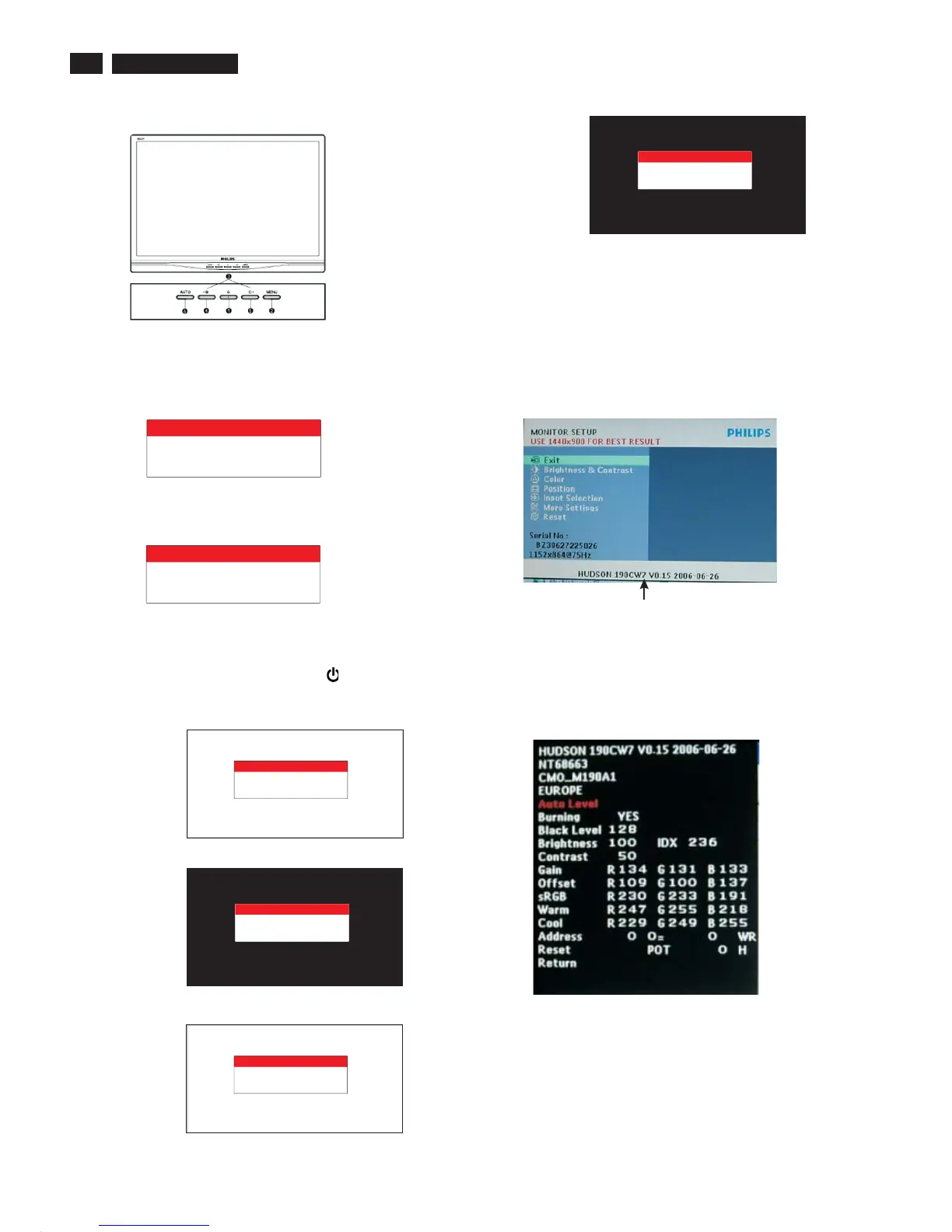
Front Control
To Lock/Unlock OSD FUNCTION(User Mode)
The OSD function can be locked by pressing"OK"button(1) for more
than 10 seconds, the screen shows following windows for 4 seconds.
Everytime when you press"OK" button, this message
appears on the screen automatically.
ATTENTION SIGNAL
OSD MAIN CONTROLS
LOCKED
Unlock OSD function
Unlocked OSD function can be released by pressing "OK" button for
more than 10 seconds again.
ATTENTION SIGNAL
OSD MAIN CONTROLS
UNLOCKED
After 15 seconds,
bring up:
----------
----------
repeatly
Connect Signal cable again=> go back to normal display
After 15 seconds,
bring up:
After 15 seconds,
bring up:
Access Aging Mode
Step1:D
Step 2 : [Push "AUTO" & " MENU " buttons
at the same time and hold them]+[Press power " " button untill comes
out " AGING screen"] => then release all buttons.
Bring up:
isconnect Interface Cable between Monitor and PC.
Turn off LCD monitor.Then
Access Factory Mode
1). Turn off monitor.
2).
3).Press "MENU" button, wait until the OSD menu with
Characters "HUDSON 190CW7 V0.15 2006-06-26" (below OSD
menu) come on the Screen of the monitor.
[Push "AUTO" & "MENU" buttons at the same time and hold them]
+[Press "power" button untill comes out "Windows screen" ]
=> then release all buttons
Factory Mode indicator
Factory Menu
Cursor can move on gray color area
Hot key function: by pressing " LEFT " and " RIGHT " key
Simultaneously at User Mode (or Factory Mode)
(PS: The OffsetRGBfunction can be used on reduce or eliminate
snowy noise on the background when the resolution of video signal
is 1440*900 vertical 60Hz. Slightly increase or decrease the value
until snowy noise completely disappear.
ATTENTION
AGING...
ATTENTION
AGING...
ATTENTION
AGING...
ATTENTION
AGING...
ATTENTION
AGING...
ATTENTION
AGING...



 To Next Page