13
HUDSON 8
Mechanical Instruction
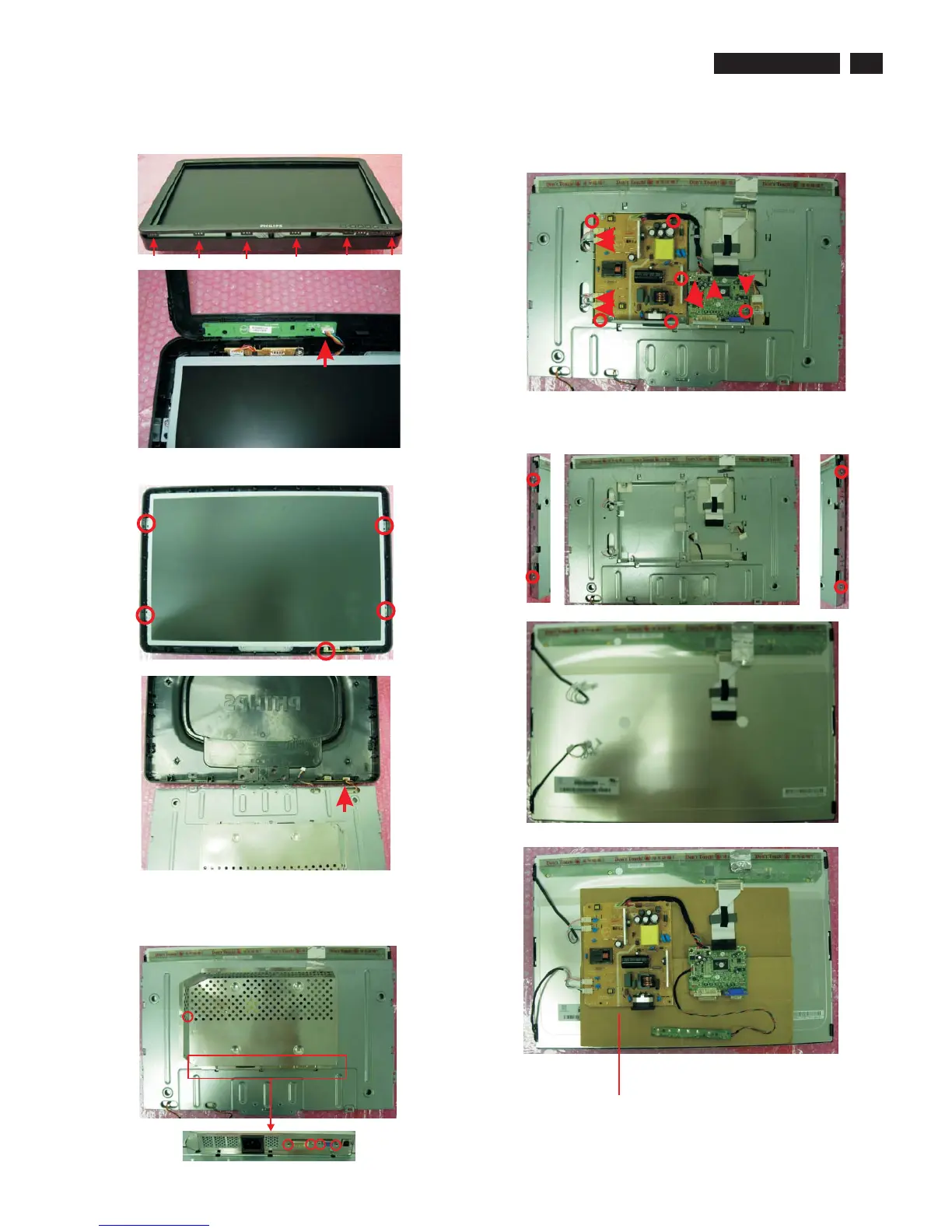
4. Use plastic putty knife to release 6 snaps on the bottom side as Fig.11.
5. Disconnect the cable of Key board as Fig.12.
Fig.11
Fig.12
Step 3. Remove the Rear cover.
Fig.13
Fig.14
1. Remove the 5 screws as Fig.13
2. Disconnect the 1 cable of USB board as Fig.14
Step 4. Remove the shield ., scaler board , power board and USB board.
Fig.16
1. Remove the 5 screws to remove the shield as Fig.15.
2. Remove the 6 screws and disconnect 8 calbe to remove the scaler
board , power board and USB board as Fig.16.
Fig.15
Step 5. Remove the main frame.
Remove the 4 screws as Fig.17.
Fig.17
Fig.18
Insulation material
Fig.19


 To Next Page