12
HUDSON 8
Mechanical Instruction
Front View
Back View
Fig.1
Fig.2
Fig.4
Fig.5
Fig.9
Fig.3
Fig.10
Fig.6
Fig.8
Fig.7
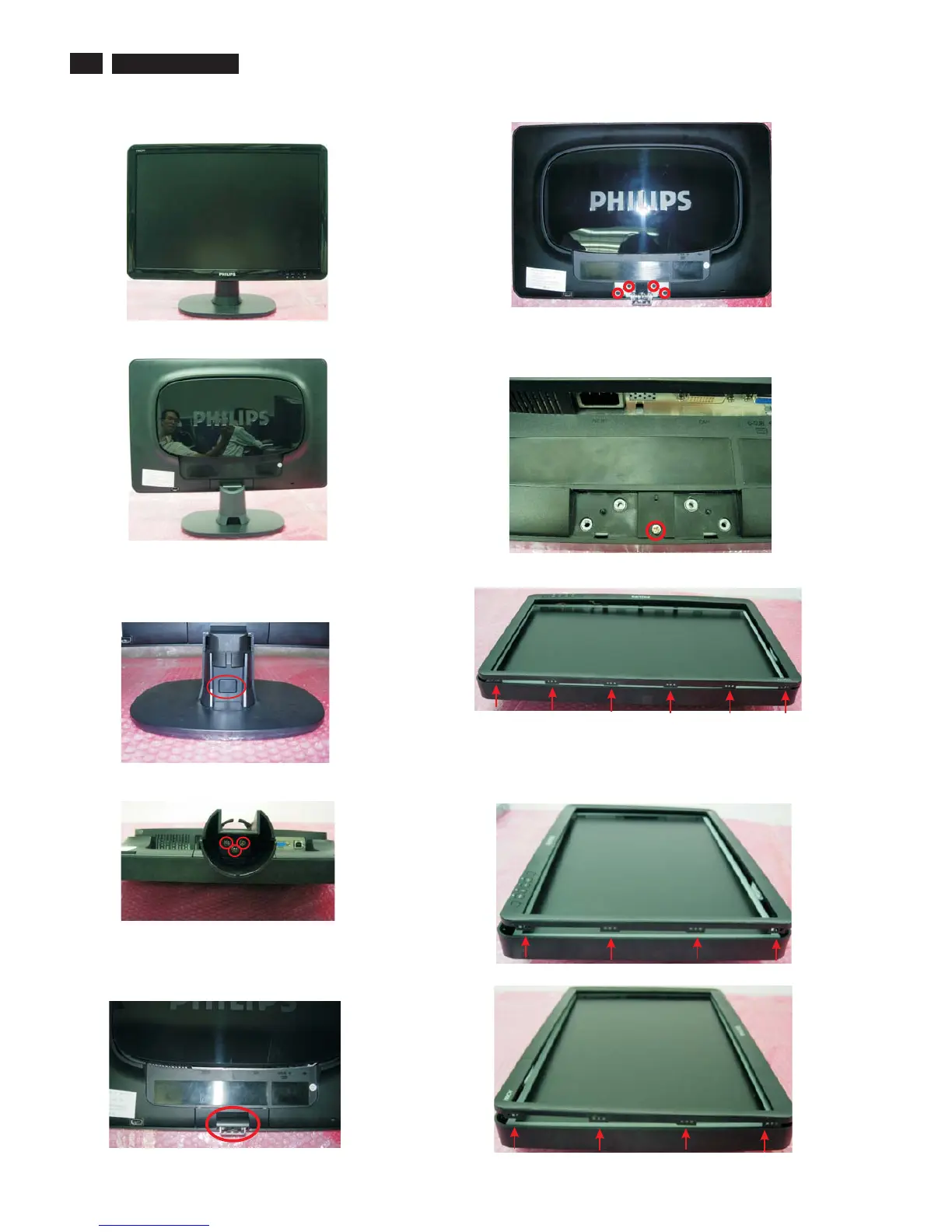
Step 1. Remove the Base.
1. Remove the cable cover as Fig.3.
2. Press the button as Fig.3 and pull out the base as Fig.4
3. Remove the 3 screws to remove the Column as Fig.5.
4. Remove the hinge cover as Fig.5.
5. Remove the 4 screws to remove the hinge ass'y as Fig.6.
6. Remove the 1 screw as Fig.7.
Step 2. Remove the Front bezel.
1. Use plastic putty knife to release 6 snaps on the top side as Fig.8.
2. Use plastic putty knife to release 4 snaps on the right side as Fig.9.
3. Use plastic putty knife to release 4 snaps on the left side as Fig.10.



 To Next Page