14
HUDSON 8
Color Adjustment
Alignment procedure
1. Turn on the LCD monitor.
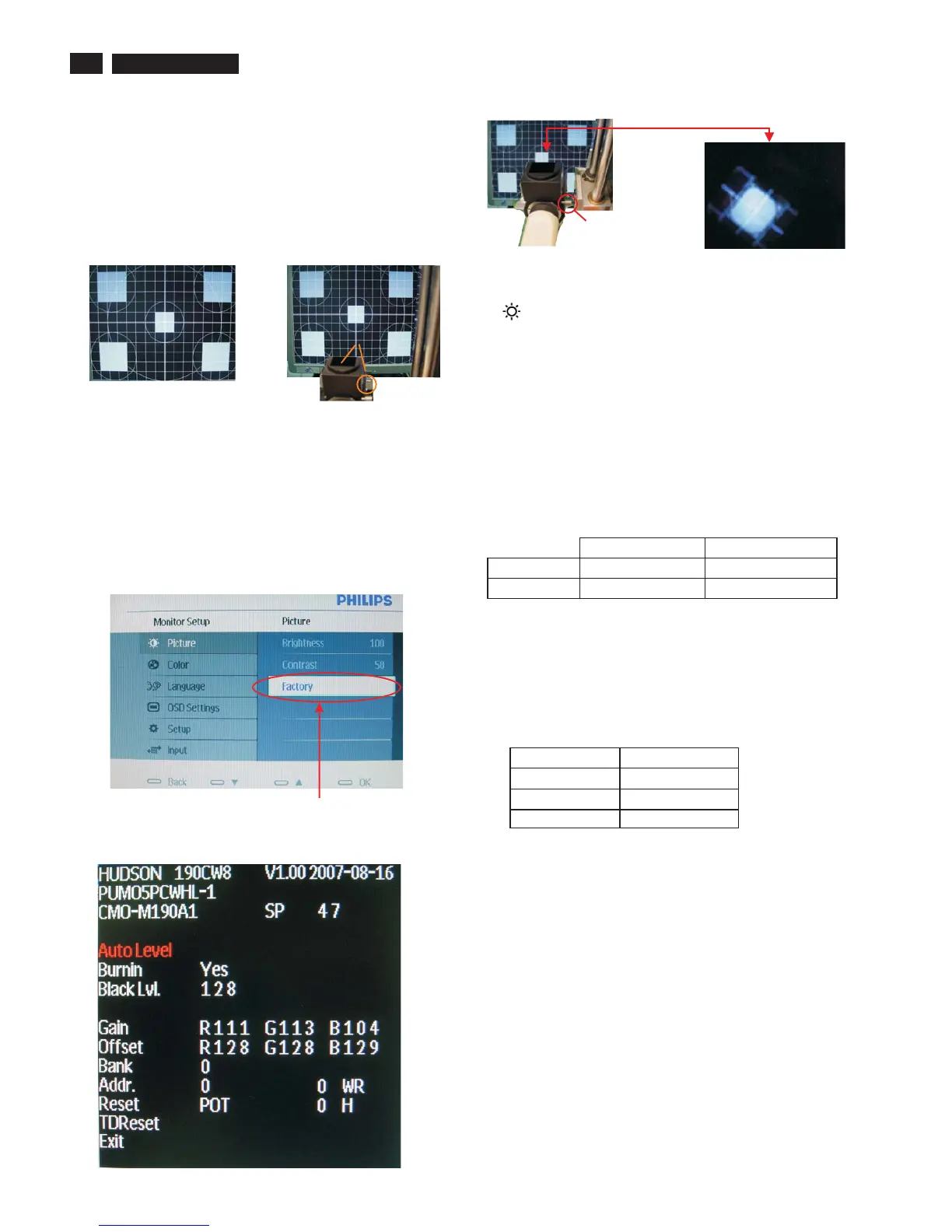
2.Turn on the Timing/pattern generator. See Fig.1
3. Preset LCD color Analyzer CA-110
-Remove the lens protective cover of probe CA-A30.
-Set measuring/viewing selector to measuring position for reset
analyzer.(zero calibration) as Fig.2
- Turn on the color analyzer (CA-110)
-Press 0-CAL button to starting reset analyzer.
Fig. 1
Fig. 2
Clear imageClear image
Measurement/viewing selectorMeasurement/viewing selector
Fig. 3
4). Press button, then select factory indicator by"MENU" "INPUT"
button .Press"MENU button to bring up submenu windows as below:
""
"
Fig.5
Cover (black)Cover (black)
Measurement viewing selectorMeasurement viewing selector
Fig. 4
Fig. 2
4. Access Factory Mode
1). Turn off monitor.
2).
3).Press "OK button, wait until the OSD menu with Characters
(below OSD menu) come on the Screen of the monitor.
as shown in Fig3.
[Push "AUTO" & "MENU" buttons at the same time and hold them]
+[Press "power" button untill comes out "Windows screen" ]
=> then release all buttons
"
"Factory"
Factory Mode indicator
5. Display
Press “MENU”button to select. Change the value by "INPUT" or
key until the X,Y co-ordinates as below
6. Display Adjustment
6.1 Auto color adjustment
Apply a 1440*900/60Hz signal with 32 level grey pattern, set
brightness control at 100%, and contrast control at 50%. Access to
factory mode, and then press “Auto Level”to adjust RGB Gain and
Offset. Check 64-grey pattern distinguishable.
6.2 Adjustment of WHITE-D
WD will be adjusted by FGA function automatically. When FGA is
done successfully, the colour coordinate should be as follows with
1440*900/60Hz signal and full white pattern:
9300°K 6500°K
x (center) 0.283 ± 0.005 0.313 ± 0.005
y (center) 0.297 ± 0.005 0.329 ± 0.005
Use Minolta CA-210 for colour coordinates and luminance check.
Luminance is > 300 Nits in the center of the screen when brightness
at 100% and contrast set to 100%.
6.2 Check of sRGB (B)
Apply a 1440*900/ 60Hz signal with full white pattern, set brightness
control at 100%, and contrast control at 50%. For the screen center,
the 1931 CIE chromaticity Y) co-ordinates shall be:
sRGB
x(center) 0.313 ± 0.005
y(center) 0.329 ± 0.005
Y > 170 nits


 To Next Page