220BL2 LCD 5
Installation
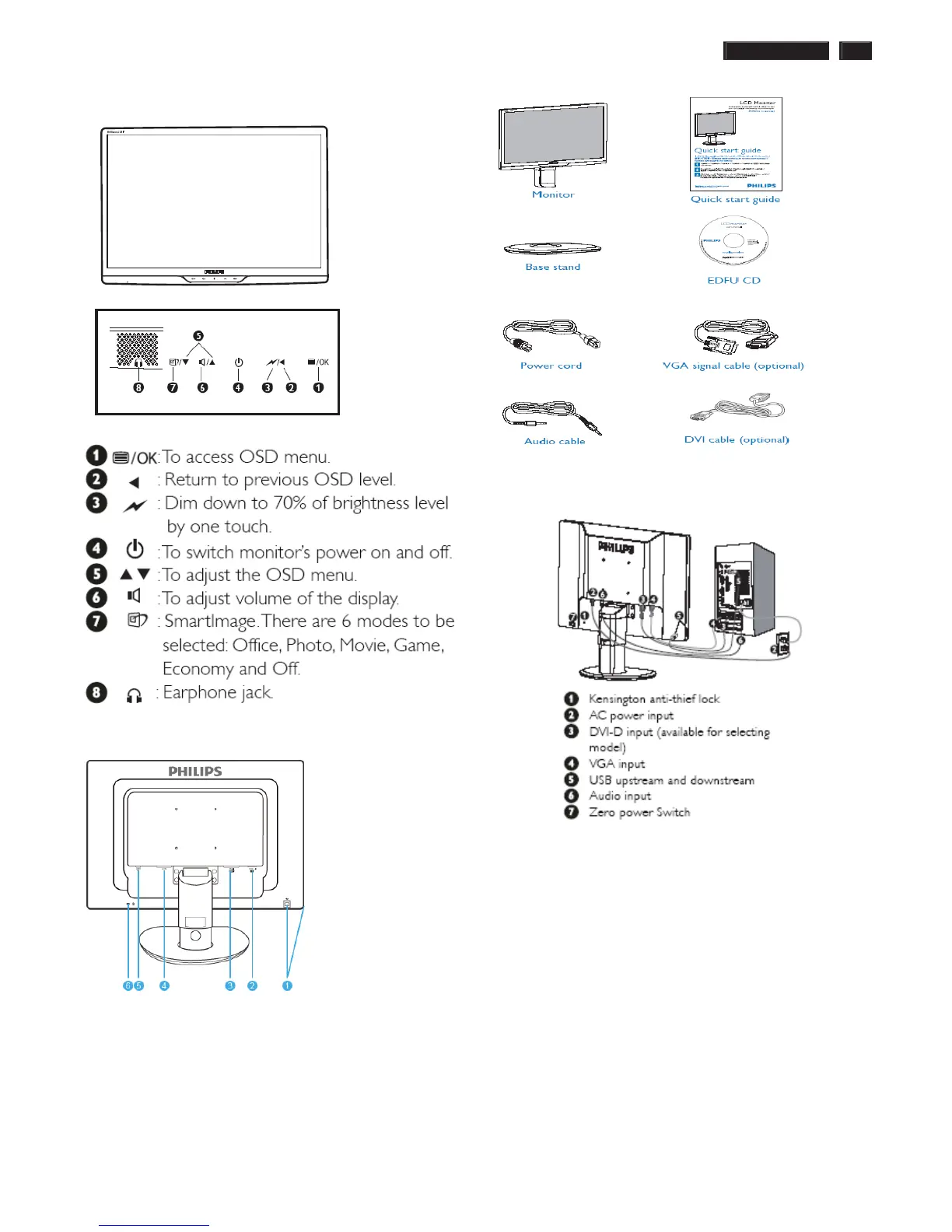
Front View Product Description
Rear View
ʳ
1ʳ USB upstream port and downstream portʳ
2ʳ VGA inputʳ
3ʳ DVI-D input (available for selective models)ʳ
4ʳ AC power inputʳ
5ʳ PC Audio input ʳ
6ʳ Kensington anti-thief lockʳ
Accessory Pack
Unpack all the parts
Connecting to Your PC
1) Connect the power cord to the back of the monitor firmly.
(Philips has pre-connected VGA cable for the first installation.)
2) Connect to PC
(a) Turn off your computer and unplug its power cable.ʳ
(b) Connect the monitor signal cable to the video
connector on the back of your computer.ʳ
(c)
Connect the PC audio cable to the audio connector
on the back of your computer.ʳ
(d)
Connect the USB upstream port on the monitor and
the USB port on PC with a USB cable. The USB
downstream port is now ready for any USB device to
plug in.ʳ
(e) Plug the power cord of your computer and your
monitor into a nearby outlet.ʳ
(f) Turn on your computer and monitor. If the monitor
displays an image, installation is complete.ʳ



 To Next Page