4
2. Setting up the monitor
2.1 Installation
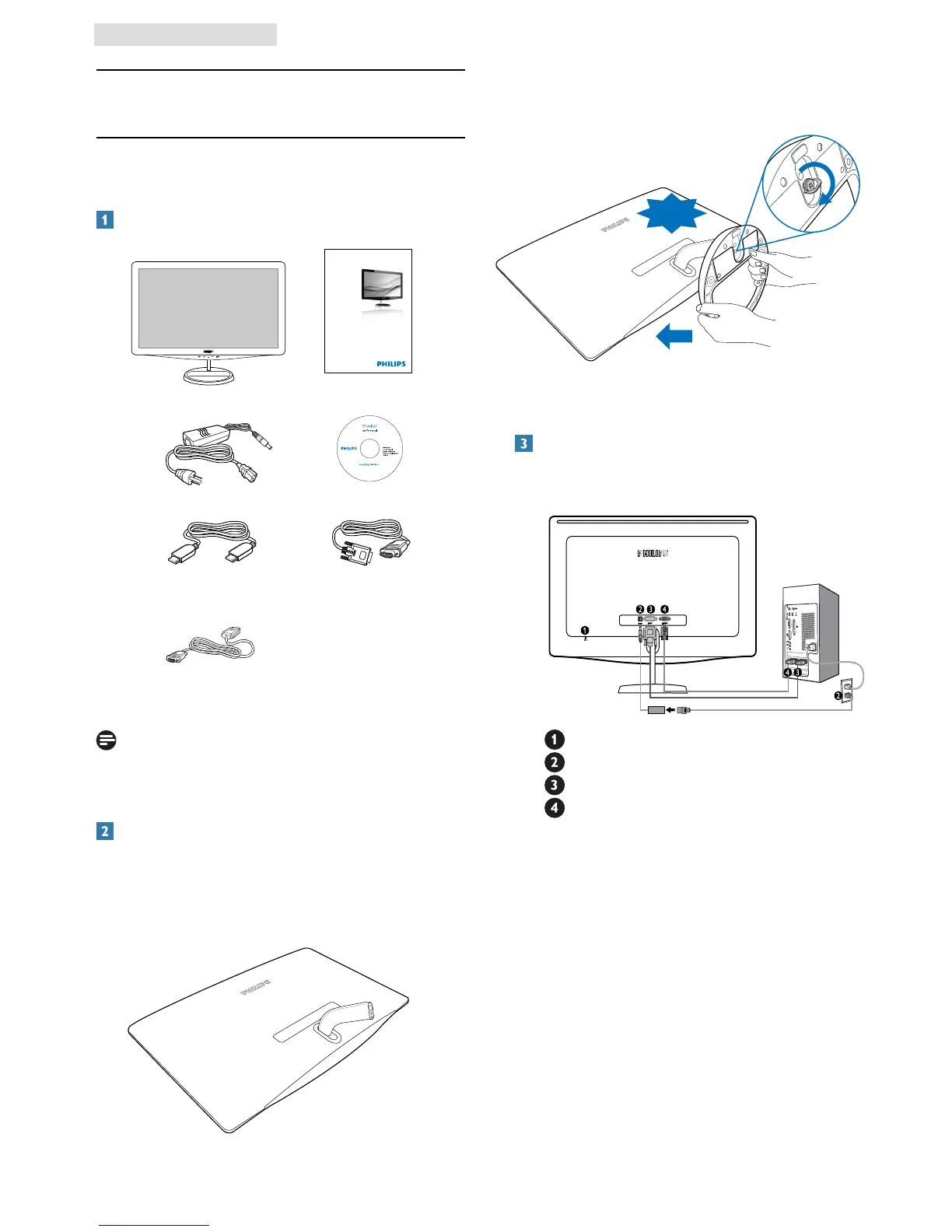
Package contents
2. Setting up the monitor
Install base stand
1. Place the monitor face down on a smooth
and soft surface taking care to avoid scratching
or damaging the screen.
2. Attach the monitor base stand to the base
column then fasten base stand.
VGA signal cable (optional) HDMI cable (optional)
DVI cable (optional)
Philips and the Philips’ Shield Emblem are registered trademarks of
Koninklijke Philips Electronics N.V. and are used under license from
Koninklijke Philips Electronics N.V.
©
2
0
1
1
K
o
n
i
n
k
l
i
j
k
e
P
h
i
l
i
p
s
E
l
e
c
t
r
o
n
i
c
s
,
N
.
V
.
A
l
l
r
i
g
h
t
s
r
e
s
e
r
v
e
d
.
U
n
a
u
t
h
o
r
i
z
e
d
d
u
p
l
i
c
a
t
i
o
n
i
s
a
v
i
o
l
a
t
i
o
n
o
f
a
p
p
l
i
c
a
b
l
e
l
a
w
s
.
M
a
d
e
a
n
d
p
r
i
n
t
e
d
i
n
C
h
i
n
a
.
V
e
r
s
i
o
n
M
3
2
4
1
P
Q
1
Q
5
B
.
1
E
Q
0
1
.
0
0
1
Register your product and get support at
www.philips.com/welcome
Quick
Start
228C3L
248C3L
CLICK!
Note
Use only the AC/DC adapter model:
APD-DA-36Q12-AAAA/Darfon-BC36-1201-06.
Connecting to your PC
248C3L
Kensington anti-theft lock
DC power input
DVI-D input
VGA input



 To Next Page