5
2. Setting up the monitor
power cable.
3. Connect the monitor signal cable to the
video connector on the back of y
our
computer.
4. Plug the power cable into the power
adaptor and into a nearb
y outlet.
5. T
urn on your computer and monitor. If
the monitor displays an image, installation
is complete.
248C3LH
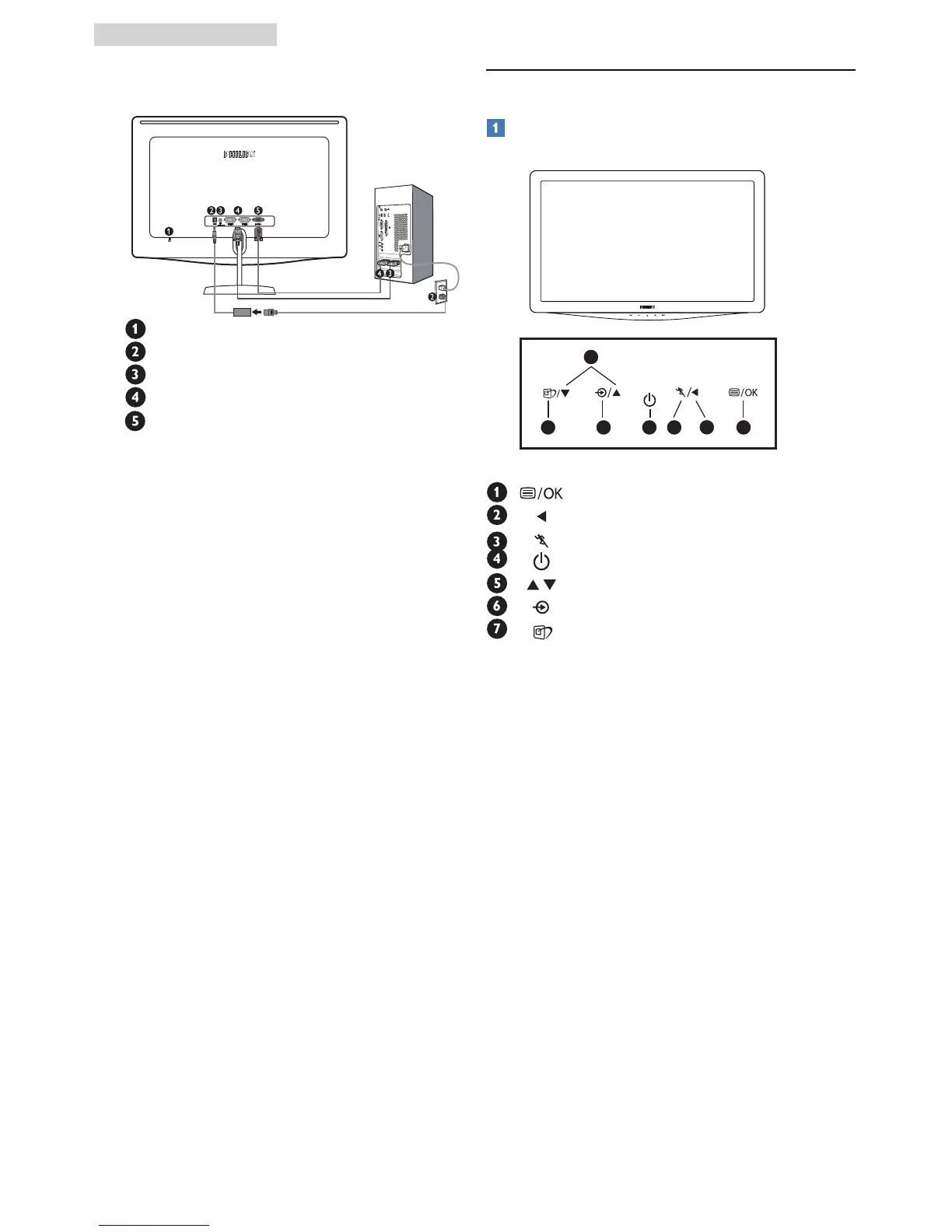
Kensington anti-theft lock
DC power input
HDMI audio out
HDMI input
VGA input
Connect to PC
1. Connect the power adapter cable to the
back of the montior f
irmly.
2. Turn off your computer and unplug its
2.2 Operating the monitor
Front view product description
: To access OSD menu.
: Return to previous OSD level.
: To use the Turbo function.
: To switch monitor’s power on and off.
: To adjust the OSD menu.
: To change the signal input.
: SmartImage. There are 7 modes to
be selected: Text, Office, Photo, Movie,
Game, Economy and Off.
67
5
4
2
13



 To Next Page