17
MOVIE RATINGS
T
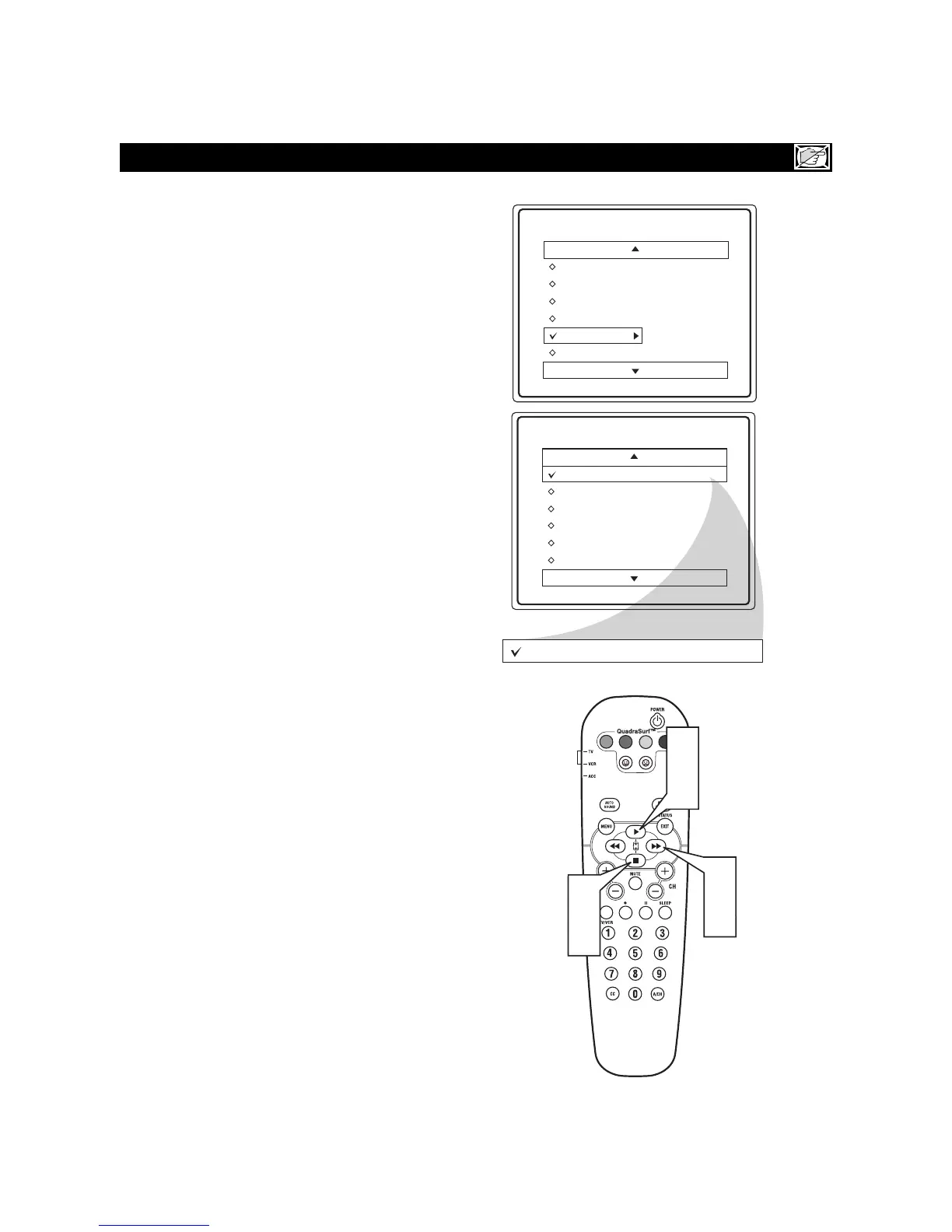
he AutoLock™ feature can block programming
based on the Movie Industry ratings.
Once you’ve entered your access code and the
AutoLock™ features are displayed on the screen:
1
Press the CURSOR UP
qq
or DOWN
uu
buttons
to highlight the words Movie Rating.
2
Press the CURSOR RIGHT
rr
button to dis-
play the Movie Rating options (G, PG, PG-13, R,
NC17, or X).
3
Press the CURSOR UP
qq
or DOWN
uu
buttons
to highlight any of the Movie Rating options.
When highlighted, all these options can be turned
On (which will allow blocking) or Off (which will
allow viewing).
4
Use the CURSOR RIGHT
rr
button on the
remote to turn the rating option On or Off.
When a rating level is chosen to be blocked, any higher
level rating will also be blocked from viewing. (i.e.: If
“R” is selected to be blocked, NC-17 and X will automat-
ically be blocked.)
NOTE: If you ever forget your code, the 0, 7, 1, 1 code
is the factory default and can be used to enter and create
a new access code.








 To Next Page