26
REMOTE USE - SERACH METHOD FOR ACCESSORIES
T
he Search Method of programming your remote
can take as long as 12 minutes to perform so we
recommend you use it as a last resort.
Please read all the steps below before beginning.
1
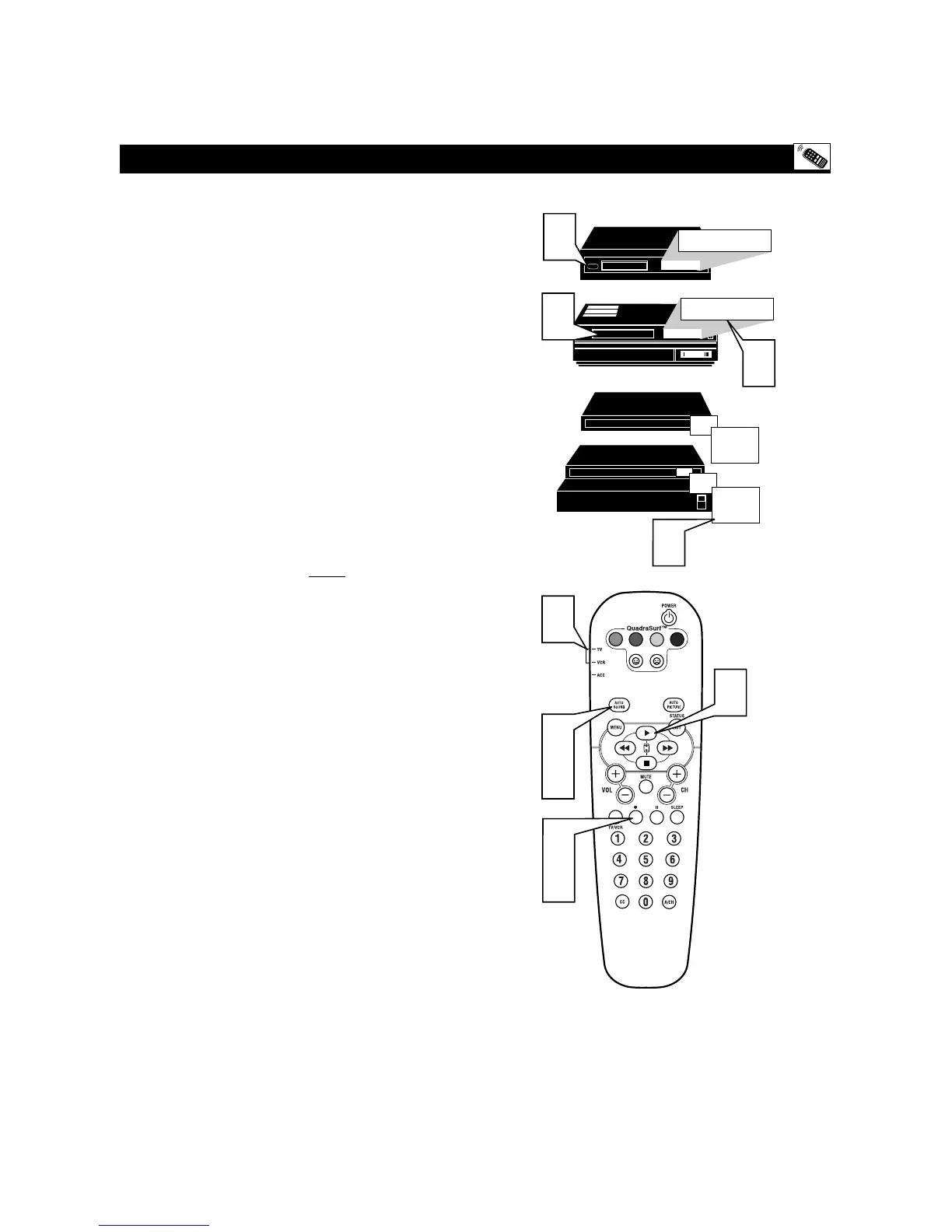
Press the POWER button on the device your are
attempting to program to turn it ON.
2
If programming a VCR or DVD type product that
has a STOP play command, place a VCR Tape or
DVD disc into the device. Press the PLAY button.
3
Place the TV/VCR/ACC Mode Switch in the
proper position. VCR for programming Video
Cassette Recorders or ACC for all other accessory
devices.
4
Press the VCR • RECORD and the AUTO
SOUND buttons simultaneously and hold them
down. As you continue to hold down buttons, the
remote will run through its programmed code list
with a command for the VCR or DVD to STOP
play. Or, for Cable Boxes and Satellite Receivers the
command will be to CHANGE CHANNELS.
5
When the STOP command happens release the two
buttons. Or for Cable Boxes and Satellite Receivers,
as soon as the channel changes ONCE, IMMEDI-
ATELY release the two buttons.









 To Next Page