AUTO PICTURE™
W
hether you’re watching a movie or a sport-
ing event, your TV has automatic video con-
trol settings matched for your current program
source or content.
1
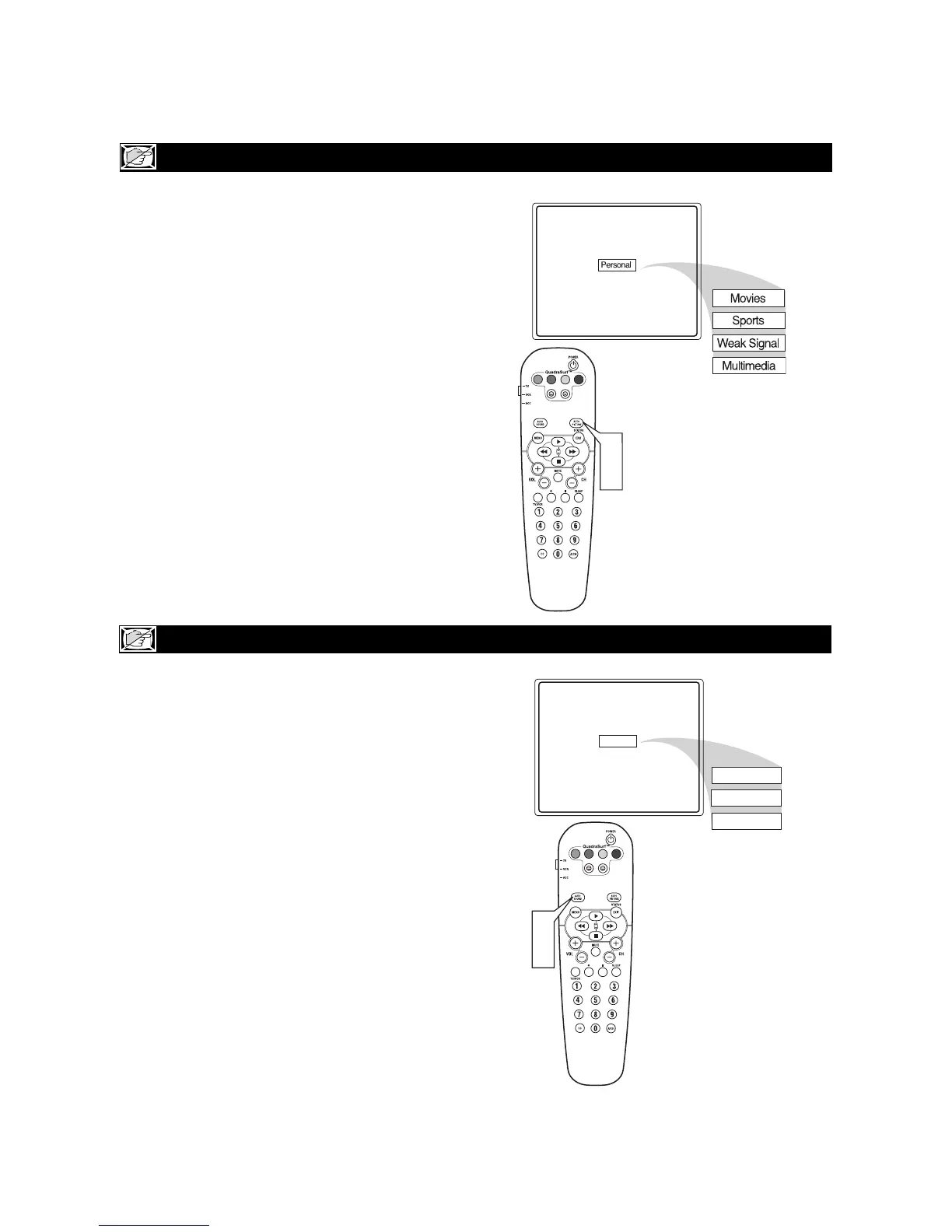
Press the AUTO PICTURE button on the remote
control. The current Auto Picture setting will be
displayed on the screen.
2
Press the AUTO PICTURE button repeatedly
to select either Personal, Movies, Sports, Weak
Signal, or MULTIMEDIA picture settings.
NOTE: The way you choose to set the Picture Menu
Controls will become your Personal setting.
AUTO SOUND™
T
he Auto Sound feature allows the listener to
select between four different factory set sound
options.
1
Press the AUTO SOUND button on the remote
control. The current Auto Sound setting will
appear in the middle of the screen.
2
Press the AUTO SOUND button repeatedly to
toggle between the four settings. (Personal,
Theatre, Music, or Voice)
NOTE: The way you choose to set the Sound Menu
Controls will become your Personal setting.








 To Next Page