T
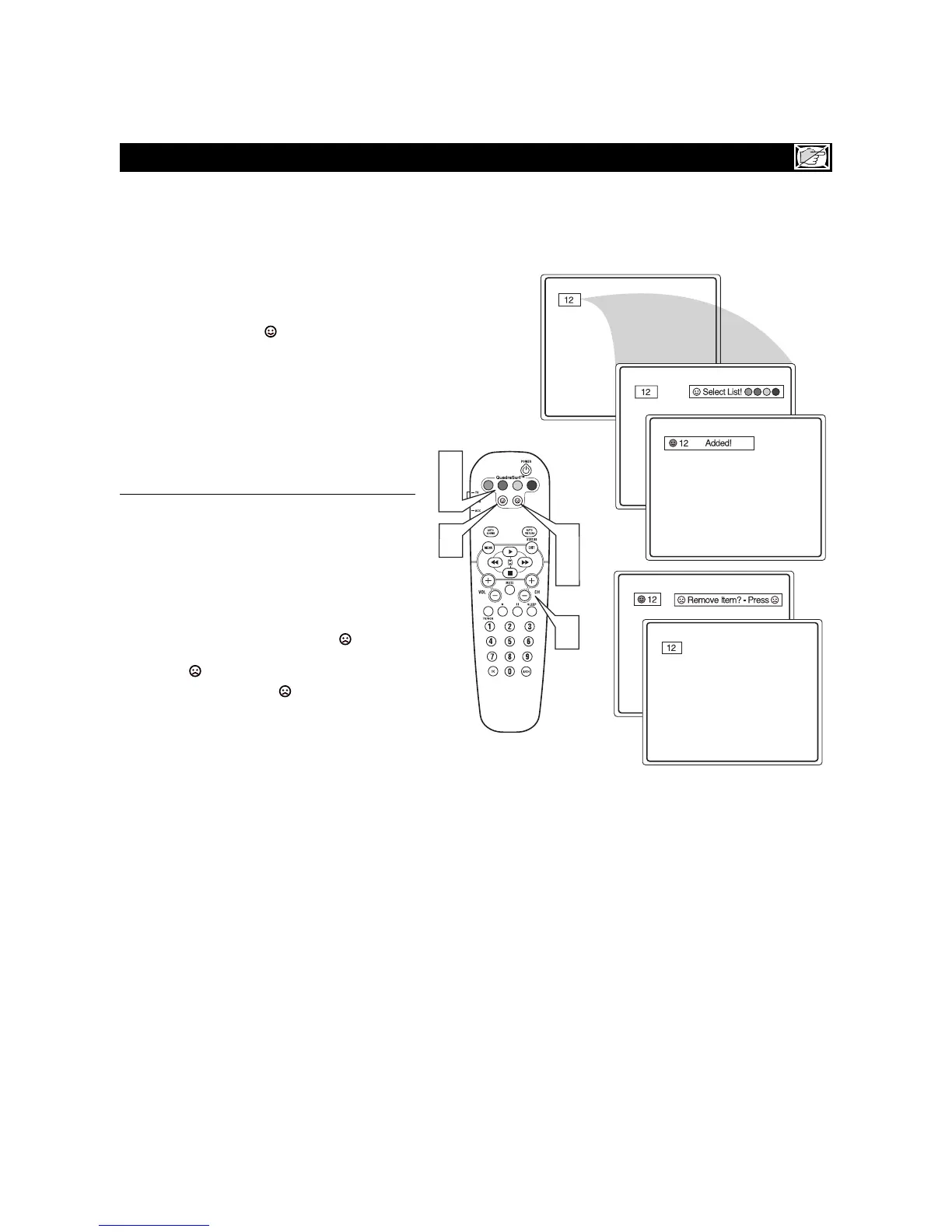
he QuadraSurf™ control allows you set up
four different personal channel Surf lists using
the colored buttons (on the remote control), each
holding up to ten channels in its quick
viewing“list.”
1
Press the CHANNEL (+) or (–) buttons (or the
NUMBER buttons) to select a channel to add to
one of the SURF lists.
2
Press the SMILEY button on the remote
control to ADD the channel to one of the SURF
lists.
3
Press the corresponding COLORED (Red,
Green, Yellow or Blue) button to add the channel
to that button’s Surf list. (Up to ten channels per
button can be stored.)
Repeat steps 1 through 3 to add additional channels (up
to 10) to each of the the SURF lists.
To remove a channel from one of the SURF lists;
4
Press the COLORED Quadra Surf button
until the desired channel appears. The screen
will display the channel number with a colored
“Smiley” face to indicate the Colored button it
relates to.
5
While the “Smiley” face channel indicator is
displayed, press the FROWNIE button.
The screen will read, “Remove item? -
Press .”
6
Press the FROWNIE button again to con
firm your decision to remove the channel from
the Surf list.
Repeat steps 4-6 to remove other channels from Surf
lists.
QUADRASURF™








 To Next Page