26
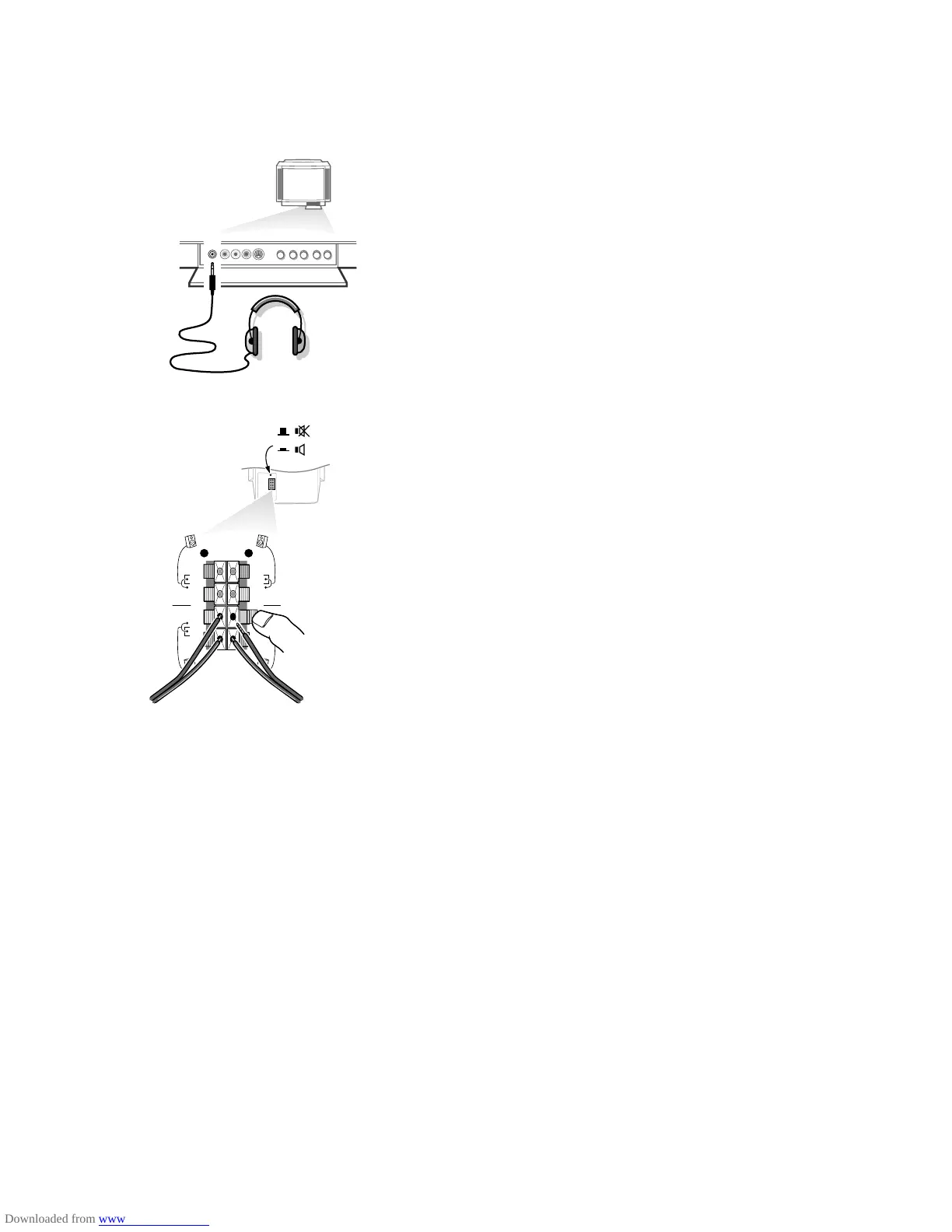
Headphone
• Insert the plug into the headphone socket L at the front side of the TV.
• Press ¬ on the remote control to switch off the internal loudspeakers of the
TV.
The headphone impedance must be between 8 and 4000 Ohm. The headphone
socket has a 3.5 mm jack.
In the
SOUND menu select Headphone to adjust the headphone volume and
to select dubbed or original language (when the TV channel broadcasts in two
languages) for your headphone sound. See p. 13.
Extra loudspeakers
You can replace the left and right loudspeakers of your set by two extra
loudspeakers, min. 8 Ohm.
• Connect the two loudspeakers to the connector clips at the back of the TV.
Connect the left front loudspeaker at
FRONT L; the right front loudspeaker at
FRONT R.
Push the connector clip down and insert the end of the wire into the opening: the
positive wire (the one with the black line) to the red loudspeaker connection; the
negative wire to the black loudspeaker connection. Do not insert the wires too far.
• Select a low volume adjustment and put the loudspeaker switch at the back in
the ¬ position.
The internal right and left loudspeakers of your TV are now switched off.
If you want to connect more equipment to your TV, consult your dealer.
FRONT
REAR
R
L
c
d
3104 305 34730.5.gb 28-05-1999 11:07 Pagina 26









 To Next Page