25
Video recorder and other peripherals
(except CD-i/Photo CD)
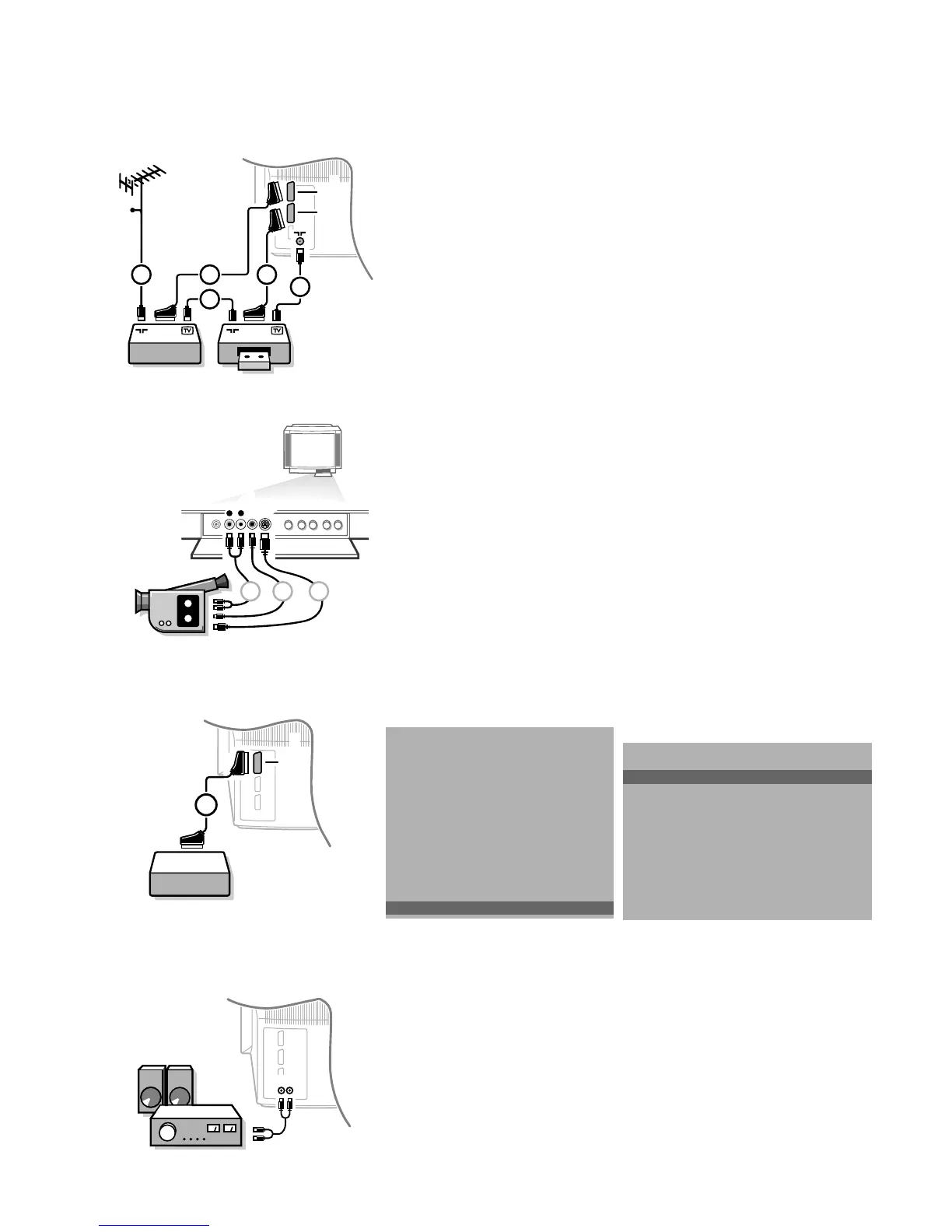
• Connect the aerial cables 1, 2 and 3 as shown opposite. Better picture
quality can be obtained if you also connect eurocable 5 to
EXTERNAL 2 and a
eurocable 4 to
EXTERNAL 1 or 3.
• Look for the test signal of your peripheral in the same way as you do for a
video recorder.
When a video recorder is connected to
EXTERNAL 1 you can only record a
programme from your TV.
Only when a video recorder is connected to
EXTERNAL 2 it is possible to
record a programme from your TV as well as from other connected
equipment. See Record with your video recorder, p. 28.
Camera and camcorder
• Connect your camera or camcorder at the front side of your TV.
• Connect the equipment to VIDEO 2 and AUDIO L 1 for mono equipment.
• Press the X key under the door of the remote control repeatedly to select
the sound coming from one or both loudspeakers of your TV.
• For stereo equipment also connect AUDIO R 1 .
S-VHS quality with a S-VHS camcorder is obtained by connecting the S-VHS
cables with the
S-VHS input 3 and AUDIO inputs 1.
Other equipments
Connect the eurocable 1 to EXTERNAL 1 as shown opposite.
Only for CD-i and Photo CD :
• Press S and s at the same time.
• Select CD-i/Photo CD Present in the Setup menu of the INSTALLATION
menu.
This offers you optimum picture quality for your CD-i or Photo CD.
• Keep the red MENU key pressed to switch off all menus.
Audio equipment / Amplifier
• Connect the audio cables to the audio input of your audio equipment and to
AUDIO L and R at the back of your TV.
You can listen to your TV sound via your audio equipment.
S•VHS
VIDEO
AUDIO
L
R
1 2 3
INSTALLATION
Menu language
Country
Automatic Installation
Manual Installation
Give Name
Reshuffle
Favourite Programmes
Connection diagrams
SETUP
J SETUP
SETUP
CD-i/Photo CD
Decoder/Descrambler
Picture tilt
Information Line
Ext2 Input
VCR Type
Surround Sound Off/Channel 1...7
(Auto Picture/Sound On/Off)
NEX
TV
IEW
Provider None/0.99
Auto Format Yes/No
INSTALLATION
J CD-i/Photo CD
3104 305 34730.5.gb 28-05-1999 11:07 Pagina 25









 To Next Page