4
( Insert the mains plug in the wall socket with a mains voltage of 220V-240V.
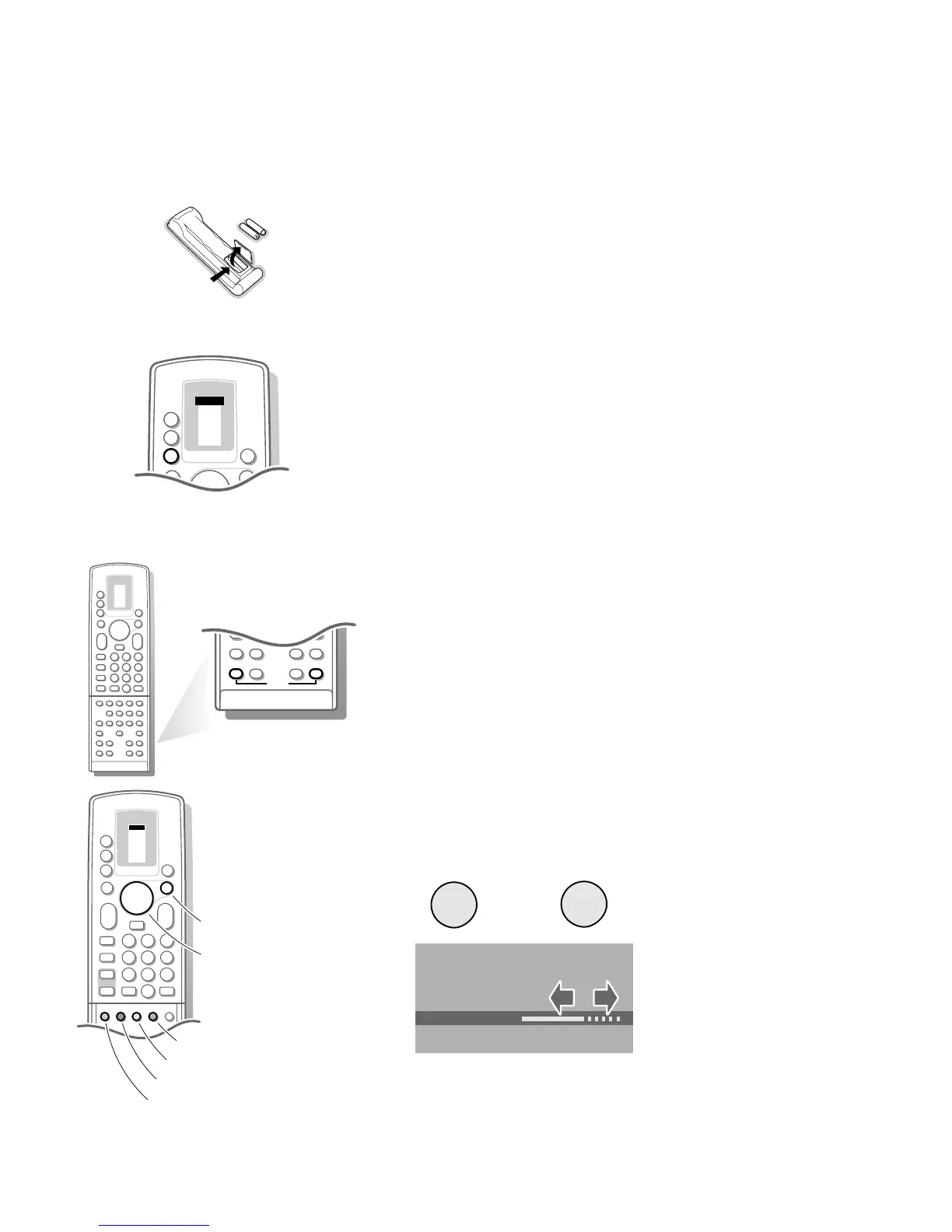
§ Remote control: Remove the cover of the battery compartment.
Insert the 2 batteries supplied (Type R03G-1,5V).
Press the TV key next to the display to be sure your remote control is in the
TV mode.
The batteries supplied do not contain the heavy metals mercury and cadmium.
Nevertheless in many countries exhausted batteries may not be disposed of with your
household waste. Please ensure you dispose of exhausted batteries according to local
regulations.
è Switch TV on: Press the power switch A on the front of your TV.
A green indicator and the screen light up.
If the indicator is red, press the - P + key on the remote control.
The red lamp blinks every time you press a key on the remote control.
When you switch on your set for the first time, the menu
LANGUAGE automatically
appears on the screen. Alternatively the explanation appears in the different
languages. Choose your own language and press the OK key on the remote control.
VCR 1
VCR 2
SAT
AMP
TUNER
TAPE
DCC
CD
TV
ZOOM
π
π
π
π
OK
M
u
TV
B
+
V
P
+
Installation
Select the INSTALLATION MENU :
& Open the door of the remote control.
é Press S and s at the same time.
To use the menus
& Use the A keys to select a menu item.
é Press the OK key to activate.
“ Use the red
MENU key on the door of the remote control to return or to
switch menu off.
SOUND
0
i
0
j
π
†
Ò
C
‡
X
P
S
fi s
d
P
+
-
c
TXT
d
fh
U
yÚ
MENU TITLE
Subject 1
Subject 2
Subject 3
J Subject 4
Subject 5
Subject 6
J Subject 4 L M
VCR 1
VCR 2
SAT
AMP
TUNER
TAPE
DCC
CD
TV
ZOOM
π
π
π
π
OK
M
u
TV
b
æ
q
b
B
1
23
456
789
PICTURE
SOUND
SMART
+
-
V
P
+
-
¬
0
i
0
activate
picture menu
sound menu
features menu
programme list
select adjustments
3104 305 34730.5.gb 28-05-1999 11:06 Pagina 4









 To Next Page