9
Surround Sound
To make use of the wireless surround loudspeakers, use the pπ keys to
select the same channel as you selected on the active loudspeaker. (Ex factory,
channel 6 has been selected as default.)
A disturbance free sound reproduction wil be guaranteed under most
circumstances.
To avoid interferences from external RF (wireless) equipment such as a
headphone, RF audio, remote controls for light, ... it may be necessary to shift
to another channel number.
In practice only 3 or 4 channels are available because at least a step of two
channels are necessary to have enough separation.
Always be sure that the active surround speaker and the Surround Sound
setting are switched to the same transmitting channel. Otherwise no sound or
only a distorted sound will be heard on the surround speakers.
When the TV is tuned to a channel in the neighbourhood of 433 Mhz, then the
transmitter is switched off because no RF surround sound is possible. This is
necessary to avoid disturbed picture.
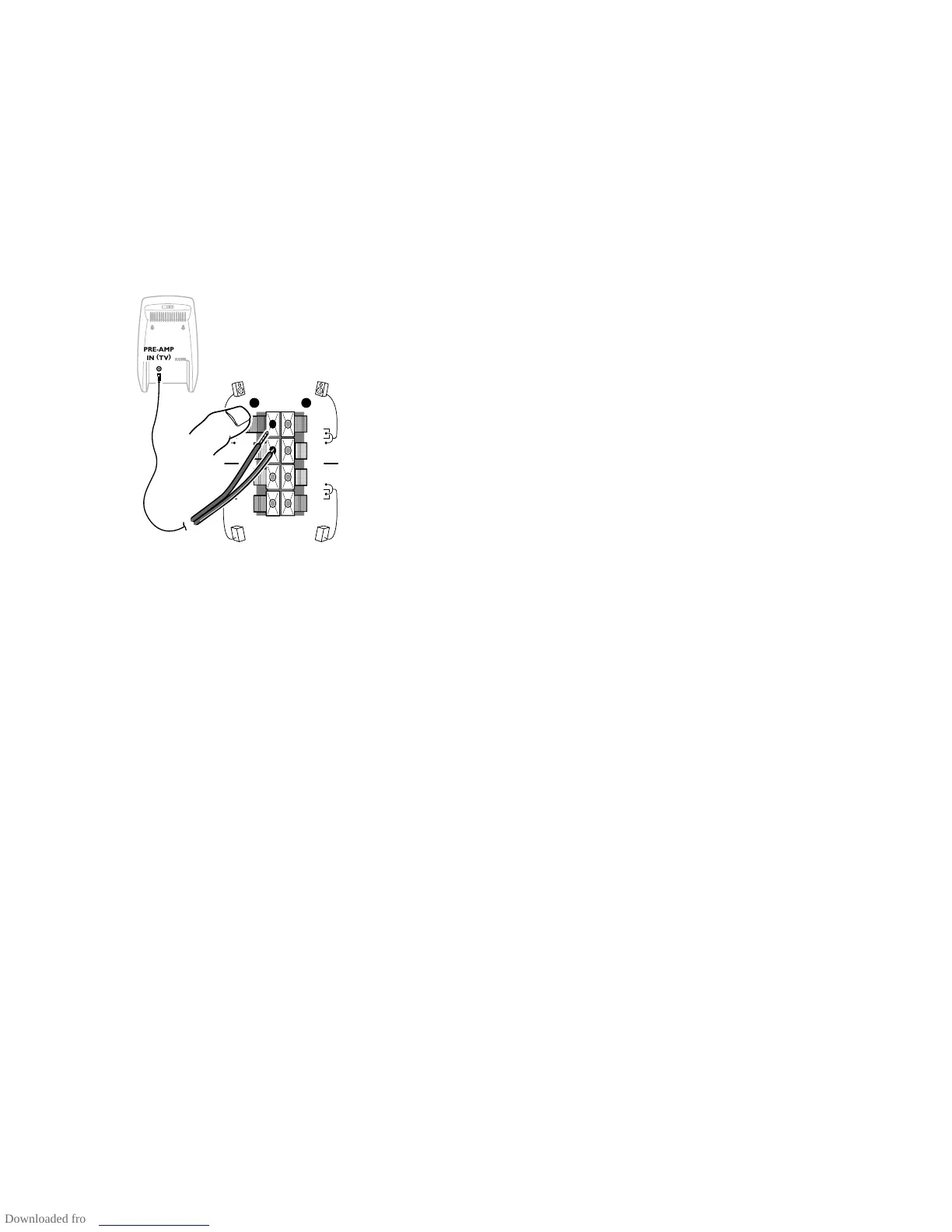
When no RF surround sound is possible or when there is too much
interference, use the wired back up solution. In this case select off in the
Surround Sound menu item.
Connect the supplied cinch cable with the
PRE-AMP IN (TV) connector at the
back of the active surround loudspeaker and with the black and red
REAR R or L connector clips at the back of the TV.
NEXTVIEW provider
NEXTVIEW enables you to see a television programme guide on the screen
instead of in a weekly magazine. See
NEXTVIEW, p. 18.
NEXTVIEW functionality is based on extended teletext services offered by TV
channels, providers. Normally you will select as
NEXTVIEW provider the TV
channel that transmits most information in your language. You can make the
best selection via info from TV announcements or from the newspapers.
• Select the programme number of the desired TV channel as stored in the
favourite programme list, with the p or π keys or with the digit keys. The
selected TV channel will provide a programme guide and additional info of its
own broadcasts as well as from other (non selected) TV channels.
• Select None if you only want the programme guide of the watched TV
channel.
Important:
In order to have the actual time and date displayed in the
NEXTVIEW screen and
NEXTVIEW working properly, the first TV channel from the favourite list should also
broadcast teletext.
Please check at startup if the time and date are correct in the
NEXTVIEW screen.
Not all TV channels support
NEXTVIEW.
How to make use of
NEXTVIEW, see p. 18.
Installation
Select Installation and press the OK key to return immediately to the
INSTALLATION menu.
To exit from the menu
‘ Keep the red menu key on the door of the remote control pressed.
3104 305 34730.5.gb 28-05-1999 11:06 Pagina 9









 To Next Page