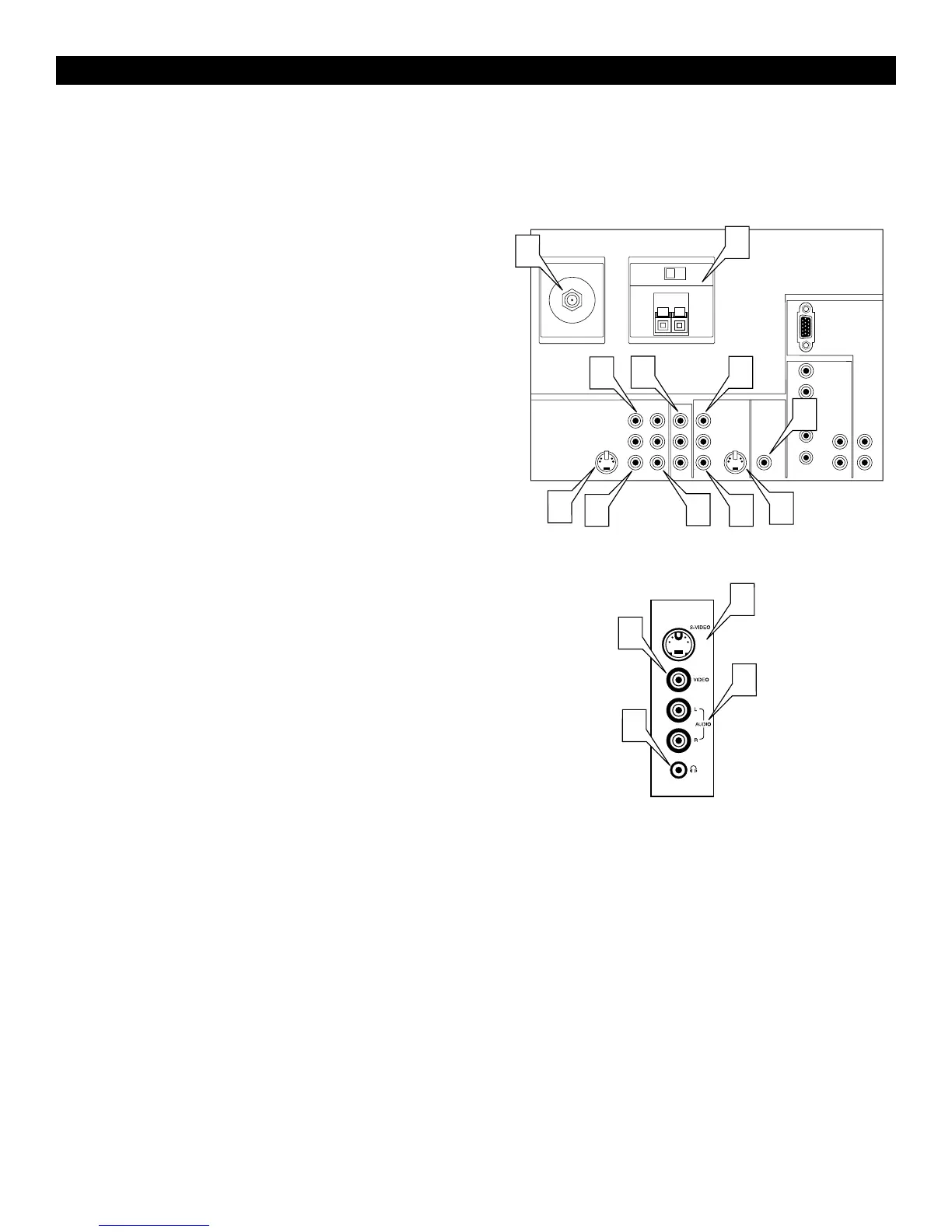
You can connect a wide range of video and audio equipment to your TV
in various ways. This page and the next one provide an overview of sig-
nal compatibilities and the types of equipment you can connect to the
sockets. Connection examples follow on subsequent pages. As necessary,
also refer to the handbook for peripheral equipment.
Overview :Standard Inputs/Outputs
1
ANTENNA IN 75Ω socket—compatible with the broadcast stan-
dard in your area. Use to connect radio-frequency (RF) signals
from VHF/UHF antennas or a cable system.
2
YPbPr (component video input [CVI] sockets)—compatible
with 480i and 576i signals. Use to connect equipment having com-
ponent video outputs, such as DVD players, laser-disc players,
video-game players, satellite receivers, or other equipment. Use the
INPUT-AV 1 L(eft) and R(ight) AUDIO sockets for sound connec-
tions.
3
S-VIDEO (super video) sockets—compatible with 480i and 576i
signals. Use to connect peripherals having Super VHS (S-VHS)
outputs, such as VCRs, DVD players, laser-disc players, video-
game players, satellite receivers, or other equipment.
4
VIDEO (composite) sockets
(INPUT-AV
1, INPUT-AV 2, and TV’s side socket panel
[AV3])—compatible with 480i and 576i signals. Use to connect
peripherals having composite video outputs, such as VCRs, video-
game players, or other equipment.
5
AUDIO inputs (INPUT-AV 1, INPUT-AV 2, and TV’s side
socket panel [AV3])—use to connect from the audio output sock-
ets on VCRs, DVDs, or other peripherals.
6
MONITOR OUT (VIDEO/AUDIO)—use to connect to a VCR
to record programmes from the TV. Or use the AUDIO outputs to
connect to an audio hi-fi system.
7
AMP SWITCH, CENTER
CHANNELAMP INPUT, and
SUBWOOFER Output—use to make optional surround-sound
connections.
8
n Headphone socket (stereo, 3.5 mm)—use to connect head-
phones for personal listening. The headphone impedance must be
between 8 and 4000 Ohms.



 To Next Page