11
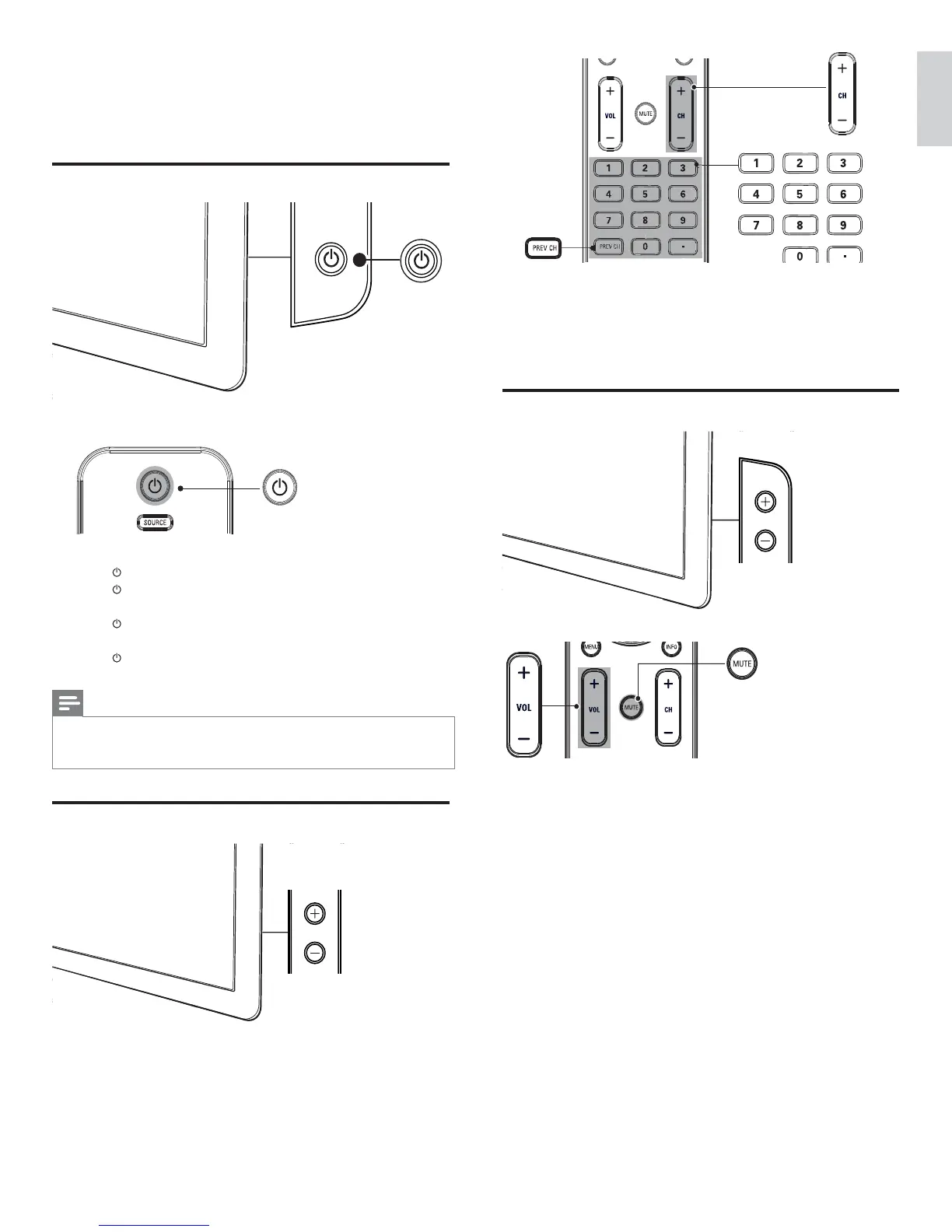
• Press CHANNEL +/ - on the side of the TV. For digital channels,
press a number (1 to 999) followed by a dot “.” and then the
corresponding sub channel number (1 to 999). Ex. 108.30.
• Press CH +/- or enter a number on the remote control.
• Press PREV CH to return to the previously viewed channel.
Adjust volume
To increase or decrease volume
• Press VOL +/- on the remote control or press VOLUME +/- on
the side of the TV.
To mute or unmute sound
• Press MUTE on the remote control to mute the sound.
• Press MUTE again to restore the sound.
To adjust headphone volume
• Press VOL +/- on the remote control or press VOLUME +/- on
the side of the TV. When headphones are plugged into the TV, the
loud speakers are automatically muted.
VOLUME
5 Use your TV
This section helps you perform basic TV operations.
Switch your TV on/off or to standby
To switch on
• Press
POWER at the side of the TV.
• Press
on the remote control.
To switch to standby
• Press
on the remote control.
To switch off
• Press
POWER at the side of the TV.
Note
• Energy consumption contributes to air and water pollution. When the power cord
is plugged in, your TV consumes energy. Your TV has a very low standby power
consumption.
Switch channels
POWER
CHANNEL
English
EN






 To Next Page