
 Need help?
Do you have a question about the Philips 50PUS7304 and is the answer not in the manual?
Explains the Home launcher and accessing settings from Home.
Details on finding and using apps and the Philips TV Collection.
Emphasizes reading safety instructions before using the TV.
Instructions for mounting the TV stand and wall mounting the TV.
Guidance on connecting and handling the TV's power cable.
Instructions for connecting the antenna cable for TV signals.
Guidance on connecting the satellite F-type connector.
Details the functions of each button on the remote control.
Steps to pair the remote control with the TV via Bluetooth.
How to use voice commands to search for content on the TV.
How to turn the TV on, switch to standby, and disconnect power.
Steps for installing TV channels, including antenna and cable setup.
Guidance on tuning to channels, locking channels, and parental ratings.
Detailed guide for satellite dish installation and settings.
Procedures for antenna installation and channel updates.
General advice on connecting devices with quality cables for best signal.
Guide to installing and using CAM modules for scrambled channels.
Instructions for connecting Home Theatre Systems via HDMI ARC.
Connecting, formatting, and using a USB hard drive for recording and pausing.
Guide to connecting the TV to a home network wirelessly or via wired connection.
Steps to sign in with a Google Account for full TV capabilities.
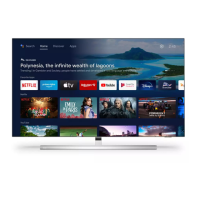
Overview of the Home screen, apps, and live TV.
Information on installing and using apps from the Philips TV Collection.
Using Google Play for Movies & TV, Music, and Games.
How to start and use the TV's internet browser.
How to switch between connected devices and sources.
Adjusting picture styles, colour, contrast, sharpness, and brightness.
Adjusting sound styles, personal modes, and advanced settings.
Turning Ambilight on/off and selecting styles.
General settings including USB keyboard, location, and shop setup.
Setting up PIN codes, locking apps, and creating restricted profiles.
Viewing media from USB flash drives or hard drives.
How to open, navigate, and use the TV Guide features like reminders.
How to record TV programmes, including now and scheduled recordings.
How to pause and resume live TV broadcasts.
How to update TV software via the internet or USB.
Common issues and solutions related to TV operation and remote control.
Important safety instructions to prevent electric shock, fire, injury, and overheating.
 General
| Smart TV | Yes |
|---|---|
| Processor | P5 Perfect Picture Engine |
| Operating System | Android TV |
| HDMI Ports | 4 |
| Wi-Fi | Yes |
| Bluetooth | Yes |
| Screen Size | 50 inches |
| Resolution | 4K UHD (3840 x 2160) |
| HDR | Dolby Vision, HLG |
| Voice Control | Google Assistant |


 To Next Page