5. Use more of yourTY
This section describes the advanced features of your TV.
5.1 Understand the remote control
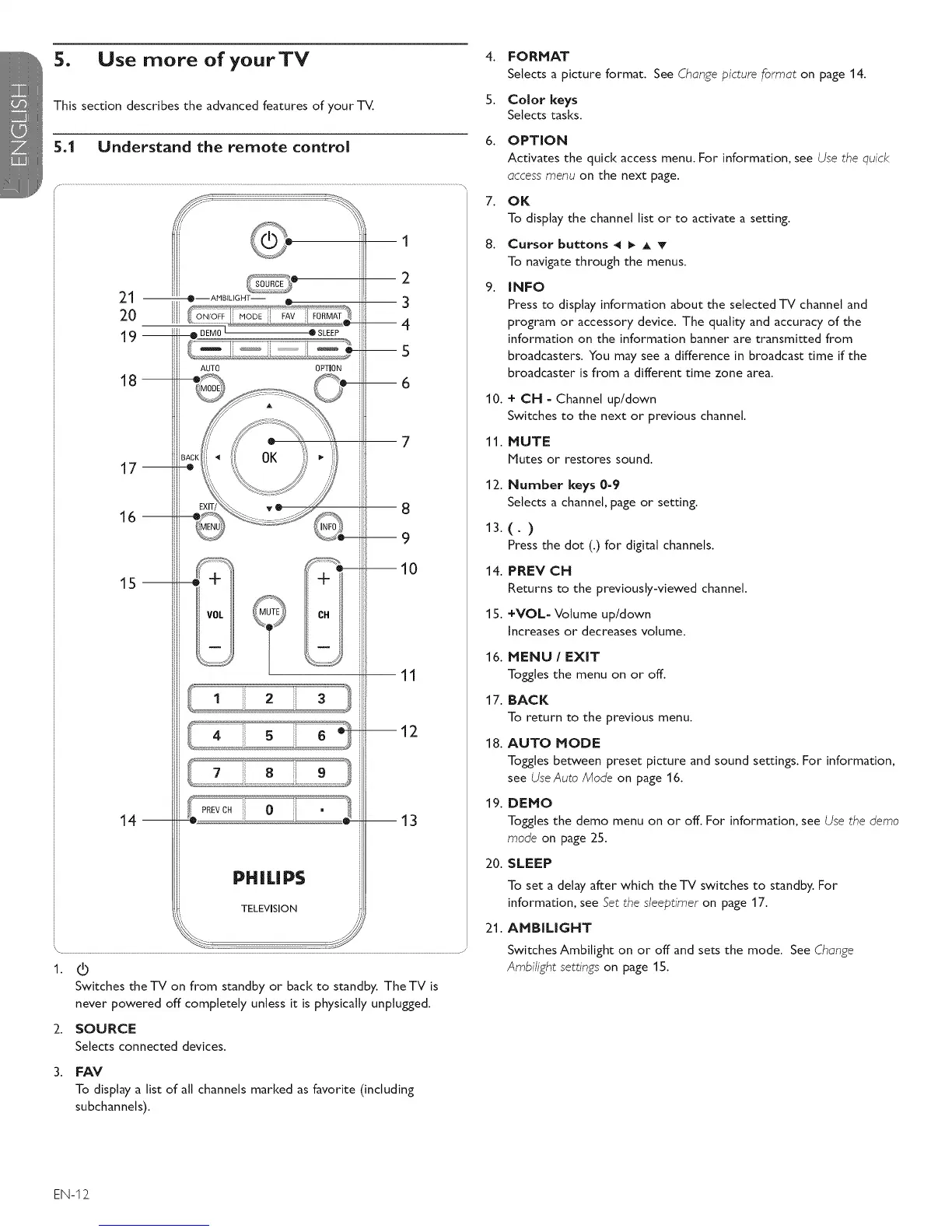
21--
20
19--
18 m
17 m
16 m
15 m
14 m
O -AMBIUGHT-
AUTO
o, 'i
TO
.............
OPTION
J
>':'i}
INF0_
\
1
2
3
--4
--5
--6
8
9
--10
11
m12
m13
\ ........ S J
1. IO
Switches the -iV on from standby or back to standby. The TV is
never powered off completely unless it is physically unplugged.
2. SOURCE
Selects connected devices.
3. FAV
To display a list of all channels marked as favorite (including
subchannels).
4. FORMAT
Selects a picture format. See Change picture format on page 14.
5. Color keys
Selects tasks.
6. OPTION
Activates the quick access menu. For information, see Use the quick
access menu on the next page.
7. OK
To display the channel list or to activate a setting.
8. Cursor buttons 4 _ A T
To navigate through the menus.
9. INFO
Press to display information about the selected TV channel and
program or accessory device. The quality and accuracy of the
information on the information banner are transmitted from
broadcasters. You may see a difference in broadcast time if the
broadcaster is from a different time zone area.
10. + CH - Channel up/down
Switches to the next or previous channel.
11. MUTE
Mutes or restores sound.
12. Number keys 0-9
Selects a channel, page or setting.
13.(. )
Press the dot (.) for digital channels.
14. PREV CN
Returns to the previously-viewed channel.
15. +VOL- Volume up/down
Increases or decreases volume.
16. MENU / EXIT
Toggles the menu on or off.
17. BACK
To return to the previous menu.
18. AUTO MODE
Toggles between preset picture and sound settings. For information,
see UseAuto Mode on page 16.
19. DEMO
Toggles the demo menu on or off. For information, see Use the demo
mode on page 25.
20. SLEEP
To set a delay after which the -iV switches to standby. For
information, see Set the sleeptimer on page 17.
21. AMBILIGNT
Switches Ambitight on or off and sets the mode. See Change
Ambi/ight settings on page 1S.
EN-I2







 To Next Page