6. Change yourTV installation
The first time you switch on your TV you select the language for the TV
menus and make basic choices for picture and sound settings. Use this
chapter to reinstall the TV, to set preferences in the TV menus, or to
tune new TV channels.
6.1 Select your menu language
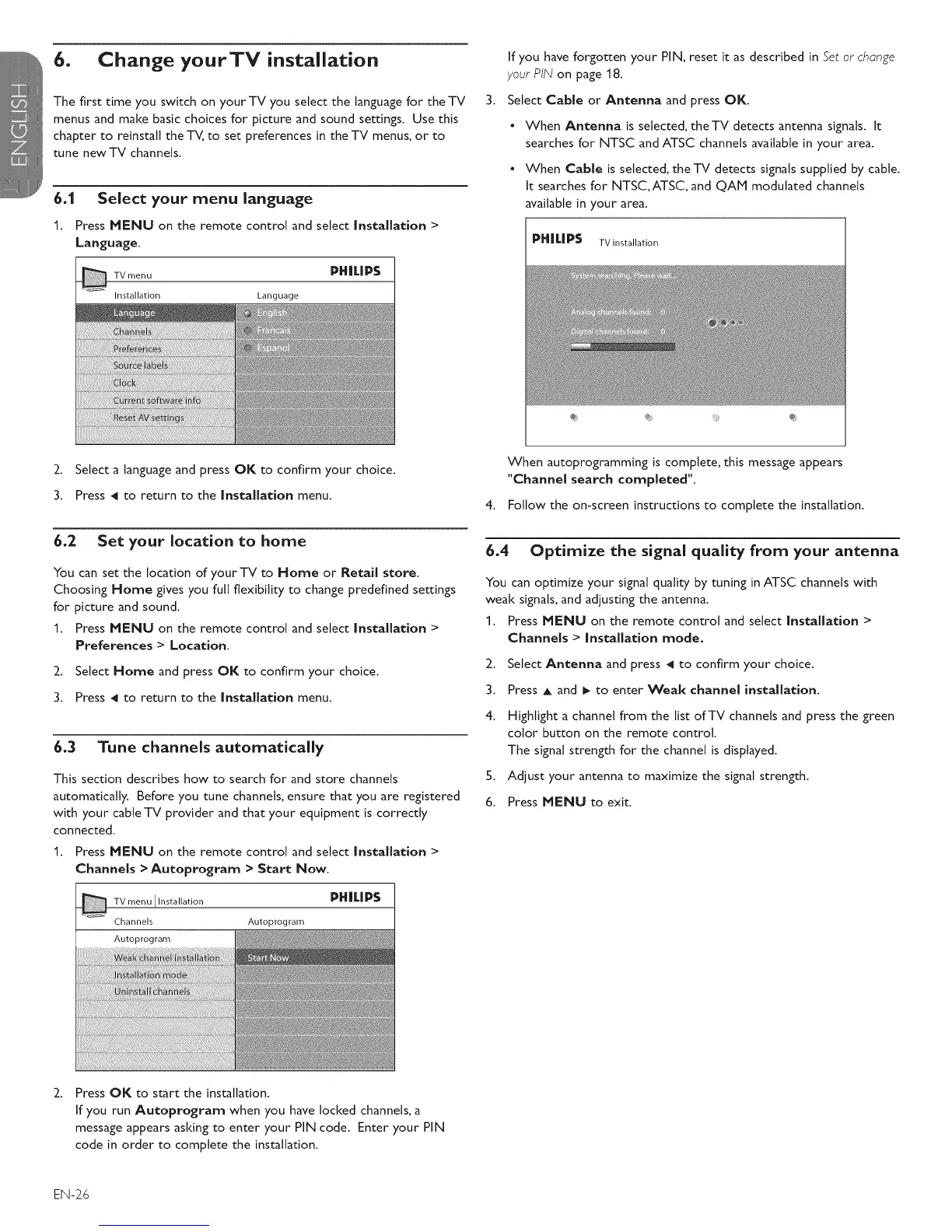
1. Press MENU on the remote control and select Installation >
Language.
TVmenu PHILIPS
Installation Language
3.
If you have forgotten your PIN, reset it as described in Set or change
your PIN on page 18.
Select Cable or Antenna and press OK.
• When Antenna is selected, theTV detects antenna signals. It
searches for NTSC and ATSC channels available in your area.
• When Cable is selected, the TV detects signals supplied by cable.
It searches for NTSC,ATSC, and QAE1 modulated channels
available in your area.
PH|L|PS TV installation
2. Select a language and press OK to confirm your choice.
3. Press _1 to return to the Installation menu.
6.2 Set your location to home
You can set the location of your TV to Home or Retail store.
Choosing Home gives you full flexibility to change predefined settings
for picture and sound.
1. Press MENU on the remote control and select Installation >
Preferences > Location.
2. Select Home and press OK to confirm your choice.
3. Press _1 to return to the Installation menu.
6.3 Tune channels automatically
This section describes how to search for and store channels
automatically. Before you tune channels, ensure that you are registered
with your cable TV provider and that your equipment is correctly
connected.
1. Press MENU on the remote control and select Installation >
Channels > Autoprogram > Start Now.
Installation PH | L| PS
Autoprograrn
When autoprogramming is complete, this message appears
"Channel search completed".
4. Follow the on-screen instructions to complete the installation.
6.4 Optimize the signal quality from your antenna
You can optimize your signal quality by tuning in ATSC channels with
weak signals, and adjusting the antenna.
1. Press MENU on the remote control and select Installation >
Channels > Installation mode.
2. Select Antenna and press _1 to confirm your choice.
3. Press A and _ to enter Weak channel installation.
4. Highlight a channel from the list of TV channels and press the green
color button on the remote control.
The signal strength for the channel is displayed.
5. Adjust your antenna to maximize the signal strength.
6. Press MENU to exit.
Press OK to start the installation.
If you run Autoprogram when you have locked channels, a
message appears asking to enter your PIN code. Enter your PIN
code in order to complete the installation.
EN-26







 To Next Page