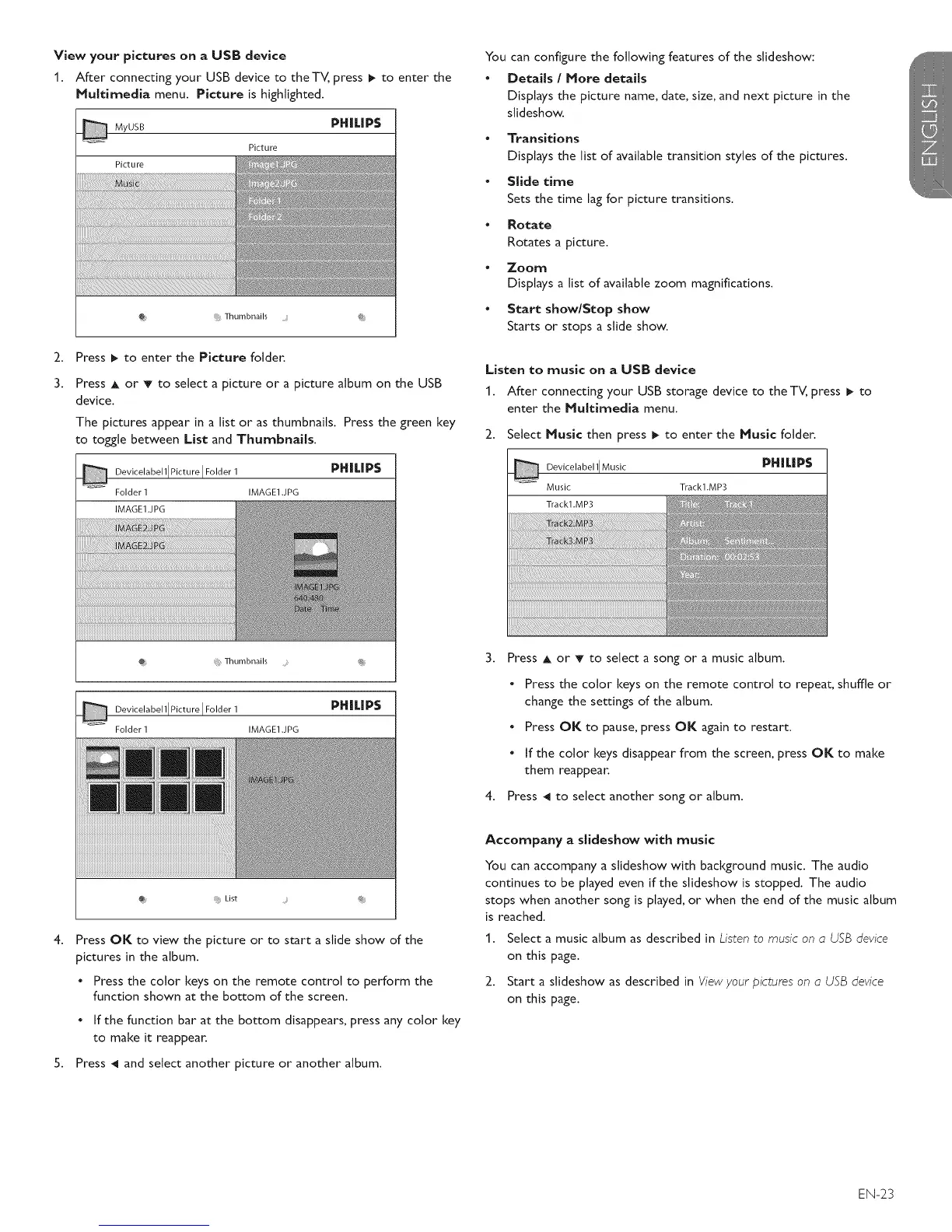
View your pictures on a USB device
1. After connecting your USB device to the TV, press _ to enter the
Multimedia menu. Picture is highlighted.
MyUSB PHILIP$
Picture
Picture
2.
3.
Thumbnails .... @
Press _ to enter the Picture folder.
Press A or T to select a picture or a picture album on the USB
device.
The pictures appear in a list or as thumbnails. Press the green key
to toggle between List and Thumbnails.
Devicelabell[Picture I Folder1 PH|I| P$
Folder1 IMAGE1.JPG
IMAGE1.JPG
Thumbnails @
Devicelabell IPicture I Folder 1 PHILIPS
Folder 1 IMAGE1 .JPG
Press OK to view the picture or to start a slide show of the
pictures in the album.
• Press the color keys on the remote control to perform the
function shown at the bottom of the screen.
• If the function bar at the bottom disappears, press any color key
to make it reappear.
5. Press _1 and select another picture or another album.
You can configure the following features of the stideshow:
• Details / More details
Displays the picture name, date, size, and next picture in the
stideshow.
• Transitions
Displays the list of available transition styles of the pictures.
• Slide time
Sets the time lag for picture transitions.
• Rotate
Rotates a picture.
Zoom
Displays a list of available zoom magnifications.
• Start show/Stop show
Starts or stops a stide show.
Listen to music on a USB device
1. After connecting your USB storage device to the TV, press _ to
enter the Nuitimedia menu.
2. Select Music then press _ to enter the Music folder.
PH |L|P$
Devicela bel 11Music
Music Trackl.MP:_
Track1 .MP3
3. Press A or T to select a song or a music album.
• Press the color keys on the remote control to repeat, shuffle or
change the settings of the album.
• Press OK to pause, press OK again to restart.
• If the color keys disappear from the screen, press OK to make
them reappear.
4. Press _1 to select another song or album.
Accompany a slideshow with music
You can accompany a stideshow with background music. The audio
continues to be played even if the slideshow is stopped. The audio
stops when another song is played, or when the end of the music album
is reached.
1. Select a music album as described in Listen to music on a USB device
on this page.
2. Start a slideshow as described in View your pictures on a USB device
on this page.
EN-23





 To Next Page