65BDL3050Q
15
4
)
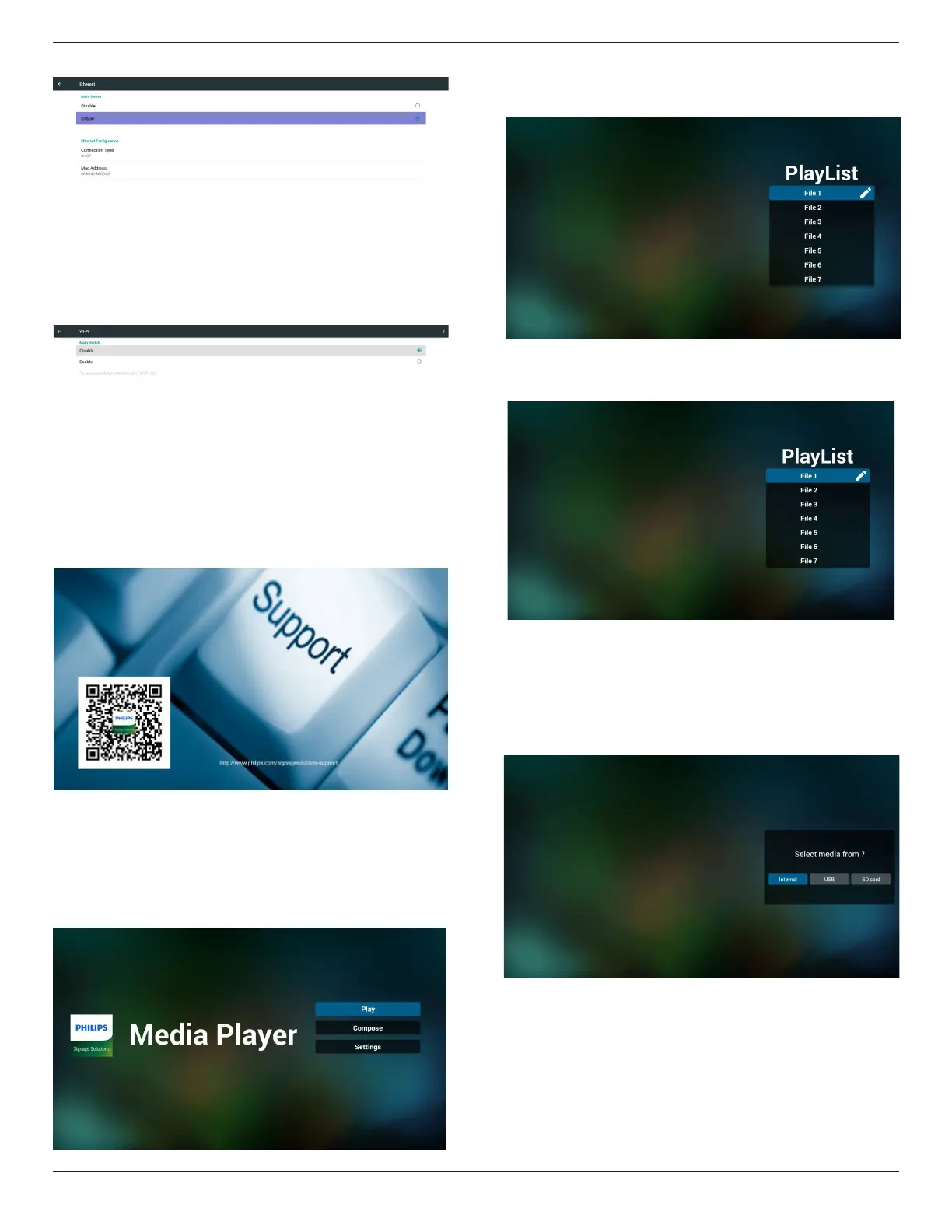
Ethernet page
5) Wi-Fi (Optional)
6) Help page:
Display QRcode page.
4.4. Media Player introduction:
1. Home page of Media Player, this page has three items: “Play”,
“Compose” and “Settings”.
Play : select playlist to play.
Compose: edit playlist.
Settings: setting play properties.
2. Select “Play” on home page, rst you should choose one playlist to
play between FILE 1 and FILE 7.
The pencil icon means the playlist is non-empty.
3. Select “Compose” on home page, rst you should choose one
playlist to edit between FILE 1 and FILE 7.
The pencil icon means the playlist is non-empty.
4. If an empty playlist is chosen, the app will guide you to select the
media source.
All media les should be placed in /philips/ of root directory.
For example,
videos: {root dir of storage}/philips/video/
photos: {root dir of storage}/philips/photo/
music : {root dir of storage}/philips/music/


 To Next Page