65BDL3050Q
32
4. PDF Player
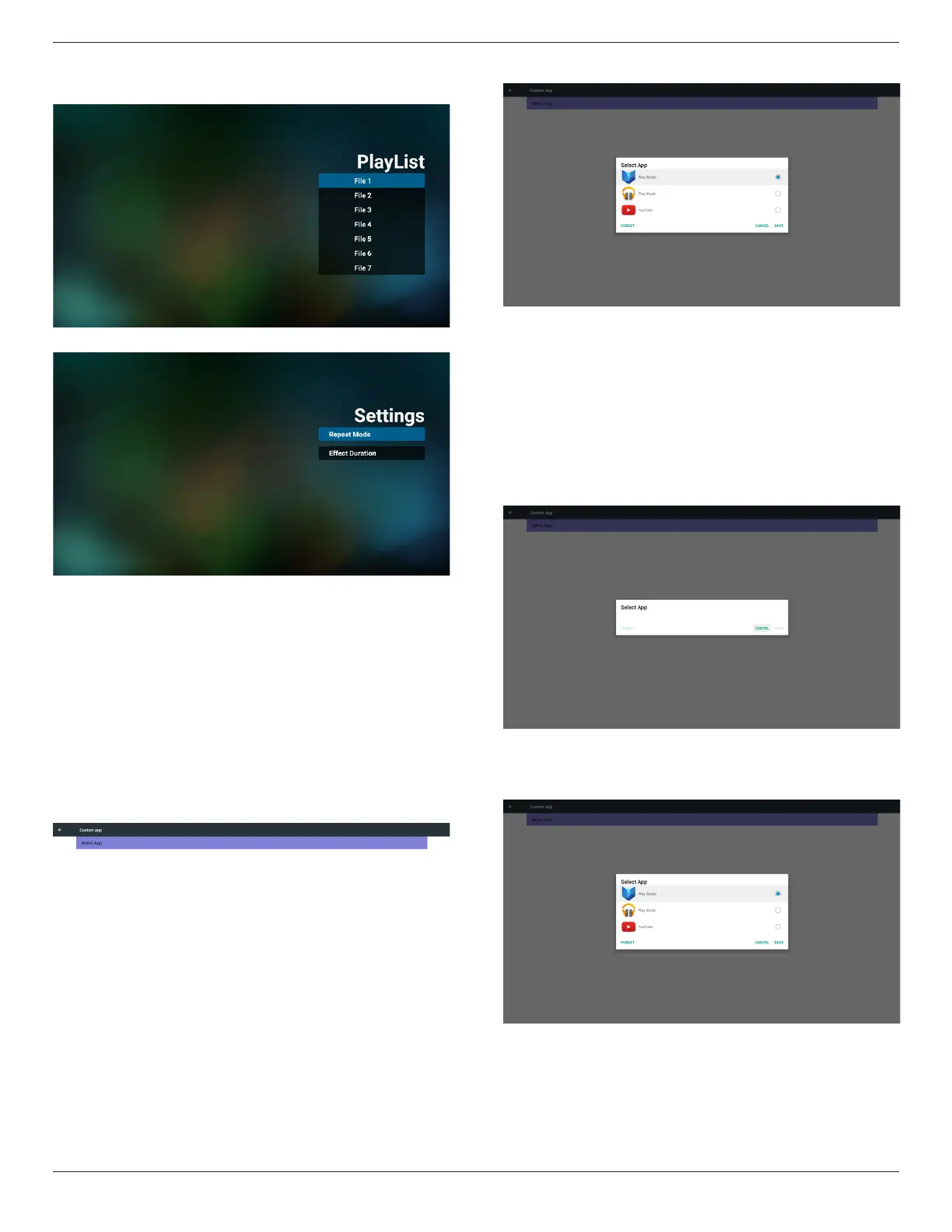
(1) Open PDF Player Player List edit page.
(2) Open PDF Player effect edit page.
5. Custom App
User can set up the application for Customer Source.
Note
(1) Only display User Installed app.
(2) Will not show up system pre-install app.
Scalar OSD menu operation
RCU: Source -> Custom
If set up customer APK, PD will open customer app when switch source
to Customer mode.
If no set up customer APK, PD will show Black screen when switch
source to Customer mode.
Function introduction
(1) Save
Select App and press Save key to save it.
(2) Forget
Press Forget key to clean previous stored data
(3) Cancel
No change, close window directly
If no customer installed apk, the list will be blank.
No option for choose. Save and Forget key will be gray and
unavailable.
User can select customer installed apk in list
No setup Custom App
Screen will show available apps and focus on rst app item automatically.


 To Next Page