15EN
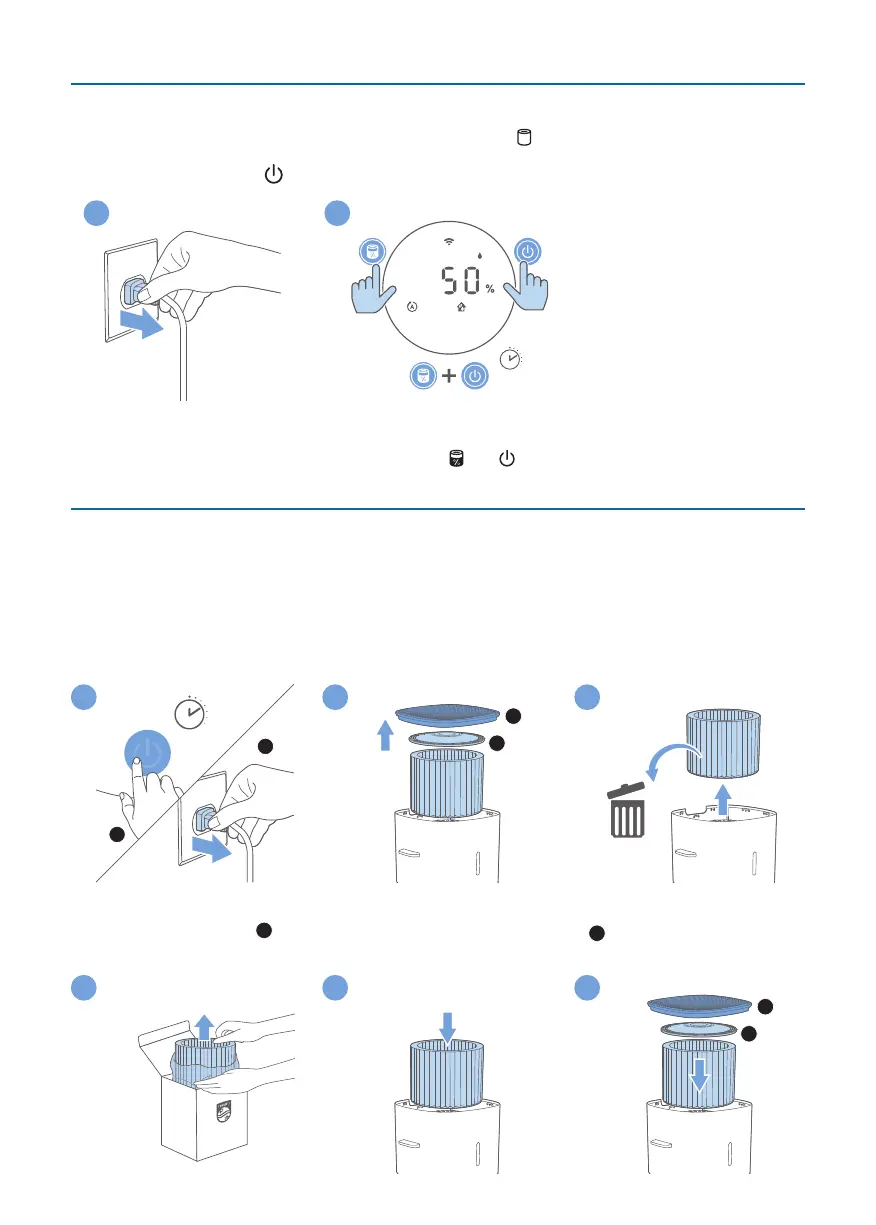
Filterreset
You can replace the lter even before lter replacement alert ( ) displays on the screen. After
replacing a lter, you need to reset the lter lifetime counter manually.
1 Tap the power button for 3 seconds to turn o the appliance and unplug from power socket.
3s
2
3
2 Put the power plug in the power socket.
3 Within 15 seconds after power on, tap and hold and button for 3 seconds to reset the lter
lifetime counter.
Replacingthehumidicationlter
Note:
•
Always unplug the appliance before you replacing the lter.
•
Use only Philips original humidication lter FY3455.
Replace the humidication lter every 6 months for optimal performance. If the lter is in good
condition, you could use it for a longer period of time. Make sure to replace the humidication lter at
least once a year.
2
S
1
1
2
1 2 3
1 Switch o the appliance and unplug from the power socket.
2 Open the top cover (
1
), and then open the top cover of the lter (
2
).
3 Remove the lter from the appliance. Discard the used lter.
FY3455
4 5 6
2
1



 To Next Page