Fill up the water tank.
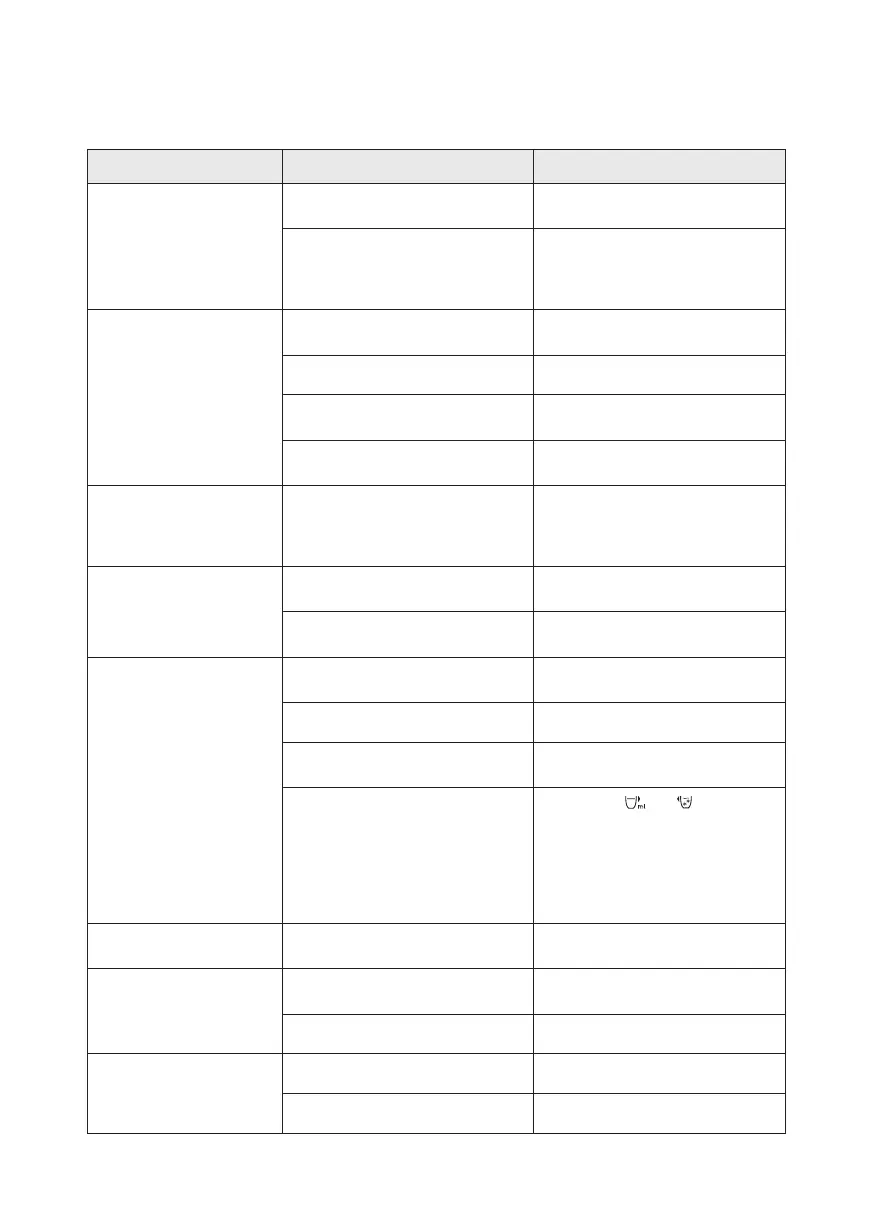
The dispense button is locked.
Press the safety lock button to
unlock.
The appliance is not connected
with power.
The appliance is not connected
with power.
Plug in the power plug, and press
the power button to turn it on. If it
does not work, please contact
consumer care.
The appliance does not
dispense hot water.
Plug in the power plug, and press
the power button to turn it on.
There is no water in the water tank.
The display panel does
not light up
The appliance is in sleep mode.
Touch any button to wake up the
appliance.
6. Trouble shooting
The appliance requires descaling.
Descale according to the
instruction in chapter 5.
Problem Possible causes Solutions
Leakage of the water tank.
Water drips from the outlet.
The water tank is lled beyond the
maximum water level.
There is condensed water on the
display after dispensing hot water.
Wipe the panel with a dry cloth.
Fill the water tank up to the
maximum water level.
The water tank is lled beyond the
maximum water level.
Fill the water tank up to the
maximum water level. If leakage
continues, please contact consumer
care.
The appliance does not
dispense cold water.
The appliance is not connected
with power.
There is no water in the water tank. Fill up the water tank.
Plug in the power plug, and press
the power button to turn it on.
During the rst use, the cold water
tank is not lled yet.
Follow the rst time cleaning
instruction in chapter 5.
Slow water ow.
Limescale builds up in the heating
element.
There is air in the water pump. Fill up the water tank.
Follow the descaling instruction
to descale.
Water shortage indicator
ashes.
There is no water in the water tank.
The lter is blocked. Replace with a new lter cartridge.
Fill up the water tank.
Unstable water ow.
Limescale builds up in the heating
element.
Follow the descaling instruction
to descale.
The cooling system is turned o.
Long press and for 3 seconds
to turn on the cooling system.
After the cooling system is turned
on, you will hear the cooling sound,
and the Cooling Indicator will light
up. If it does not work, please contact
consumer care.
EN 32


 To Next Page