EasyManua.ls Logo

Philips AE 3650 - Radio Reception

Philips AE 3650
22 pages
Print Icon
To Next Page IconTo Next Page
To Previous Page IconTo Previous Page
Loading...
Radio
reception
RADIO
RECEPTION
e
Ensure
that
the
LOCK-switch
is
off.
e
Press
POWER
to
switch
the
radio
on.
The
frequency
and
the
wave
band
will
appear
on
the
display.
e
Adjust
the
volume
with
the
VOLUME
control.
e
You
can
connect
headphones
to
the
PHONES
socket.
The
loudspeaker
will
then
be
switched
off.
e
Set
the
wave
range
with
the
BAND
selector
switch
.
e
|f
you
select
SW
with
the
BAND
selector
switch.
press
SW
to
select
the
required
meter
band
of
short
wave.
e
Tune
to
the
desired
station
using
by
briefly
pressing
the
Tuning
up
(+)
or
Tuning
down
(-)
button.
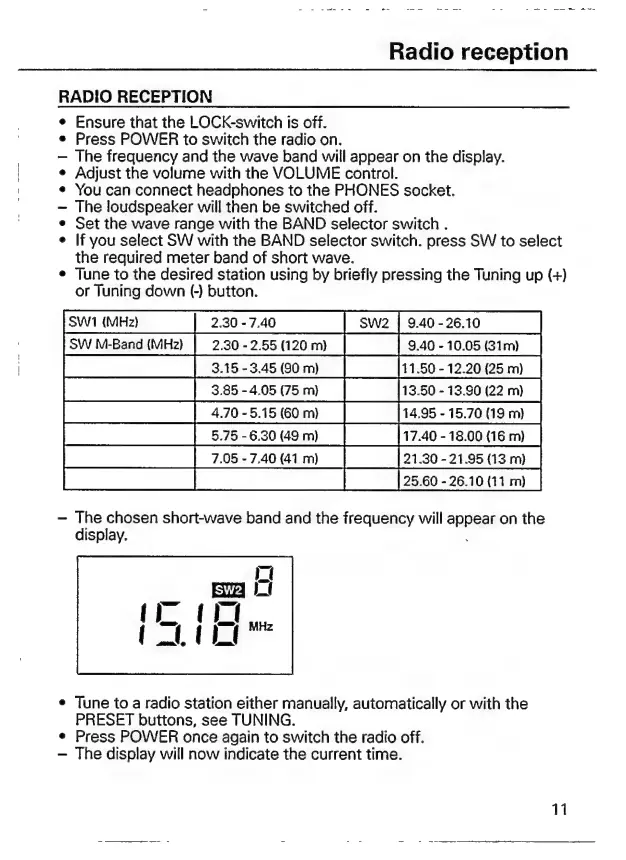
SW
Bend
WD
|
230-268020m
|
|
eao-1008
Gm
P|
818-345
60m
1
[iso
12200250
T
73856897
|
O
|reso-1990(22m
Pp
|
470-515960m.
|
|1.95-1570(19m
|
rocosa]
Tira
180048
o
0 1
FT
laa,
E
O
|
[25.60-26.10
111
m)
The
chosen
short-wave
band
and
the
frequency
will
spas
on
the
display.
e
Tune
to
a
radio
station
either
manually,
automatically
or
with
the
PRESET
buttons,
see
TUNING.
e
Press
POWER
once
again
to
switch
the
radio
off.
The
display
will
now
indicate
the
current
time.
11

Related product manuals