21EN
Note
• When the alarm is activated, an alarm icon for Alarm 1
or Alarm 2 is displayed. To stop the alarm, press on
the radio.
• You can also go to [System settings]>[Time/
Date]toset time and date (see "Use system settings
menu">"Set time/date").
Snooze the alarm
• When alarm sounds, press SNOOZE to
select a time period (in minutes).
» The alarm snoozes and repeats ringing
after the preset time period.
Set sleep timer
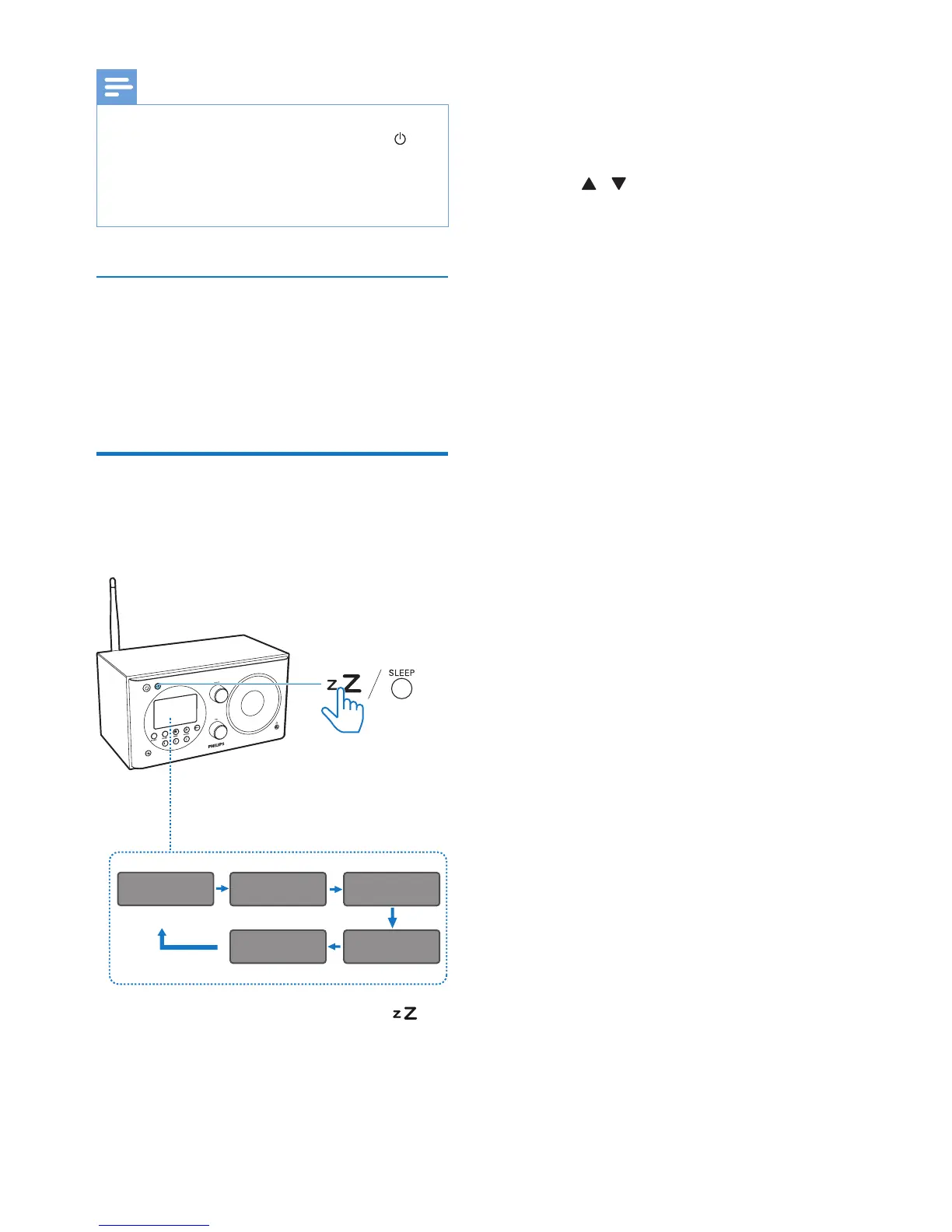
You have two ways to set the sleep timer.
Option A:
• When the radio is turned on, press
(on the radio) or SLEEP (on the remote
control) repeatedly to select the sleep
timer period (in minutes).
» The radio switches to standby mode
automatically after the preset period.
Sleep OFF
15MINS 30MINS
45MINS60MINS
» When [Sleep OFF] is displayed, the
sleep timer is deactivated.
Option B:
1 Select [Main menu]>[Sleep].
2 Press / repeatedly to select the sleep
timer period (in minutes).
» When [Sleep OFF] is displayed, the
sleep timer is deactivated.


 To Next Page