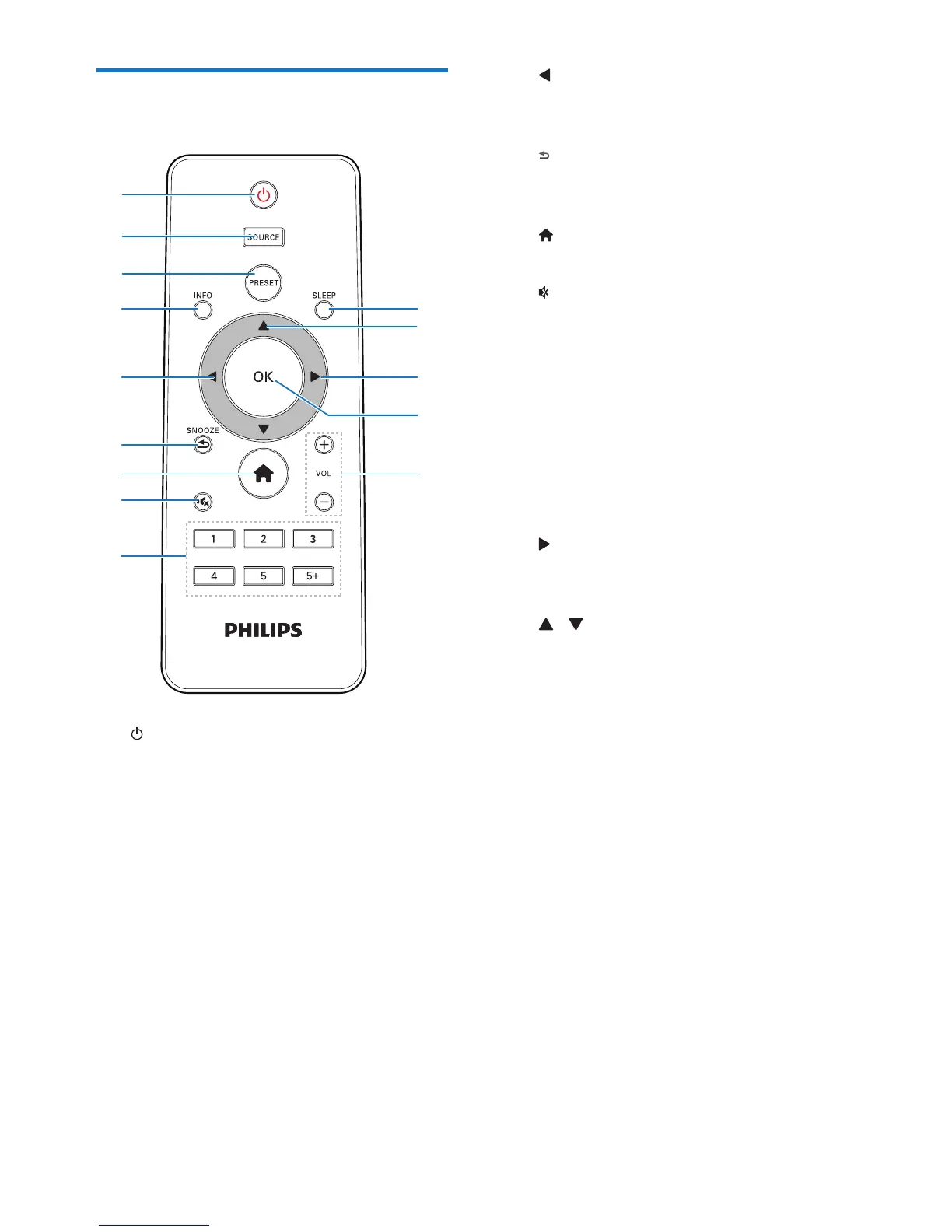
a
• Turn on the radio.
• Switch to standby mode.
b SOURCE
• Select a source: DAB radio, FM radio,
AUX, or Internet radio.
c PRESET
• Store radio stations.
• Display the preset station list.
d INFO
• In DAB mode, display information of
DAB stations.
• In Internet radio mode, display
information of Internet radio stations.
• In FM mode, display information of
RDS stations.
e
• Return to the previous menu.
• Select an option or sub-option.
f /SNOOZE
• Return to the previous menu.
• Snooze the alarm.
g
• In working mode, access the top menu.
h
• Mute or resume sound.
i Numeric keypad (1-5+)
• Select a preset radio station.
• Select a number to store radio stations.
j + VOL -
• Adjust volume.
k OK
• Conrm a selection.
l
• Conrm a selection.
• Select an option or sub-option.
m /
• Tune to radio stations.
• Navigate through the menu list.
n SLEEP
• Set sleep timer.


 To Next Page