- 13 -
Room temperature
A baby sleeps comfortably at a temperature between 16°C / 61°F and
20°C / 68°F. You can set a minimum and a maximum temperature range.
You can also set a temperature alert.
1 To open the temperature submenu, select 'Temperature' in the menu.
Press OK to conrm.
2 Select 'Temp Range' in the temperature submenu and press OK to
conrm.
3 Use the + and - buttons to set the minimum temperature range
between 10°C / 50°F and 19°C / 66°F and the maximum
temperature range between 22°C / 72°F and 37°C / 99°F. Press OK
to conrm.
4 Select 'Alert' in the temperature submenu. Press OK to conrm.
5 Select 'Alert ON' or or 'Alert OFF'. Press OK to conrm.
6 Select 'Temp Scale' in the temperature submenu. Press OK to conrm.
7 Select ‚Celsius‘ or ‚Fahrenheit‘ and press OK to conrm. The
temperature in the set scale appears on the display.
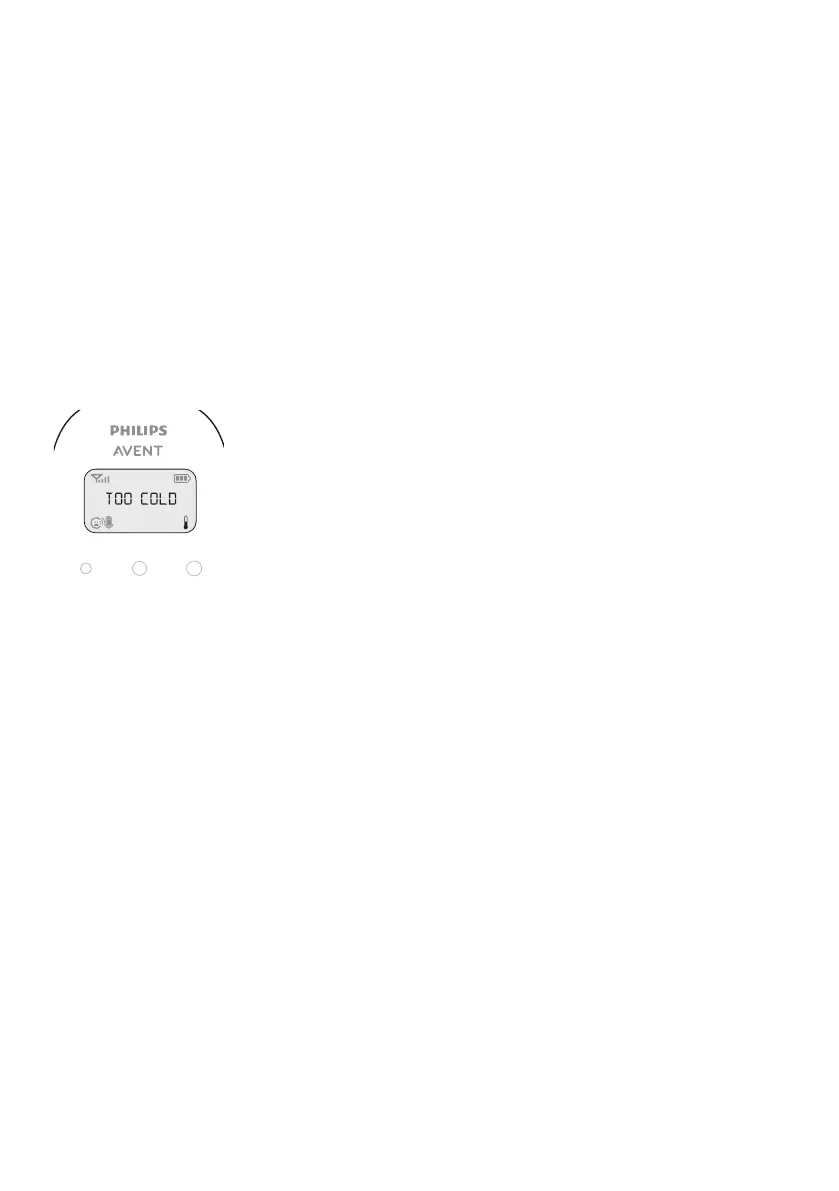
If the temperature is outside the set range, the temperature alert
symbol on the display ashes and the message ‚TOO COLD‘ or ‚TOO
HOT‘ appears on the display. If you set the alert to ‚ON‘, the parent
unit also beeps.
Clock
The default setting for the clock is hidden. You can choose to show the
clock and set the clock time in the menu of the parent unit.
1 Select 'Clock' in the menu with the + and - buttons. Press OK to
conrm.
2 Select 'Show Time' and press OK to conrm.
3 Select 'Set Time' and press OK to conrm.
4 Set the hour and the minutes and press OK to conrm.
The clock time alternates with other indications in the message eld of
the display.
Language
You can use this menu option to change the language setting.
1 Select 'Language' in the menu with the + and - buttons. Press OK to
conrm.
2 Use the + and - buttons to select your language and press OK to
conrm.








 To Next Page