- 7 -
Paging the parent unit
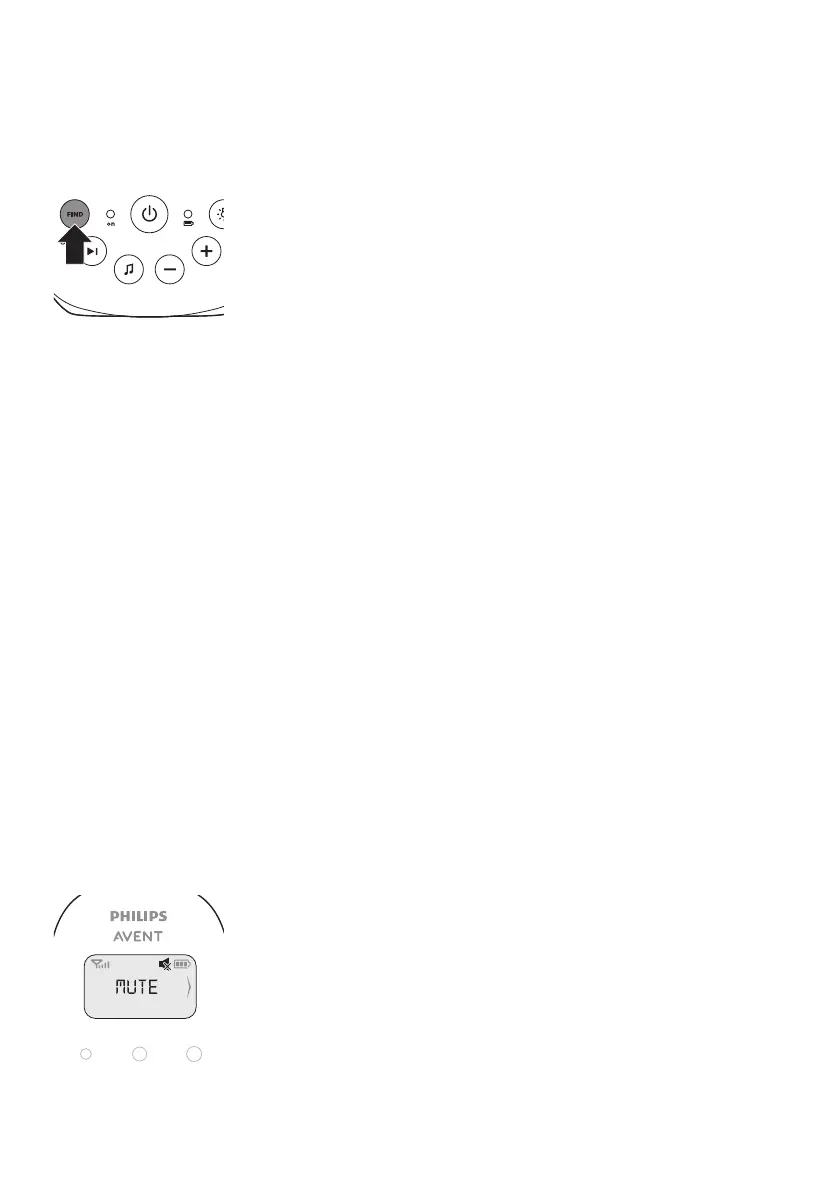
If you have lost the parent unit, you can use the FIND button on the baby
unit to locate the parent unit. This function only works when the parent
unit is switched on and within range.
1 Press FIND on the baby unit. The parent unit produces a paging alert
tone.
2 To stop the paging alert tone, press FIND on the baby unit again or
press any button on the parent unit. The paging alert tone stops
automatically after 2 minutes.
Battery status light
1 The battery status light is solid green when the baby unit is operating
on battery power and the batteries contain enough energy.
2 The battery status light ashes red quickly when the batteries run
low while the baby unit is operating on battery power. Replace the
batteries when they run low.
Functions and feedback on the parent unit
Volume
The volume can be set if the menu is not active. There are seven volume
levels and a 'volume o' setting.
Setting the volume level
1 Press the + button or the - button once.
The current volume level appears on the display.
2 Press the + button to increase the volume or press the - button to
decrease the volume.
If no button is pressed for more than 2 seconds, the volume level
indication disappears from the display and the volume setting is saved.
Volume o
Below the lowest volume setting, there is a ‚volume o‘ setting.
1 Press the + button or the - button once.
The current volume level appears on the display.
2 Press and hold the - button for more than 2 seconds to set the volume
to o.
The message ‚MUTE‘ and the mute symbol appear on the display. Only
the sound level lights show that the baby produces sounds.








 To Next Page