- 23 -
Video 20.3
o
C
Menu
Nightlight
Zoom
Temperature alert
Connection
Settings
>
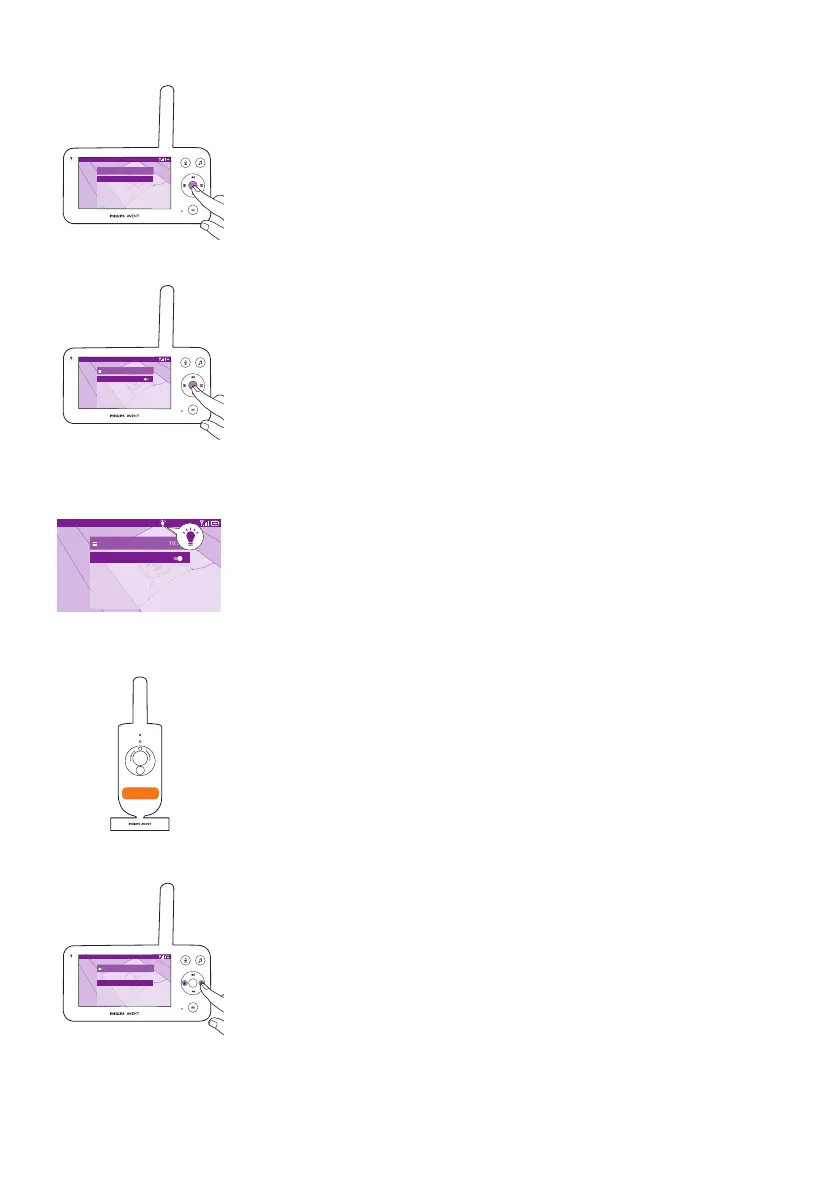
2 Choose Nightlight and press the conrm button to enter the setting
options�
Video 20.3
o
C
Nightlight
Switch on
Brightness
Timer
low
5 min
3 Press the conrm button to switch on and o the nighlight function.
Video 20.3
o
C
Nightlight
Switch off
Brightness
Timer
5 min
The display shows a light icon in the status bar when the nightlight is on�
The nightlight of the baby unit turns on�
Video 20.3
o
C
Nightlight
Switch off
Brightness
Timer
low
5 min
><
You can set the brightness level of the nightlight from the parent unit�
Press the left or right part of the control button to choose low, medium or
high�













 To Next Page