- 28 -
Menu features
All features described in the following sections can be operated through
the menu of the parent unit�
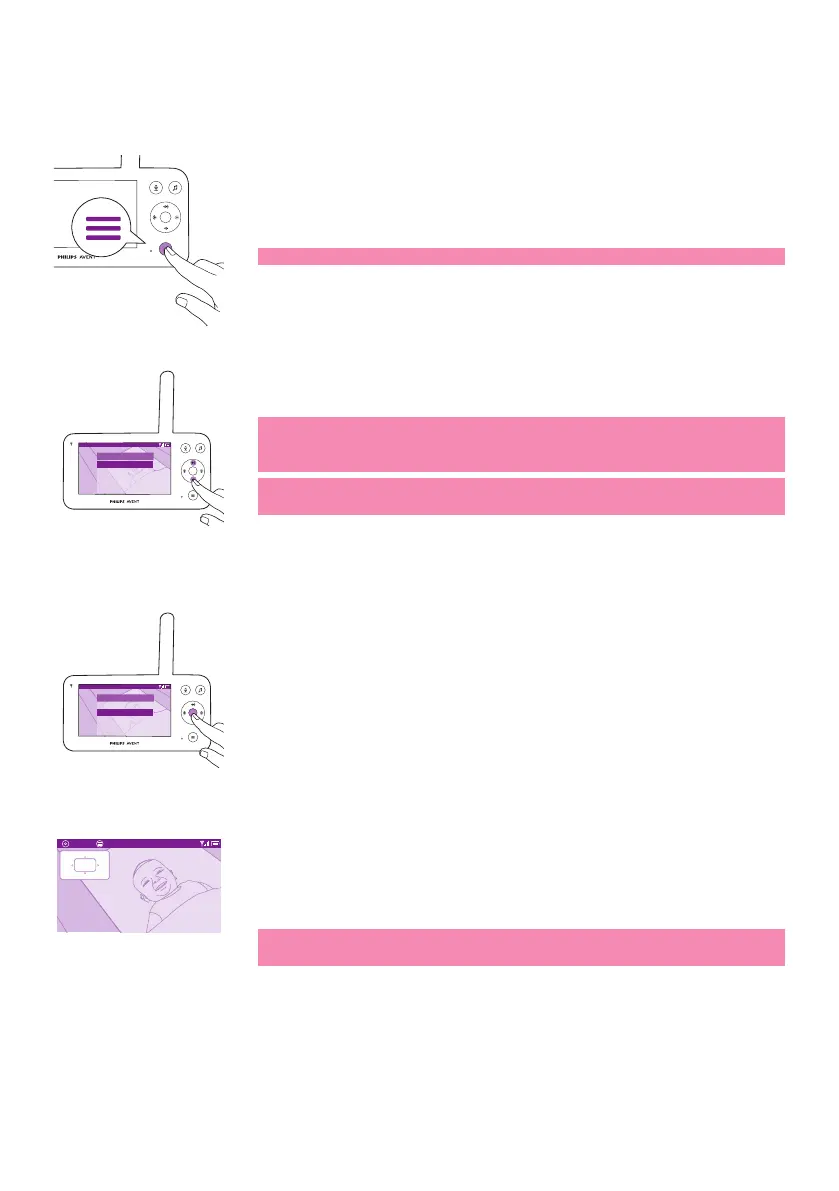
1 Press the menu button to enter the menu list�
Note: You will leave the menu when pressing the menu button again�
Video 20.3
o
C
Menu
Nightlight
Zoom
Temperature alert
Connection
Settings
>
2 Use the control button to navigate through the menu� The selected
menu item is highlighted purple�
Note: If you are already in one of the sub menus and you want to
switch between menu features,press the menu button again to
navigate back to the main menu�
Note: If you are in the menu but do not press a button for 8 seconds,
the menu will exit without saving changed settings.
Zoom
Video 20.3
o
C
Menu
Nightlight
Zoom
Temperature alert
Connection
Settings
>
1 Press the conrm button to enter the zoom menu.
Zoom Exit 20.3
o
C
2x
2 Press the conrm button to adjust the video image. You can use the
top/bottom/right/left part of the control button to choose what part
of the image will be shown on the parent unit�
3 Press the menu button to save the new setting and exit.
4 If you want to zoom out the image on the parent unit, go to the zoom
menu and turn o the zoom function.
Tip: Long-press the conrm button for two seconds to get a quick
access to the Zoom function�













 To Next Page