- 29 -
Temperature alert
The temperature sensor enables you to monitor the temperature in your
baby's room�
Note: The current temperature in your baby's room is shown in the
status bar of the parent unit�
Video 20.3
o
C
Menu
Nightlight
Zoom
Temperature alert
Connection
Settings
>
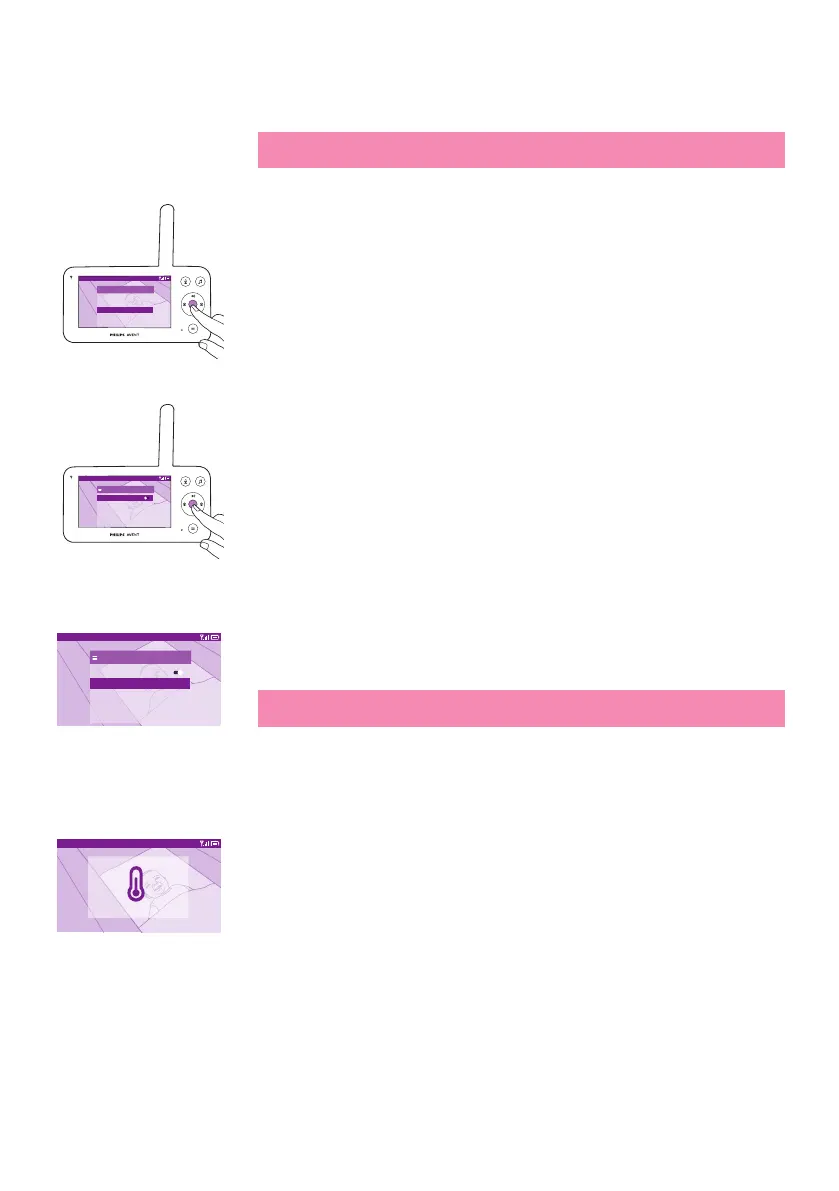
1 Press the conrm button to access the temperature alert menu.
Video 20.3
o
C
Temperature alert
Switch On
High
Low
Unit
20
16
°C
2 The temperature alert can be set on or o, press the conrm button to
turn it on or o.
Video 20.3
o
C
Temperature alert
Switch off
High
Low
Unit
20
16
°C
3 To change the maximum and minimum temperatures for the
temperature alert, select the desired temperatures in the temperature
menu�
Tip: You can change the temperature unit from C (Celsius) to F
(Fahrenheit) by selecting the unit option�
Video 20.3
o
C
High temperature alert
4 Press the left part of the control button to save the new setting and
return to the main menu�
5 The parent unit shows this alert when the measured temperature goes
outside the range between the minimum and the maximum values.













 To Next Page