- 25 -
Soothing sounds
You can activate the soothing sounds feature either from the parent unit,
the baby unit or the app. To activate it from the parent unit, follow the
instructions below:
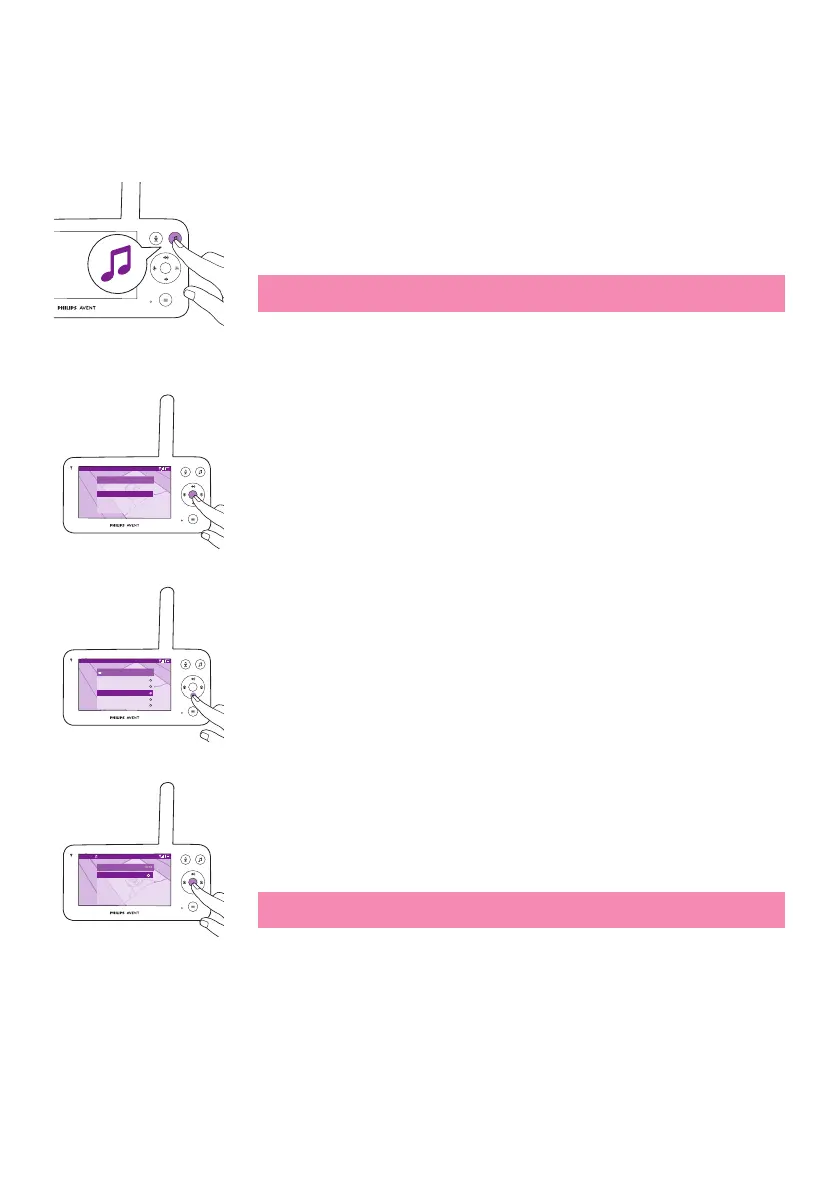
1 Press the soothing sounds button on the parent unit to open the
menu�
Note: Pressing the button while the menu is already open, will close
the menu�
Video 20.3
o
C
Soothing sound
Play
Select sound
Volume
Timer
>
6/8
10 min
2 Press the bottom part of the control button to scroll down to 'Select
sound' menu item, press the conrm button to enter the soothing
sounds list�
Video 20.3
o
C
Soothing sound
All lullabies
Baa Baa Black Sheep
Brahms’ Lullaby
Golden Slumbers
Hush Little Baby
3 Press the top or bottom part of the control button to scroll through
the list�
4 Press the conrm button to select or deselect the one you want to
play. You can also select 'All lullabies' to playback the rst 5 lullabies.
Video Brahms’... 20.3
o
C
Soothing sound
Stop
Select sound
Volume
Timer
6/8
10 min
5 Navigate to 'Play' and press the conrm button to start playing the
selected sound�
If you want to stop, press the conrm button again.
The status barof the parent unit shows the name of sound thatis being
played�
Tip: Long-press the soothing sounds button to start playing the
selected sound�















 To Next Page