EasyManua.ls Logo

Philips AZ 1209 - Troubleshooting Common Issues; No Sound or Power Problems; CD Player Error Messages; Cassette Recorder Problems

Philips AZ 1209
16 pages
Print Icon
To Next Page IconTo Next Page
To Previous Page IconTo Previous Page
Loading...
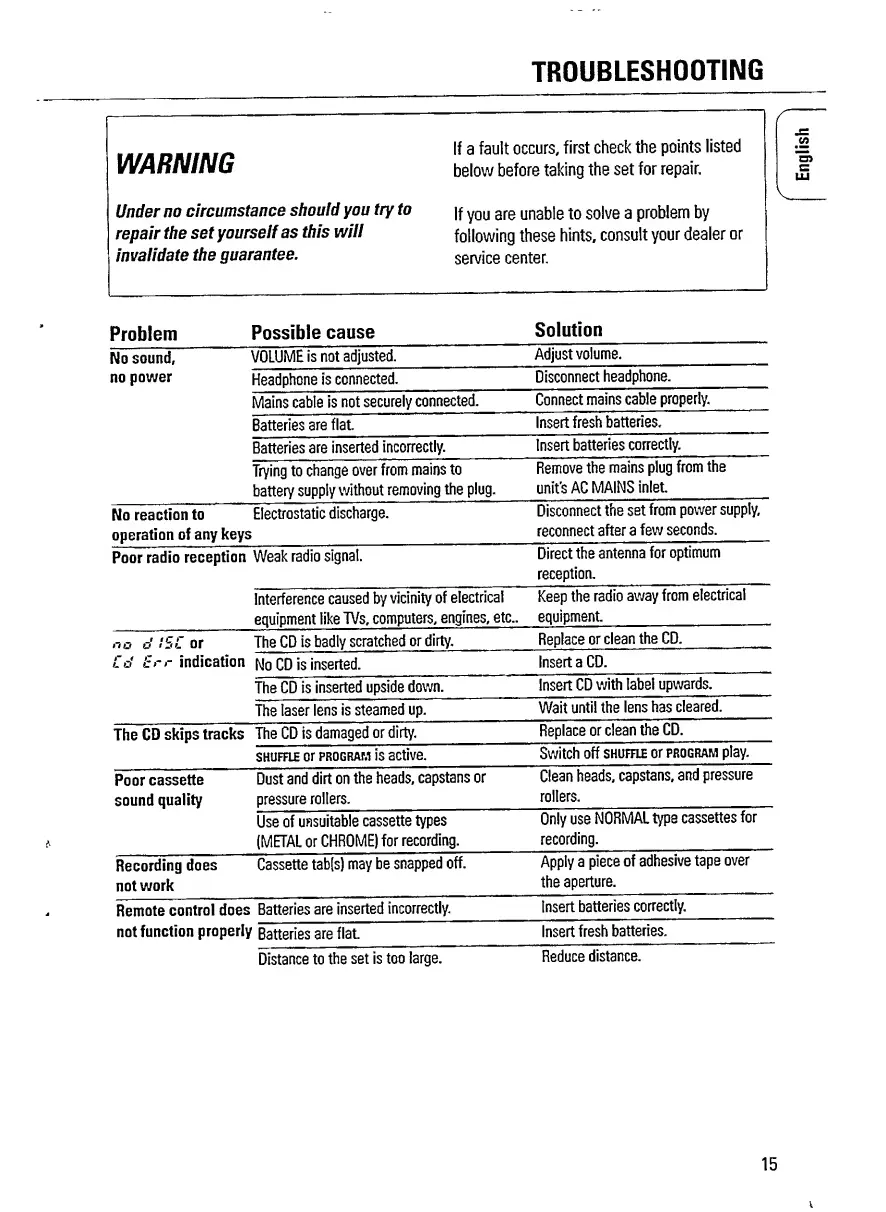
TROUBLESHOOTING
If
a
fault
occurs,
first
check
the
points
listed
WARNING
below
before
taking
the
set
for
repair.
Under
no
circumstance
should
you
try
to
|f
y
0U
are
unable
to
solve
a
problem
by
repair
the
set
yourself
as
this
will
following
these
hints,
consult
your
dealer
or
invalidate
the
guarantee.
service
center.
1
Problem
Possible
cause
Solution
No
sound.
VOLUME
is
not
adjusted.
Adjust
volume.
no
power
Headphone
is
connected.
Disconnect
headphone.
Mains
cable
is
not
securely
connected.
Connect
mains
cable
properly.
Batteries
are
flat.
Insert
fresh
batteries.
Batteries
are
inserted
incorrectly.
Insert
batteries
correctly.
Trying
to
change
over
from
mains
to
battery
supply
without
removing
the
plug.
Remove
the
mains
plug
from
the
unit's
AC
MAINS
inlet.
No
reaction
to
Electrostatic
discharge,
operation
of
any
keys
Disconnect
the
set
from
power
supply,
reconnect
after
a
few
seconds.
Poor
radio
reception
Weak
radio
signal.
Direct
the
antenna
for
optimum
reception.
interference
caused
by
vicinity
of
electrical
equipment
like
TVs,
computers,
engines,
etc..
Keep
the
radio
away
from
electrical
equipment.
no
o'
!SL
or
The
CD
is
badly
scratched
or
dirty.
Replace
or
clean
the
CD.
Ed
Err
indication
No
CD
is
inserted.
Insert
a
CD.
The
CD
is
inserted
upside
down.
Insert
CD
with
label
upwards.
The
laser
lens
is
steamed
up.
Wait
until
the
lens
has
cleared.
The
CD
skips
tracks
The
CD
is
damaged
or
dirty.
Replace
or
clean
the
CD.
shuffle
or
program
is
active.
Switch
off
shuffle
or
program
play.
Poor
cassette
Dust
and
dirt
on
the
heads,
capstans
or
Clean
heads,
capstans,
and
pressure
sound
quality
pressure
rollers.
rollers.
Use
of
unsuitable
cassette
types
(METAL
or
CHROME)
for
recording.
Only
use
NORMAL
type
cassettes
for
recording.
Recording
does
not
work
Cassette
tab[s)
may
be
snapped
off.
Apply
a
piece
of
adhesive
tape
over
the
aperture.
Remote
control
does
*
Batteries
are
inserted
incorrectly.
Insert
batteries
correctly.
not
function
properly
Batteries
are
flat.
Insert
fresh
batteries.
Distance
to
the
set
is
too
large.
Reduce
distance.
15
English

Related product manuals