EasyManua.ls Logo

Philips AZ 1209 - Power Supply

Philips AZ 1209
16 pages
Print Icon
To Next Page IconTo Next Page
To Previous Page IconTo Previous Page
Loading...
English
POWER
SUPPLY
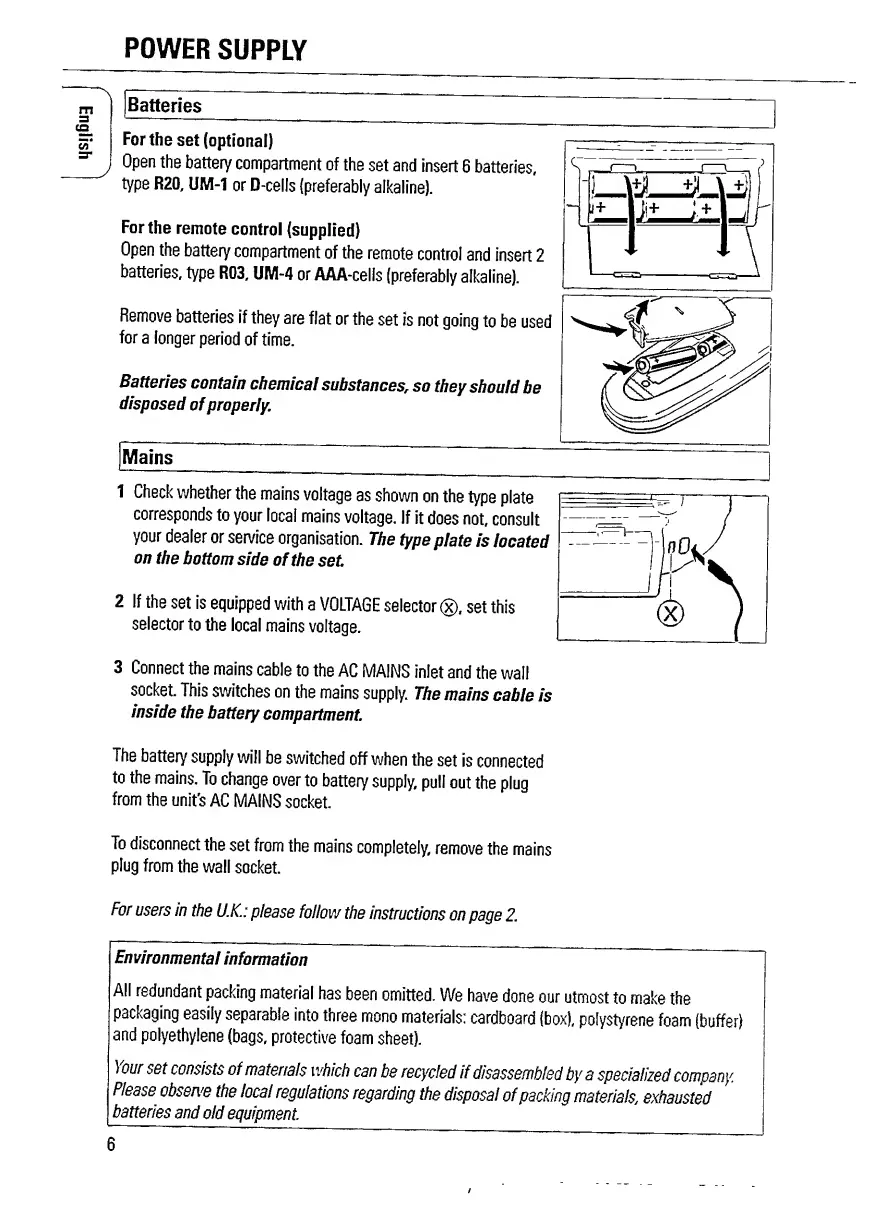
Batteries
J
For
the
set
(optional)
Open
the
battery
compartment
of
the
set
and
insert
6
batteries,
type
R20,
UM-1
or
D-cells
(preferably
alkaline).
For
the
remote
control
(supplied)
Open
the
battery
compartment
of
the
remote
control
and
insert
2
batteries,
type
R03,
UM-4
or
AAA-cells
(preferably
alkaline).
Remove
batteries
if
they
are
flat
or
the
set
is
not
going
to
be
used
for
a
longer
period
of
time.
Batteries
contain
chemical
substances,
so
they
should
be
disposed
of
properly.
Mains
1
Check
whether
the
mains
voltage
as
shown
on
the
type
plate
corresponds
to
your
local
mains
voltage.
If
it
does
not,
consult
your
dealer
or
service
organisation.
The
type
plate
is
located
on
the
bottom
side
of
the
set
2
If
the
set
is
equipped
with
a
VOLTAGE
selector
(x).
set
this
selector
to
the
local
mains
voltage.
3
C
onnect
the
mains
cable
to
the
AC
MAINS
inlet
and
the
wall
socket.
This
switches
on
the
mains
supply.
The
mains
cable
is
inside
the
battery
compartment.
The
battery
supply
will
be
switched
off
when
the
set
is
connected
to
the
mains.
To
change
over
to
battery
supply,
pull
out
the
plug
from
the
unit’s
AC
MAINS
socket.
To
disconnect
the
set
from
the
mains
completely,
remove
the
mains
plug
from
the
wall
socket.
For
users
in
the
U.K.:
please
follow
the
instructions
on
page
2.
Environmental
information
All
redundant
packing
material
has
been
omitted.
We
have
done
our
utmost
to
make
the
packaging
easily
separable
into
three
mono
materials:
cardboard
(box),
polystyrene
foam
(buffer)
and
polyethylene
(bags,
protective
foam
sheet).
)
our
set
consists
of
materials
which
can
be
recycled
if
disassembled
by
a
specialized
company.
Please
observe
the
local
regulations
regarding
the
disposal
of
packing
materials,
exhausted
batteries
and
old
equipment.
6

Related product manuals