EasyManua.ls Logo

Philips AZ 1209 - Radio Operation Guide; Tuning and Scanning Stations

Philips AZ 1209
16 pages
Print Icon
To Next Page IconTo Next Page
To Previous Page IconTo Previous Page
Loading...
English
RADIO
j
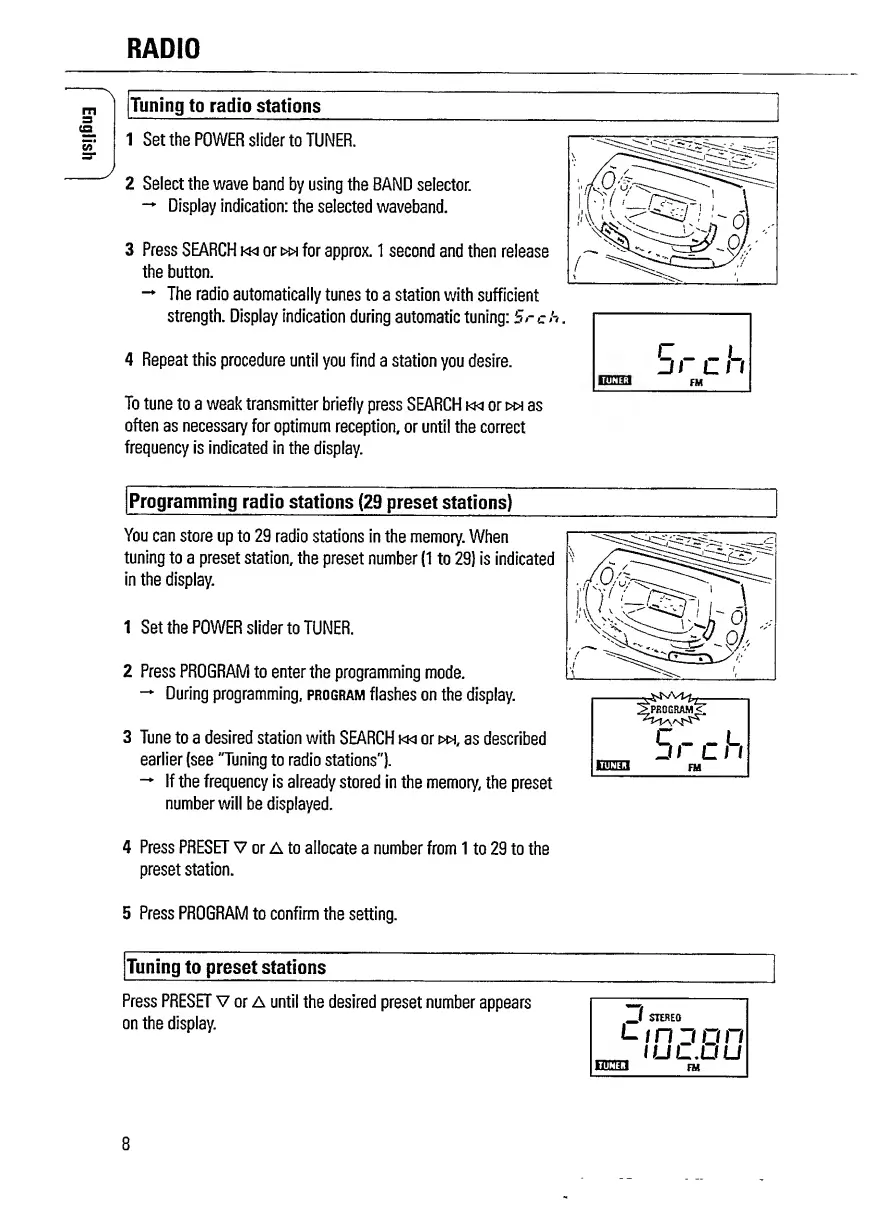
Tuning
to
radio
stations
1
Set
the
POWER
slider
to
TUNER.
2
Select
the
wave
band
by
using
the
BAND
selector.
Display
indication:
the
selected
waveband.
3
Press
SEARCH
km
orw*
for
approx.
1
second
and
then
release
the
button.
The
radio
automatically
tunes
to
a
station
with
sufficient
strength.
Display
indication
during
automatic
tuning:
Srch
4
Repeat
this
procedure
until
you
find
a
station
you
desire.
To
tune
to
a
weak
transmitter
briefly
press
SEARCH
km
orw»
as
often
as
necessary
for
optimum
reception,
or
until
the
correct
frequency
is
indicated
in
the
display.
Programming
radio
stations
(29
preset
stations)
You
can
store
up
to
29
radio
stations
in
the
memory.
When
tuning
to
a
preset
station,
the
preset
number
(1
to
29)
is
indicated
in
the
display.
1
Set
the
POWER
slider
to
TUNER.
2
Press
PROGRAM
to
enter
the
programming
mode.
During
programming,
program
flashes
on
the
display.
3
Tune
to
a
desired
station
with
SEARCH
km
or
>w,
as
described
earlier
(see
"Tuning
to
radio
stations").
If
the
frequency
is
already
stored
in
the
memory,
the
preset
number
will
be
displayed.
4
P
ress
PRESET
V
or
A
to
allocate
a
number
from
1
to
29
to
the
preset
station.
5
P
ress
PROGRAM
to
confirm
the
setting.
Tuning
to
preset
stations
Press
PRESET
V
or
A
until
the
desired
preset
number
appears
on
the
display.
_/
STEREO
Linn
on
.
IUL.UU
Km
FM
8

Related product manuals