EasyManua.ls Logo

Philips AZ 1209 - Page 5

Philips AZ 1209
16 pages
Print Icon
To Next Page IconTo Next Page
To Previous Page IconTo Previous Page
Loading...
CONTROLS
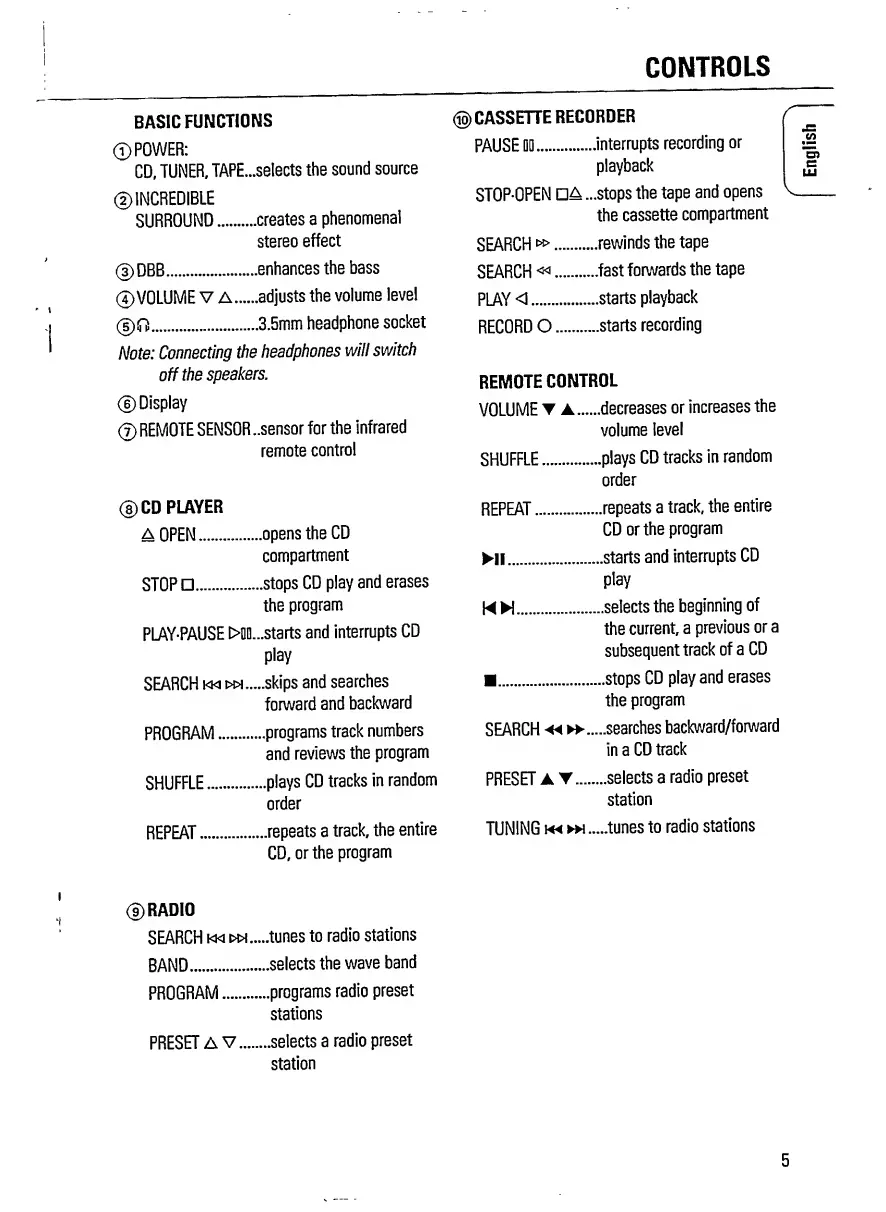
BASIC
FUNCTIONS
©POWER:
CD,
TUNER,
TAPE...selects
the
sound
source
©INCREDIBLE
SURROUND.creates
a
phenomenal
stereo
effect
©DBB.enhances
the
bass
©VOLUME
V
A.adjusts
the
volume
level
©0.3.5mm
headphone
socket
Note:
Connecting
the
headphones
will
switch
off
the
speakers.
©Display
©REMOTE
SENSOR
..sensor
for
the
infrared
remote
control
©CD
PLAYER
A
OPEN.opens
the
CD
compartment
STOP
.
stops
CD
play
and
erases
the
program
PLAY-PAUSE
>Ml...starts
and
interrupts
CD
play
SEARCH
km
.skips
and
searches
forward
and
backward
PROGRAM.programs
track
numbers
and
reviews
the
program
SHUFFLE.plays
CD
tracks
in
random
order
REPEAT.repeats
a
track,
the
entire
CD,
or
the
program
©
CASSETTE
RECORDER
PAUSE
DO.
..interrupts
recording
or
playback
STOP-OPEN
04.
..stops
the
tape
and
opens
the
cassette
compartment
SEARCH
w>.
..rewinds
the
tape
SEARCH«.
..fast
forwards
the
tape
PLAY
<.
...starts
playback
RECORDO.
...starts
recording
REMOTE
CONTROL
VOLUME
A...
...decreases
or
increases
the
volume
level
SHUFFLE.
...plays
CD
tracks
in
random
order
REPEAT.
...repeats
a
track,
the
entire
CD
or
the
program
HI.
....starts
and
interrupts
CD
play
MW.
....selects
the
beginning
of
the
current
a
previous
or
a
subsequent
track
of
a
CD
.
....stops
CD
play
and
erases
the
program
SEARCH
•««
....searches
backward/forward
in
a
CD
track
PRESET
AT....
.....selects
a
radio
preset
station
TUNING
mom,
.tunes
to
radio
stations
i
i
(?)
RADIO
SEARCH
kw
wh
BAND.
PROGRAM.
PRESET
A
V...
.tunes
to
radio
stations
.selects
the
wave
band
.programs
radio
preset
stations
.selects
a
radio
preset
station
5
English

Related product manuals