EasyManua.ls Logo

Philips AZ 1508 - CD Player Basic Playback; Playing CDs; CD Player Error Messages

Philips AZ 1508
18 pages
Print Icon
To Next Page IconTo Next Page
To Previous Page IconTo Previous Page
Loading...
CD
PLAYER
Playing
a
CD
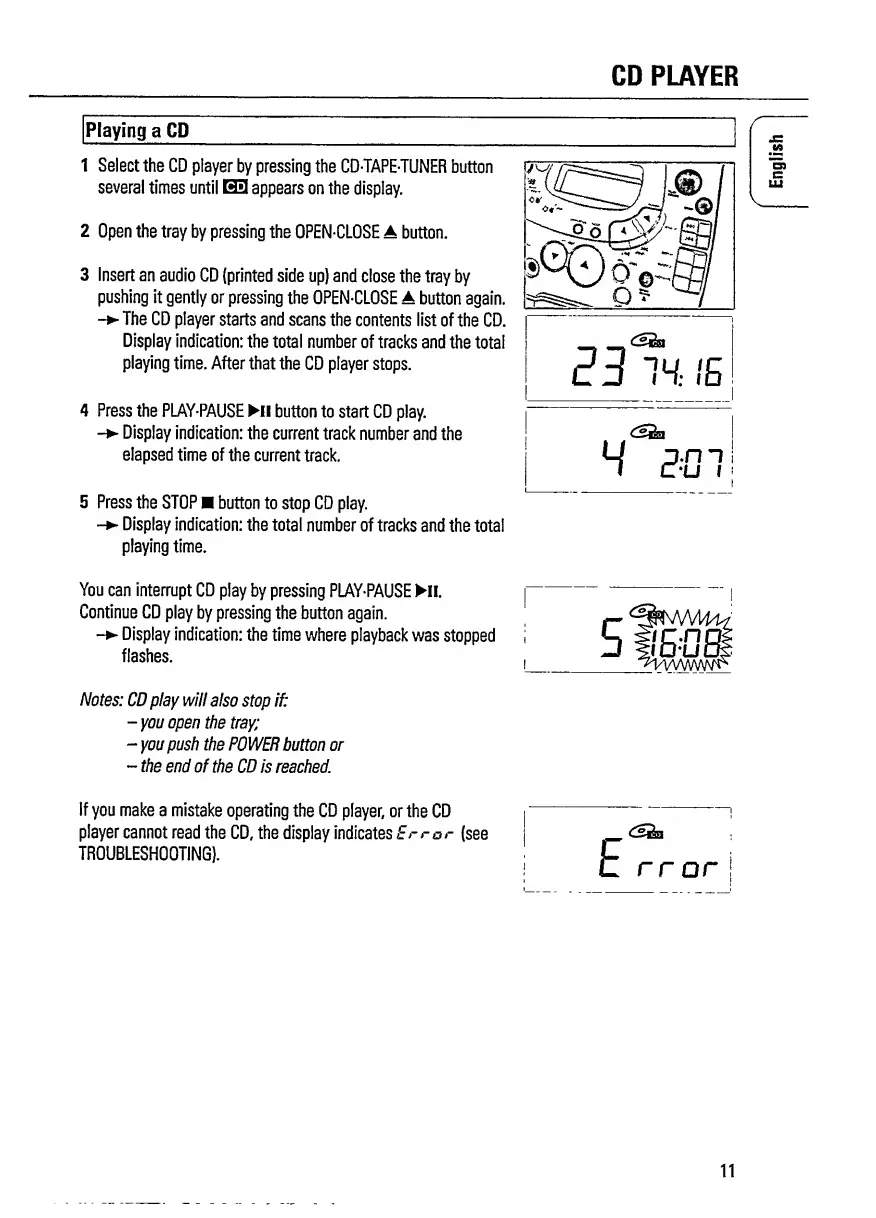
1
Select
the
CD
player
by
pressing
the
CD-TAPE-TUNER
button
several
times
until
H3
appears
on
the
display.
2
Open
the
tray
by
pressing
the
OPEN-CLOSE
A
button.
3
Insert
an
audio
CD
(printed
side
up)
and
close
the
tray
by
pushing
it
gently
or
pressing
the
OPEN-CLOSE
A
button
again.
-
The
CD
player
starts
and
scans
the
contents
list
of
the
CD.
Display
indication:
the
total
number
of
tracks
and
the
total
playing
time.
After
that
the
CD
player
stops.
4
Press
the
PLAY-PAUSE
Hi
button
to
start
CD
play.
-
Display
indication:
the
current
track
number
and
the
elapsed
time
of
the
current
track.
5
Press
the
STOP
button
to
stop
CD
play.
-
Display
indication:
the
total
number
of
tracks
and
the
total
playing
time.
V.
You
can
interrupt
CD
play
by
pressing
PLAY-PAUSE
Hi.
Continue
CD
play
by
pressing
the
button
again.
-
Display
indication:
the
time
where
playback
was
stopped
flashes.
Notes:
CD
play
will
also
stop
if:
-you
open
the
tray;
-
you
push
the
POWER
button
or
-
the
end
of
the
CD
is
reached.
If
you
make
a
mistake
operating
the
CD
player,
or
the
CD
player
cannot
read
the
CD,
the
display
indicates
Error
(see
TROUBLESHOOTING).
rr
or
j
ii
English

Related product manuals