12 Telescopic antenna
Improve FM reception
•
13 AC MAINS~
Socket for the power cord
•
14 Battery door
15 Source selector: CD, TUNER, MP3 LINK,TAPE/OFF
Select CD, radio or MP3 source of sound
•
Switch to standby mode
•
3 Get started
Caution
Use the controls only as stated in this user manual. •
Always follow the instructions in this chapter in sequence.
If you contact Philips, you will be asked for the model and serial number of your Soundmachine. The model number
and serial number are on the bottom of your Soundmachine. Write the numbers here:
Model No. __________________________
Serial No. ___________________________
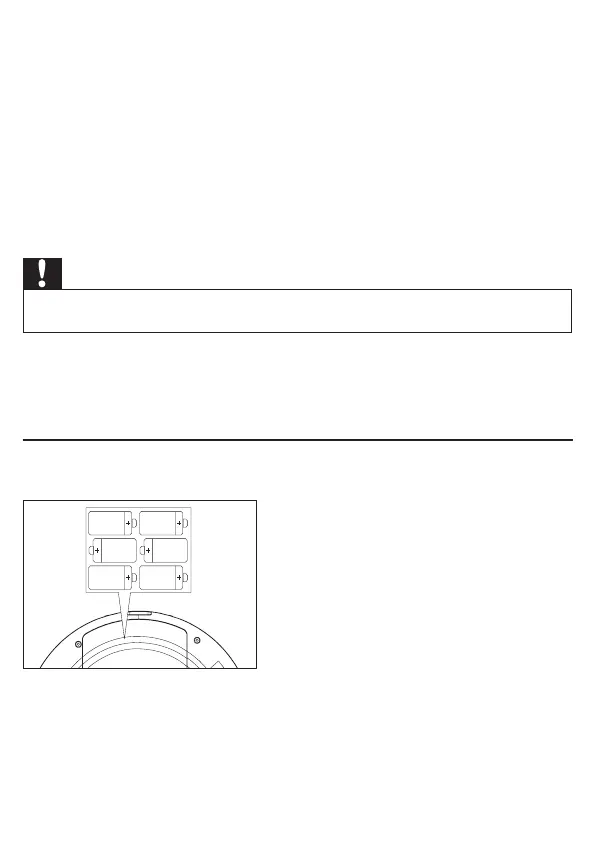
Install batteries
1 Open the battery compartment.
2 Insert 6 x 1.5V R14/UM-2/C-cell batteries with correct polarity (+/-) as indicated.
3 Close the battery compartment.
6 x 1.5V R-14/UM-2/C-cell



 To Next Page