1 Slide the source selector to MP3-LINK.
2 Turn on the CD sound machine.
3 Connect the supplied MP3 link cable to
• the MP3-LINK socket on the back of this CD sound machine, and
• the audio output socket (usually the headphone socket) on the
external device.
4 Play the external device.
7 Use the dock
Compatible iPod/iPhone models
This CD sound machine supports the following iPod and iPhone
models.
• iPhone 4S
• iPhone 4
• iPhone 3GS
• iPhone 3G
• iPhone
• iPod touch (1st, 2nd, 3rd, and 4th generations)
• iPod nano (1st, 2nd, 3rd, 4th, 5th, and 6th generations)
• iPod classic
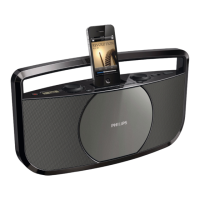
Enjoy audio through the dock
Note
• The peak current through the dock connector is limited as 1,000 mA for
iPod/iPhone. To avoid damage to your iPod/iPhone and this system, securely
load your iPod/iPhone as indicated.


 To Next Page